
Every Python Concept a Generative AI Developer Actually Needs to Know
Last Updated on June 22, 2026 by Editorial Team
Author(s): DhanushKumar
Originally published on Towards AI.
Every Python Concept a Generative AI Developer Actually Needs to Know
From async coroutines that power real-time LLM streaming, to memory tricks that let you process million-document datasets — the complete map, written for engineers building with AI today.
Most Python tutorials teach you the language. This one teaches you the language as a GenAI engineer uses it — where every concept has a direct line to a real problem you will hit building LLM pipelines, RAG systems, and AI agents.
Async / Await — The Heartbeat of Every LLM App
Here is the brutal truth about building LLM applications: your code spends most of its time waiting. Waiting for llm to respond. Waiting for an embedding API. Waiting for a vector database. Without async, you serve one user at a time. With async, you serve thousands concurrently — on a single thread.
What actually happens when you write await
When Python hits an await expression, it pauses the current coroutine and hands control back to the event loop. The event loop looks at everything else that's ready to run, makes progress on it, and returns to your coroutine once the awaited result is available. No threads. No OS context switches. Pure cooperative multitasking.
import asyncio
import anthropic

client = anthropic.AsyncAnthropic()

async def ask_claude(prompt : str, label : str) -> str :
 # Every await is a potential pause - but only if something else needs CPU
 message = await client.messages.create( model = "claude-opus-4-5",max_tokens = 512, messages=[{"role":"user","content":prompt}]
 return f"[{label}]{message.content[0].text}"

async def main():
 questions = [
 ("What is a transformer architecture?", "A"),
 ("Explain RAG in one paragraph.", "B"),
 ("What is chain-of-thought prompting?", "C"),
 ("Describe the attention mechanism briefly.", "D"),
 ("What is a vector database used for?", "E"),
 ]
 # All 5 fire at once - total time ≈ slowest single call (~2s)
 # Sequential would take ~10s
 results = await asyncio.gather(
 *[ask_claude(q, l) for q, l in questions]
 )
 for r in results:
 print(r)
asyncio.run(main())
⚡ Real-World Impact
Sequential LLM calls for 100 documents × 3 seconds each = 5 minutes. With asyncio.gather() they run concurrently and finish in ~3–5 seconds. That's a 60× speedup with zero extra hardware.
Tasks: fire and forget (then collect later)
asyncio.create_task() schedules a coroutine immediately without waiting for it. This lets you kick off parallel work and collect results later — perfect for RAG pipelines where you retrieve from a vector store and a web search at the same time.
async def rag_pipeline(query: str) -> str :
 # phase 1 : kick off both retrievals simultaneously
 task_vector = asyncio.create_task(search_vector_db(query))
 task_web = asyncio.create_task(search_web(query))
 # both run concurrently while we do other prep work
 system_prompt = "You are a helpful research assistant"
 # collect results - awaiting blocks only unitl each is redy
 vector_hits , web_hits = await task_vector, await task_web
 context = build_context(vector_hits, web_hits)
 #phase 2 : single llm call with full context
 return await call_llm(system_prompt, context, query)
total : max(vector_latency,web_latency) + llm_latency
Streaming tokens in real time with async generators
ChatGPT-style streaming — where tokens appear as they’re generated — requires async generators. Instead of waiting for the full response, you yield each token as it arrives and forward it to the client immediately.
import anthropic
client = anthropic.AsyncAnthropic()
async def stream_response(prompt: str):
 """ Async generator - yields tokens as they arrive from the llm "
 async with client.messages.stream(
 model = "claude-opus-4.5", max_tokens = 1024,
 messages = [{"role":"user", "content"prompt}]) as stream:
 async for text in stream.text_stream:
 yield text # each token arrives here ~50 ms apart


async def handle_request(prompt: str):
 full_text = ""
 async for token in stream_response(prompt):
 print(token, end="", flush=True) # real-time display
 full_text += token
 print()
 return full_text
asyncio.run(handle_request("Explain diffusion models simply."))
Locks: protecting shared state across coroutines
Even though asyncio is single-threaded, race conditions exist. If two coroutines both read-then-write a shared counter without a lock, you’ll get wrong results. asyncio.Lock ensures only one coroutine is inside the critical section at a time.
import asyncio
from collections import defualtdict

request_counts : dict[str,int] = defaultdict(int)
lock = asyncio.Lock()

async def tracked_embed(Text : str , model : str) -> list[float]:
 async with lock:
 request_counts[model] += 1
 if request_counts[model] > 1000:
 raise RuntimeError(f"Daily limit hit for {model}")
 return await call_embedding_api(text,model)
Section 02 : Threading — When Your Library Doesn’t Speak Async
Many powerful Python libraries — requests, some database drivers, HuggingFace's synchronous API — are blocking. You can't just slap await on them. But you also can't leave performance on the table. Threading is the answer.
The GIL: what it blocks and what it doesn’t
The Global Interpreter Lock (GIL) is a mutex in CPython that prevents more than one thread from running Python bytecode at the same time. It sounds like threading is useless — but it isn’t, because the GIL is released during:
I/O operations : Network calls, file reads/writes, socket operations. The GIL releases while the OS handles I/O.
→ Threads work great here
C extensions
NumPy, PyTorch ops, SciPy — all run C code that releases the GIL for the duration.
→ Threads work great here
Pure Python CPU
Loops, string operations, pure Python math. The GIL never releases — threads don’t help.
→ Use multiprocessing instead
threadpool_embedding.py
from concurrent.futures import ThreadPoolExecutor, as_completed
from sentence_transformers import SentenceTransformer

#blocking library - can't use asyncio but threads work fine
model = SentenceTransformer("all-MiniLM-L6-V2")

def embed_text(text : str, idx : int ) -> tuple :
 embedding = model.encode(text) # GIL released - C extension runs
 return idx, embedding.tolist()

texts = [f"Document chunk {i} " for i in range(50)]
with ThreadPoolExecutor(max_workers = 8) as pool:futures = {pool.submit(embed_text, t, i): i for i, t in enumerate(texts)}
 results = {}
 for future in as_completed(futures):
 idx, embedding = future.result()
 results[idx] = embedding
print(f"Embedded {len(results)} chunks")
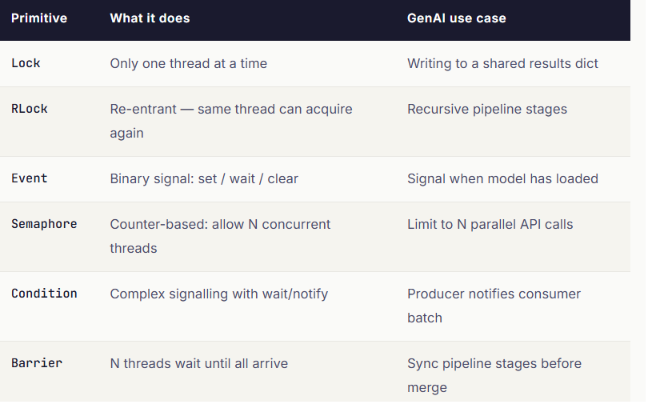
Synchronization primitives — the full toolkit

import threading, time
model_ready = threading.Event()
api_sem = threading.Semaphore(5) # max 5 concurrent inference

def load_model():
 print("Loading model weights...")
 time.sleep(3) # simulate loading 7B param model
 model_ready.set() # unblocks ALL waiting threads at once
 print("Model ready!")
def inference_worker(worker_id: int):
 model_ready.wait() # block here until model is loaded
 with api_sem: # at most 5 simultaneous inference calls
 print(f"Worker {worker_id}: running inference")
 time.sleep(0.5) # simulate inference
loader = threading.Thread(target=load_model, daemon=True)
workers = [threading.Thread(target=inference_worker, args=(i,)) for i in range(12)]
loader.start()
for w in workers: w.start()
for w in workers: w.join()
Section 03 Multiprocessing — Escaping the GIL for CPU-Heavy Work
Tokenising 10 million documents. Computing cosine similarity across a 100K-embedding matrix. Running feature extraction before model training. This is CPU-bound work — and threading won’t help you. You need multiprocessing: separate OS processes, each with their own Python interpreter and GIL, running truly in parallel.
from concurrent.futures import ProcessPoolExecutor
from transformers import AutoTokenizer
import multiprocessing as mp

tokenizer = None # process-local - each worker initialises its own
def init_worker():
 """Called once per process. Avoids re-loading the tokenizer for every job."""
 global tokenizer
 tokenizer = AutoTokenizer.from_pretrained("gpt2")
def tokenise_chunk(text: str) -> dict:
 # Pure CPU work - runs across all cores simultaneously
 tokens = tokenizer(
 text, truncation=True, max_length=512,
 padding="max_length", return_tensors=None
 )
 return {
 "input_ids": tokens["input_ids"],
 "attention_mask": tokens["attention_mask"],
 "token_count": sum(tokens["attention_mask"])
 }
def preprocess_dataset(texts: list[str]) -> list[dict]:
 n = mp.cpu_count()
 print(f"Using {n} cores to process {len(texts)} texts")
 with ProcessPoolExecutor(max_workers=n, initializer=init_worker) as pool:
 return list(pool.map(tokenise_chunk, texts, chunksize=128))
if __name__ == "__main__": # REQUIRED on Windows / macOS
 docs = [f"Training document number {i}" for i in range(100_000)]
 tokenised = preprocess_dataset(docs)
 print(f"Done - {len(tokenised)} chunks tokenised")
Shared memory: zero-copy arrays across processes
Passing large NumPy arrays through Queue serialises them through pickle — slow and memory-intensive. multiprocessing.shared_memory lets all processes read and write the same raw memory block. For embedding matrices, this is transformative.
import numpy as np
from multiprocessing import shared_memory , Process
def fill_shard(shm_name: str, shape: tuple, start: int, end: int):
 # Attach to existing shared block - no data copying
 shm = shared_memory.SharedMemory(name=shm_name)
 matrix = np.ndarray(shape, dtype=np.float32, buffer=shm.buf)
 for i in range(start, end):
 matrix[i] = np.random.randn(1536).astype(np.float32)
 shm.close()
if __name__ == "__main__":
 N, DIM = 50_000, 1536
 shape = (N, DIM)
 # One allocation shared by all processes - 300MB once, not 4×300MB
 shm = shared_memory.SharedMemory(create=True, size=N * DIM * 4)
 matrix = np.ndarray(shape, dtype=np.float32, buffer=shm.buf)
 chunk = N // 4
 procs = [
 Process(target=fill_shard, args=(shm.name, shape, i*chunk, (i+1)*chunk))
 for i in range(4)
 ]
 for p in procs: p.start()
 for p in procs: p.join()
 print(f"Matrix ready: {matrix.shape}")
 shm.unlink() # free the OS-level shared block
Section 04 Generators — Processing Infinite Data in Finite Memory
Pre-training data for a modern LLM is measured in terabytes. You cannot load it into RAM. You need to stream it, process it, and feed it to the model one batch at a time — and generators are exactly the right tool for this.
The fundamental idea: yield is a pause button
A regular function runs to completion and returns once. A generator function runs to a yield, returns that value, and then pauses — preserving all local state — until the caller asks for the next value. No list is ever built. Memory usage stays constant.
import josn
from pathlib import PAth
import itertools

def stream_josnl(path: str):
 """Yield one record at a time from a multi-GB JSONL file"""
 with open(path, encoding = "utf-8" ) as f :
 for line in f :
 if line.strip(): yield josn.loads(line) # one record in memory at a time

def clean(records):
 """Filter + transform - another generator, no new list."""
 for r in records:
 text = r.get("text", "").strip()
 if len(text) >= 100:
 yield {"text": text, "source": r.get("url", "unknown")}
def batch(iterable, size: int):
 """Yield fixed-size batches. Classic pattern for mini-batch training."""
 buf = []
 for item in iterable:
 buf.append(item)
 if len(buf) == size:
 yield buf
 buf = []
 if buf:
 yield buf
# Compose: the ENTIRE file is processed with O(batch_size) memory
pipeline = batch(clean(stream_jsonl("training.jsonl")), size=32)
for mini_batch in pipeline:
 print(f"Training on batch of {len(mini_batch)} documents")
 # trainer.step(mini_batch)
# Bonus: chain multiple datasets seamlessly with itertools
multi_dataset = itertools.chain.from_iterable(
 stream_jsonl(p) for p in ["data1.jsonl", "data2.jsonl", "data3.jsonl"]
)
💡 Generator vs List Comprehension
[x for x in data] builds a full list in RAM. (x for x in data) is a lazy generator expression — use it when you only need to iterate once, especially over large datasets. For 1M embeddings at dim=1536, the difference is 6 GB vs a few hundred bytes.
Section 05 Decorators & functools — Cross-Cutting Concerns Done Right
Every LLM call needs logging. Every external API call needs retries. Every expensive computation needs caching. You don’t want this logic scattered through your code — you want it applied cleanly via decorators.
import functools , time , asyncio, logging
from typing import Callable

def trace_llm(func: Callable) -> Callable: # a Callable is anything that you can put parentheses () after and execute. This includes standard functions, lambda expressions, and even classes that implement the special __call__ dunder method
 """Log every LLM call: inputs, latency, and any errors."""
 @functools.wraps(func)
 async def wrapper(*args, **kwargs):
 start = time.perf_counter()
 logging.info(f"→ {func.__name__}")
 try:
 result = await func(*args, **kwargs)
 ms = (time.perf_counter() - start) * 1000
 logging.info(f"✓ {func.__name__} completed in {ms:.0f}ms")
 return result
 except Exception as e:
 ms = (time.perf_counter() - start) * 1000
 logging.error(f"✗ {func.__name__} failed after {ms:.0f}ms: {e}")
 raise
 return wrapper
def retry(max_attempts: int = 3, base_delay: float = 1.0):
 """Exponential backoff retry for async functions."""
 def decorator(func):
 @functools.wraps(func)
 async def wrapper(*args, **kwargs):
 for attempt in range(max_attempts):
 try:
 return await func(*args, **kwargs)
 except (ConnectionError, TimeoutError) as e:
 if attempt == max_attempts - 1:
 raise
 delay = base_delay * (2 ** attempt)
 print(f"Retry {attempt+1}/{max_attempts} in {delay}s: {e}")
 await asyncio.sleep(delay)
 return wrapper
 return decorator
@trace_llm
@retry(max_attempts=3)
async def generate(prompt: str) -> str:
 # Your actual LLM call goes here
 return "response"
Handling Dynamic or Unknown Arguments
Sometimes you are writing something highly dynamic — like a decorator that logs latency or adds a retry loop (exactly like your
@trace_llmor@retryimplementations). You don't know ahead of time what arguments the underlying function will take.For those cases, you use
...(an ellipsis) to tell Python: "This is a function, but it can accept any arguments."
from typing import Callable, Any
import functools

def simple_logger(func: Callable[..., Any]) -> Callable[..., Any]:
 @functools.wraps(func)
 def wrapper(*args, **kwargs):
 print(f"Calling function: {func.__name__}")
 return func(*args, **kwargs)
 return wrapper
lru_cache: free performance for embedding lookups
Embedding API calls are expensive. If your app re-embeds the same query text multiple times, you’re burning money. @functools.lru_cache memoizes function results in memory — identical inputs return the cached result instantly.
import functools

@functools.lru_cache(maxsize=10000)
def get_embedding(text : str, model : str) -> tuple[float, ...] :
 # note : returns tulpe (hashable) not list, so it can be cached.
 embedding = call_embedding_api(text, model)
 return tuple(embedding)

#first call : hit the api(~100 ms)
v1 = get_embedding("What is RAG ?" , "text-embedding-3-small")

#second call : returns instantly from cache (0ms)
v2 = get_embedding("What is RAG?" , "text-embedding-3-small")

print(get_embedding.cache_info())

# CacheInfo(hits=1, misses=1, maxsize=10000, currsize=1)
# partial: create specialised LLM callers from a general function
def call_llm(prompt, model, temperature, max_tokens): ...
creative = functools.partial(call_llm, model="claude-opus-4-5",
 temperature=0.9, max_tokens=2048)
analyst = functools.partial(call_llm, model="claude-opus-4-5",
 temperature=0.1, max_tokens=512)
Functools
Think of
functoolsas a modifier toolkit for functions. In Python, functions are “first-class citizens”, meaning you can pass them around like variables, return them from other functions, module provides built-in tools to adapt , enhance and cache those functions without rewriting their core code. Here are few important tools in the functools module.1. functools.lru_cache ( The memory saver) : A built in cache decorator. “ LRU” stands for Least Recently Used .
How it works : It acts like a sticky note on a function.The firstitme , the function get called with a specific input , python does the heavy work and saves the result .The next time , it get called with the same input, python completely skips running the function and instantly hands the saved result.
import functools

@functools.lru_cache(maxsize=128)
def fetch_embedding(text: str):
 # Pretend this is a slow, expensive API call to OpenAI
 return call_embedding_api(text)
2.functools.wraps (The identity preserver) : A decorator used inside the custom decorators.
How it works: When you wrap a function in a decorator, you accidentally overwrite its metadata (like its name and docstring) with the decorator’s internal wrapper function.
@functools.wrapscopies the original function's identity back onto the final product.GenAI Use Case: If you are building a custom
@trace_llmor@retry_apidecorator for an agent framework, you must use@wraps. Without it, debugging tools, logging frameworks, and IDE autocompletes will think every single function in your codebase is namedwrapper.
def my_decorator(func):
 @functools.wraps(func) # <-- Keeps the original function's name intact
 def wrapper(*args, **kwargs):
 return func(*args, **kwargs)
 return wrapper
3. functools.partial (The present factory)
What it is: A way to freeze a few arguments of an existing function to create a new, specialized function.
How it works: Imagine a generalized function that takes 4 arguments. You can use
partialto lock in 3 of those arguments, giving you a new simplified function that only requires 1 argument to run.GenAI Use Case: Configuring different flavors of an LLM. You can take a base
call_llm(prompt, model, temperature)function and instantly manufacture acreative_writer(high temperature) and acode_analyst(low temperature) without writing multiple distinct functions.
from functools import partial

def call_llm(prompt, model, temperature):
 ...

# Freeze the model and temperature to make specific tools
creative_bot = partial(call_llm, model="claude-3-5", temperature=0.9)
strict_bot = partial(call_llm, model="claude-3-5", temperature=0.1)

# Now you only need to pass the prompt!
creative_bot(prompt="Write a poem about a GPU")
4. functools.reduce(The Chain Reaction)What it is: A tool that applies a function cumulatively to a list of items from left to right, reducing the list down to a single value.
How it works: If you have a list
[1, 2, 3, 4]and an addition function,reducewill add 1+2 (3), then add that result to 3 (6), then add that result to 4 (10).GenAI Use Case: Sequential processing pipelines. If you have an initial user prompt and an array of text-cleaning steps (strip whitespace $\rightarrow$ lower case $\rightarrow$ filter profanity $\rightarrow$ add system context), you can use
reduceto cleanly thread the text through the entire pipeline array in a single line.
from functools import reduce

funcs = [str.strip, str.lower, remove_profanity]
raw_prompt = " URGENT: Fix this code! "

# Applies each cleaning function to the result of the last one
clean_prompt = reduce(lambda text, func: func(text), funcs, raw_prompt)
Section 06 Context Managers — Deterministic Resource Cleanup
AI applications manage expensive, limited resources: GPU memory, HTTP connection pools, DB connection pools, temporary model checkpoints. When an exception happens mid-pipeline — and it will — you need to guarantee cleanup. Context managers are that guarantee.
from contextlib import contextmanager, asynccontextmanager
import time, uuid

@contextmanager
def pipeline_span(name : str):
 """Trace any code block with start /end timinig and error capture"""
 span_id = str(uuid.uuid4())[:8]
 start = time.pref_counter()
 print(f"[START] {name} ({span_id}}")
 try :
 yield span_id
 except Exception as e :
 print(f"[ERROR] {name} : {e}")
 raise
 finally :
 ms = (time.perf_counter() - start) * 1000
 print(f"[END] {name} - {ms:.1f}ms")

#nest spans to build a full trace tree

with pipeline_span("full_rag"):
 with pipeline_span("retrieval"):
 time.sleep(0.05)
 with pipeline_span("llm_call"):
 time.sleep(0.12)
# For dynamically many resources: ExitStack
from contextlib import ExitStack
def load_model_shards(shard_paths: list[str]):
 with ExitStack() as stack:
 # Open an unknown number of shards - all cleaned up on exit
 handles = [stack.enter_context(open(p, "rb")) for p in shard_paths]
 stack.callback(lambda: print("All shards closed"))
 for i, fh in enumerate(handles):
 header = fh.read(256)
 print(f"Shard {i}: read {len(header)} bytes")
Section 07 Type System, Dataclasses & Pydantic — Structured AI Outputs
LLMs are probabilistic. They don’t always produce valid JSON, the right fields, or values in the expected range. Your code has to validate, parse, and handle errors — and the Python type system with Pydantic makes this robust and readable.
from pydantic import BaseModel, Field, validator
from dataclasses import dataclass, field
from typing import Literal
import json, anthropic

# Dataclasses: lightweight typed containers for internal use
@dataclass
class LLMResponse:
 content: str
 model: str
 input_tokens: int
 output_tokens: int
 latency_ms: float
 finish_reason: Literal["end_turn", "max_tokens", "stop_sequence"]
 metadata: dict = field(default_factory=dict)
 @property
 def total_tokens(self) -> int:
 return self.input_tokens + self.output_tokens
# Pydantic: for LLM-produced JSON that must be validated at runtime
class ExtractedFact(BaseModel): # basemodel - blueprint that defines exactly what fields a piece of data must have along with their expected types.
 claim: str = Field(description="The factual claim")
 confidence: float = Field(ge=0.0, le=1.0, description="0-1 confidence")
 source: str = Field(description="Quote from source text")
class FactExtractionResult(BaseModel):
 facts: list[ExtractedFact]
 summary: str
 @validator("facts") #while ype hints(str,float,int) check the shape of the data, validators check the quality and rules of the data
 def at_least_one(cls, v):
 if not v:
 raise ValueError("Must extract at least one fact")
 return v
async def extract_facts(text: str) -> FactExtractionResult:
 client = anthropic.AsyncAnthropic()
 resp = await client.messages.create(
 model="claude-opus-4-5", max_tokens=1024,
 system="Extract facts. Return ONLY valid JSON, no markdown.",
 messages=[{"role": "user", "content": text}]
 )
 raw = resp.content[0].text
 return FactExtractionResult(**json.loads(raw)) # validates or raises
Behind the Scenes: What Happens on Failure?
When your pipeline calls
FactExtractionResult(json.loads(raw_llm_text)), Pydantic evaluates the types first, then runs your validator functions sequentially.If any condition fails, it raises a
ValidationError. Instead of crashing silently or poisoning your database with invalid entries, you can catch this specific error in atry/exceptblock and automatically trigger a retry prompt back to the LLM (e.g., "Your previous output failed validation because the confidence score was out of bounds. Please fix it."
Protocols: write components that work with any LLM backend
Protocol introduces Duck Typing directly into Python’s static type-hinting system. It allows you to define a contract based entirely on behavior (methods and properties) rather than family history. It stems from the old engineering phrase: "If it walks like a duck and quacks like a duck, treat it like a duck."
What is a Protocol? (The Structural Blueprint)
A Protocol is an invisible contract. It defines a list of methods and attributes that a class must have to be considered valid, but your classes never have to explicitly inherit from it. They just have to match the design.
Real-World Example
Imagine you are building an AI agent framework and want to support multiple vector databases (like Chroma, Pinecone, or Milvus). Instead of forcing every database driver to inherit from a shared base class, you define a structural
Protocol:
from typing import Protocol, runtime_checkable
@runtime_checkable
class Embedder(Protocol):
 """Any class that implements embed() satisfies this - no inheritance."""
 async def embed(self, text: str) -> list[float]: ...
 @property
 def dimension(self) -> int: ...
@runtime_checkable
class VectorStore(Protocol):
 async def upsert(self, doc_id: str, vec: list[float], meta: dict) -> None: ...
 async def search(self, vec: list[float], top_k: int) -> list[dict]: ...
class RAGPipeline:
 """Backend-agnostic: works with OpenAI, Cohere, or any compliant Embedder."""
 def __init__(self, embedder: Embedder, store: VectorStore):
 self.embedder = embedder
 self.store = store
 async def ingest(self, doc_id: str, text: str):
 vec = await self.embedder.embed(text)
 await self.store.upsert(doc_id, vec, {"text": text})
 async def retrieve(self, query: str, top_k: int = 5) -> list[dict]:
 q_vec = await self.embedder.embed(query)
 return await self.store.search(q_vec, top_k)
What is
@runtime_checkable? (The Reality Check)By default, a
Protocolonly exists for static type checkers (the squiggly lines in VS Code or your pre-commit tests). Once your Python script is actively running on a production server, Protocols vanish from memory.If you try to use a standard Python
isinstance()check at runtime to verify if a class fits your protocol, Python will crash with a severe error:TypeError: Instance and class checks can only be used with @runtime_checkable protocols.Adding the
@runtime_checkabledecorator solves this. It tells Python's live runtime engine: "When I runisinstance(obj, Protocol), actually inspect the object, look at its available methods, and see if it qualifies."
from typing import Protocol, runtime_checkable

@runtime_checkable
class VectorStore(Protocol):
 async def search(self, vec: list[float], top_k: int) -> list[dict]:
 ...

# --- Inside your core agent pipeline ---

def initialize_pipeline(db_plugin: Any):
 # This live check ONLY works because we used @runtime_checkable
 if not isinstance(db_plugin, VectorStore):
 raise ValueError("The provided plugin is missing a valid search() method!")
Why this matters for GenAI Developers
When building production-grade AI applications, vendor lock-in is a constant risk. LLM providers change, vector databases evolve, and embedding models shift.
Using Protocol combined with @runtime_checkable allows you to write perfectly swappable components. Your core RAG pipeline can accept any object a developer passes to it, as long as it fulfills the structural methods required by your framework.
Section 08 Memory Management — Because Models Are Huge
A 7B parameter model in float16 occupies 14 GB of RAM. A 70B model needs 140 GB. Even working with embeddings at scale is a memory challenge. Understanding Python’s memory model isn’t academic — it directly determines what you can run and how fast.
import sys,gc,weakref
# __slots__: eliminates per-instance __dict__ - saves ~40% memory
class TokenSlotted:
 __slots__ = ('id', 'text', 'logprob')
 def __init__(self, id, text, logprob):
 self.id = id; self.text = text; self.logprob = logprob

class TokenDict:
 def __init__(self, id, text, logprob):
 self.id = id; self.text = text; self.logprob = logprob
s = TokenSlotted(1, "hello", -0.5)
d = TokenDict(1, "hello", -0.5)
print(f"Slotted: {sys.getsizeof(s)} bytes") # ~56 bytes
print(f"Dict: {sys.getsizeof(d)} bytes") # ~232 bytes

# For 1M tokens: saves ~176MB RAM
# weakref: cache without preventing garbage collection
import weakref
class EmbeddingCache:
 def __init__(self):
 self._cache: dict[str, weakref.ref] = {}
 def put(self, key: str, arr):
 self._cache[key] = weakref.ref(arr)
 def get(self, key: str):
 ref = self._cache.get(key)
 return ref() if ref else None
 # Returns None if the array was garbage-collected
# tracemalloc: find exactly what's consuming memory

import tracemalloc
tracemalloc.start()
import numpy as np
embeddings = np.random.randn(10_000, 1536).astype(np.float32) # 60MB
snapshot = tracemalloc.take_snapshot()
top_stats = snapshot.statistics("lineno")
print(f"Top allocation: {top_stats[0].size / 1e6:.1f}MB")
sys ( system inspector) — the gateway to python’s internal engine and the os . sys.getsizeof() — looks at python object and tells exactly how many bytes of RAM it is consuming,
__slots__ — drops an object memory footprint from ~232 bytes down to ~56 bytes. When processing millions of tokens or database chunks,
syslets you mathematically audit your RAM savings.gc (garbage collector) — automated cleaning crew. python automatically deletes object from memory when no one is using them anymore (via reference counting). gc module is the specialized sub-system that hunts down these “reference cycle” and clears out. gc.collect() — to force an immediate , manual hard-purge of dead variables to instantly free up VRAM/RAM.
weakref (ghost pointer) — a way to reference an object without keeping it alive. Normally, if there is a object into a dictionary cache , that dictionary holds a “Strong reference’ to it.Event if the rest of the app completely deleted that object , it stays trapped alive in RAM because the cache dictionary is still holding onto it. weakref creates a “ghost pointer” allows the cache to see and use the data, but if the rest of the application deletes the original object, the grabage collector is allowed to destroy it anyway.The cache entry simply turns into None.
Section 09 Advanced Patterns — Metaclasses, Descriptors, Dunders
These are the techniques used inside the frameworks you use every day. Understanding them lets you write code that feels like a framework — extensible, expressive, and self-documenting.
Metaclasses: auto-registering model providers ( The factory blueprints)
If a regular class is a blueprint for creating objects, a metaclass is a blueprint for creating classes.It is a piece of code that hooks into a python at the exact moment a class is being born (defined) and allows you to modify it before it exists.
How they work: When Python reads a file and hits
class MyLLMProvider:, a metaclass intercepts that event, inspects the class's properties, and can dynamically inject methods, rewrite names, or catalog it.
class ModelRegistry(type):
 """Every subclass with a model_id gets registered automatically."""
 _registry: dict[str, type] = {}
 def __new__(mcs, name, bases, ns):
 cls = super().__new__(mcs, name, bases, ns)
 if "model_id" in ns:
 mcs._registry[ns["model_id"]] = cls
 return cls

 @classmethod
 def get(mcs, model_id: str) -> type:
 if model_id not in mcs._registry:
 raise KeyError(f"Unknown: {model_id}. Options: {list(mcs._registry)}")
 return mcs._registry[model_id]

class BaseProvider(metaclass=ModelRegistry): pass

class ClaudeProvider(BaseProvider):
 model_id = "claude-opus-4-5"
 async def generate(self, prompt): ... # auto-registered on class creation
class GPT4Provider(BaseProvider):
 model_id = "gpt-4o"
 async def generate(self, prompt): ... # auto-registered on class creation
# Dynamic selection from config - no if/elif chains
provider = ModelRegistry.get("claude-opus-4-5")()
ModelRegistry(type). Instead of manually maintaining a giant dictionary of all supported LLMs, the metaclass silently watches the codebase. The exact millisecond a developer typesclass ClaudeProvider(BaseProvider): model_id = "claude-opus-4-5", the metaclass intercepts it and automatically logs it into an active registry.
💡 The Takeaway: This eliminates complex
if/elifrouting logic across your codebase, making your framework completely plug-and-play for new open-source models.
_data: "I am a private variable. Please leave me alone." (A warning to developers).
__data__: "I am a magic system hook. Python uses me to make syntax work." (Built-in framework behavior).
Dunder methods: pipelines with the | operator
Short for “Double Underscore” methods, these are built-in hooks that always start and end with two underscores (like
__init__,__call__, or__or__).They allow you to define how your custom objects react to native Python operators. For instance, if you want to be able to use the+sign between two custom data objects, you define the__add__dunder method inside your class.
from __future__ import annotations
from typing import Callable, Any

class Step:
 def __init__(self, fn: Callable, name=""):
 self.fn = fn
 self.name = name or fn.__name__
 def __call__(self, data: Any) -> Any:
 return self.fn(data)
 def __or__(self, other: Step) -> Step:
 # step1 | step2 → a new step that chains both
 def chained(data):
 return other(self(data))
 return Step(chained, f"{self.name}|{other.name}")
 def __repr__(self): return f"Step({self.name!r})"
# Define individual steps
strip = Step(str.strip, "strip")
lower = Step(str.lower, "lower")
tokenise = Step(str.split, "tokenise")
count = Step(len, "count")
# Compose with | - reads like Unix pipes
preprocess = strip | lower | tokenise | count
print(preprocess(" Hello World from GenAI! ")) # 4
print(repr(preprocess)) # Step('strip|lower|tokenise|count')
Descriptors (The Smart Gatekeepers)
- What they are: A way to reuse custom access logic across multiple class attributes. It’s like a property decorator (
@property), but neatly packaged into its own separate, reusable class. - How they work: A descriptor class implements dunder hooks like
__get__and__set__. When you assign a descriptor to an attribute in another class, it completely intercepts any attempt to read or modify that attribute. - GenAI Context: Imagine you are building an AI agent and want to ensure that whenever someone sets
agent.temperature, the value is always bounded between0.0and2.0, and automatically logged. Instead of writing messy getter/setter code in every single model class, you build a singleBoundedTemperaturedescriptor class and reuse it everywhere.
class BoundedTemperature:
 def __set__(self, instance, value):
 # The gatekeeper catches the value BEFORE it gets saved
 if not (0.0 <= value <= 2.0):
 raise ValueError("LLM Temperature must be between 0.0 and 2.0!")
 instance.__dict__[self.name] = value

class OpenAIModel:
 temperature = BoundedTemperature() # Reusable gatekeeper applied instantly!
The Impact: It acts as a defensive shield. It stops bad data or AI hallucinations from breaking your database or crashing your application downstream.
Section 10 Production Patterns — Rate Limiting, Retries, Supervisors
This is where theory meets the real world. LLM APIs have rate limits. Workers crash. Tasks fail. Production AI systems need to handle all of this gracefully — not just in the happy path.
Async rate limiter with token bucket
import asyncio, time
from collections import deque

class RateLimiter:
 """Token-bucket rate limiter: max N calls per M seconds."""
 def __init__(self, max_calls: int, period: float = 60.0):
 self.max_calls = max_calls
 self.period = period
 self._calls: deque[float] = deque()
 self._lock = asyncio.Lock()
 async def acquire(self):
 async with self._lock:
 now = time.monotonic()
 while self._calls and now - self._calls[0] > self.period:
 self._calls.popleft()
 if len(self._calls) >= self.max_calls:
 wait = self.period - (now - self._calls[0])
 await asyncio.sleep(wait)
 self._calls.append(time.monotonic())
 async def __aenter__(self): await self.acquire(); return self
 async def __aexit__(self, *_): pass
# 60 RPM cap, max 10 simultaneous connections
limiter = RateLimiter(max_calls=60, period=60.0)
sem = asyncio.Semaphore(10)
async def safe_llm_call(prompt: str, idx: int) -> str:
 async with sem: # cap concurrency
 async with limiter: # cap rate
 await asyncio.sleep(0.5)
 return f"[{idx}] response"
async def process(prompts: list[str]) -> list[str]:
 tasks = [safe_llm_call(p, i) for i, p in enumerate(prompts)]
 return await asyncio.gather(*tasks)
Mixing asyncio + multiprocessing for hybrid workloads
In a high-performance GenAI application, you often have a hybrid workload — meaning your code has to do two completely different types of tasks back-to-back:
- The Async/Waiting Phase (I/O-Bound): Fetching text embeddings or calling remote LLM APIs (waiting on the network).
- The Multiprocessing/Math Phase (CPU-Bound): Comparing a massive matrix of those embeddings to calculate vector similarity scores (heavy local math).
If you try to do both on a single thread, the heavy math phase will completely freeze your async loop, causing all your incoming user chat requests to lag or time out.
Here is how mixing them solves this, explained simply.
The Analogy: The Head Chef & The Prep Cooks
Imagine your master kitchen has one Head Chef (Asyncio) and a team of 4 Prep Cooks in separate back kitchens (Multiprocessing).
The I/O Phase: The Head Chef writes down 100 different prompt orders and fires them off over the internet to a supplier. Because the chef is using
asyncio, they don't sit around waiting by the phone. They effortlessly keep handling new incoming restaurant orders while the supplier processes the request.The Hand-off: Suddenly, the supplier ships back a massive truckload of raw data matrices. The Head Chef needs to calculate the mathematical similarity between all of them.
The Trap: If the Head Chef sits down to crunch those numbers manually, they will be stuck at their desk for seconds. The kitchen gridlocks. No new orders can be taken.
The Multi-Hybrid Solution: Instead, the Head Chef stays at the front counter. They take the massive data payload, chop it into 4 pieces, and throw it into a chute labeled
loop.run_in_executor().Down the chute, the 4 Prep Cooks (Process Pool) grab the math data. Each cook uses their own independent kitchen core to crunch the numbers. While they are sweating over the heavy math, the Head Chef is still at the front counter, completely unblocked, happily streaming tokens and taking new user requests.
When a Prep Cook finishes their math matrix, they throw the result back up the chute. The Head Chef catches it seamlessly using the
awaitkeyword.
import asyncio
from concurrent.futures import ProcessPoolExecutor
import numpy as np

def cpu_similarity(embeddings: list[list[float]]) -> list[list[float]]:
 """CPU-bound work - runs in a separate process, bypasses GIL."""
 arr = np.array(embeddings, dtype=np.float32)
 norm = arr / (np.linalg.norm(arr, axis=1, keepdims=True) + 1e-8)
 return (norm @ norm.T).tolist()
async def full_pipeline(texts: list[str]) -> list[list[float]]:
 loop = asyncio.get_running_loop()
 # Phase 1: I/O-bound - async embedding fetch
 embeddings = await fetch_embeddings_async(texts)
 # Phase 2: CPU-bound - offload to process pool (non-blocking!)
 with ProcessPoolExecutor(max_workers=4) as pool:
 sim_matrix = await loop.run_in_executor(
 pool, cpu_similarity, embeddings
 )
 return sim_matrix
# run_in_executor bridges asyncio and multiprocessing cleanly:
# - the event loop remains unblocked during CPU work
# - CPU uses all available cores
# - result is awaited naturally
Why this is Necessary for GenAI (The Impact)
Without this hybrid pattern, you face an engineering nightmare: Async loop starvation.
The moment your Python script tries to calculate a large Cosine Similarity matrix or tokenize a massive block of text on a single thread, the Global Interpreter Lock (GIL) freezes everything. Your real-time streaming tokens will stutter, web sockets will drop connections, and your health-check endpoints will fail.
By bridging them together with
run_in_executor:You get the ultra-low memory overhead of Asyncio for network scaling.
You get the raw CPU power of Multiprocessing across all your machine’s hardware cores.
Your application remains $100\%$ responsive to users, even while crunching millions of data points in the background
Quick Reference


Building production-grade Generative AI applications requires more than just knowing how to prompt an LLM or construct a basic RAG pipeline. As we scale these systems, the traditional bottlenecks of software engineering shift. Our programs spend massive amounts of time bound by network latency waiting for API providers, while concurrently demanding high-performance CPU and memory efficiency to manage massive vector datasets, token structures, and local model shards.
Join thousands of data leaders on the AI newsletter. Join over 80,000 subscribers and keep up to date with the latest developments in AI. From research to projects and ideas. If you are building an AI startup, an AI-related product, or a service, we invite you to consider becoming a sponsor.
Published via Towards AI
Towards AI Academy
We Build Enterprise-Grade AI. We'll Teach You to Master It Too.
15 engineers. 100,000+ students. Towards AI Academy teaches what actually survives production.
Start free — no commitment:
→ 6-Day Agentic AI Engineering Email Guide — one practical lesson per day
→ Agents Architecture Cheatsheet — 3 years of architecture decisions in 6 pages
Our courses:
→ AI Engineering Certification — 90+ lessons from project selection to deployed product. The most comprehensive practical LLM course out there.
→ Agent Engineering Course — Hands on with production agent architectures, memory, routing, and eval frameworks — built from real enterprise engagements.
→ AI for Work — Understand, evaluate, and apply AI for complex work tasks.
Note: Article content contains the views of the contributing authors and not Towards AI.
Related posts
Recent Posts