How to Securely Connect Your AI Agent to Telegram with Azure
Last Updated on June 25, 2026 by Editorial Team
Author(s): Javier Iniesta
Originally published on Towards AI.
How to Securely Connect Your AI Agent to Telegram with Azure

Personal AI agents are starting to take a major leap forward. Projects like OpenClaw show that we are no longer talking only about assistants capable of answering questions, but about systems that can access tools, consult information on your computer, execute actions, and even act on our behalf.
But the more power we give them, the more important one issue becomes an issue that is often pushed into the background: security.
Imagine that we have built our local agent, connected tools to it, and now want to interact with it from anywhere using our mobile phone. Telegram seems like an ideal option: it is reliable, available on virtually any device, and offers a free, very mature API.
However, there is a problem that is rarely addressed in enough depth.
The most natural way to connect any agent to Telegram forces you, as a user, to make an uncomfortable decision: open a port on your computer or leave the bot token exposed on your local machine. Either option creates an attack surface that, in an agent with access to your tools, you simply cannot afford.
In this article, we will see how we solved this problem in AzulClaw through an architecture based on Azure Bot Service, Azure Functions, and Azure Service Bus, completely eliminating the need to expose the local machine to the Internet.
How the Problem Is Usually Solved
Telegram offers two main mechanisms for receiving messages from a bot.
Long Polling:
With this approach, the application makes periodic requests to Telegram to check whether there are new messages. The advantage is that there is no need to expose any port or have a public URL; we are the ones contacting Telegram.
However, it has several limitations when we work with AI agents.
If the agent needs several seconds to reason through a response using a language model, the reading process can become blocked. Messages start to accumulate, and handling errors, restarts, or process crashes ends up depending entirely on our code.
As the agent becomes more complex, this approach becomes harder to maintain.
Webhooks
The second option is to register a public URL so Telegram can send messages directly in real time. From an operational point of view, it is a more elegant and efficient solution. The problem appears when the agent runs on our own machine.
To receive those messages, we must expose an endpoint accessible from the Internet. In many projects, this involves configurations similar to:
{
 "channels": {
 "telegram": {
 "webhookUrl": "https://mi-dominio.com/telegram-webhook",
 "webhookHost": "0.0.0.0"
 }
 }
}
That value means the application will listen on all available network interfaces.
It is not a bad practice in itself. In fact, it is the approach used by many open-source projects and is perfectly valid for many scenarios. But when the agent has access to personal files, corporate tools, private APIs, or execution capabilities, the situation changes considerably.
How Can We Approach It Securely? Placing the Cloud Between Telegram and Your Agent
The key is to question an assumption we usually take for granted.
What if the agent did not have to communicate directly with Telegram?
Instead, we can introduce an intermediate cloud layer responsible for receiving messages, validating them, and securely transporting them to our local agent.
In this way, Telegram never interacts directly with the machine where the agent is running.
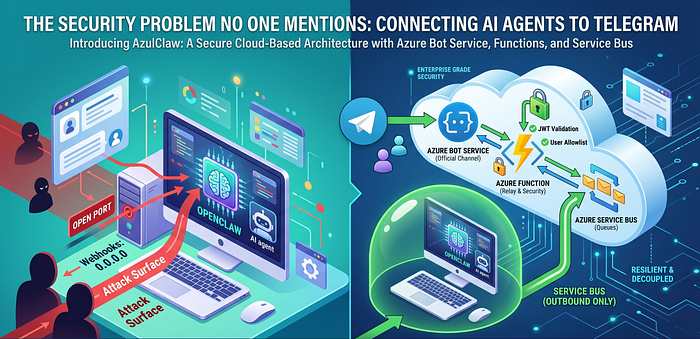
This is how the architecture we implemented in AzulClaw works:

Each component has its role:
- Azure Bot Service is the official Telegram channel. It registers the webhook, manages the bot token, and translates messages into the standard Bot Framework format. The Telegram token lives in Azure, not on your computer.
- Azure Function is the relay. It receives activities from Bot Service, authenticates them with a JWT signed by Microsoft, and puts them into the queue. It is also responsible for collecting the response and returning it.
- Azure Service Bus is the message bus. Two queues: `bot-inbound` for incoming messages and `bot-outbound` for responses. Your local agent only needs the connection string: no public IP, no open port.
AzulClaw running locally reads from the queue, processes the message, and puts the response back. Everything is outbound traffic. Never inbound.
Three Additional Security Layers
Removing public exposure of the agent is a major step, but it is not enough.
We must also protect the endpoint that receives messages in Azure.
For that reason, the relay implements three complementary security mechanisms.
- Layer 1: Bot Framework JWT. Each incoming request includes a token signed by Microsoft. The Function validates it against the Bot Framework authentication services. If it fails, `401`. No exceptions.
- Layer 2: User and chat allowlist. Even if a request is authentic and comes from Azure Bot Service, you can restrict which Telegram users or groups are allowed to interact with your agent. Numeric IDs are configured as environment variables in the Function.
- Layer 3: Correlation ID for synchronous responses. The relay assigns a unique ID to each message. When AzulClaw processes and responds, it uses that same ID as the session ID in Service Bus. The Function waits for the response to that specific message, not just any message, using Service Bus Sessions.
# The relay in the Function: receives, authenticates, enqueues, waits
correlation_id = str(uuid.uuid4())

# Authenticate Bot Framework JWT
is_authorized, _, _ = await _authenticate_request(req_body, auth_header)
if not is_authorized:
 return func.HttpResponse(status_code=401)

# Only allowed users pass
if not evaluate_telegram_access(req_body, ALLOWED_USERS, ALLOWED_CHATS).authorized:
 return func.HttpResponse(status_code=200) # silent

# Enqueue for AzulClaw
await sender.send_messages(ServiceBusMessage(
 json.dumps(req_body),
 correlation_id=correlation_id
))

# Wait for synchronous response by session ID
reply = await _await_outbound_reply(client, correlation_id)
The Local Experience: Zero Firewall Changes
From the user’s point of view, the integration is extremely simple. The local runtime includes a worker that:
- 1. Reads messages from the input queue.
- 2. Processes them using the agent.
- 3. Publishes the response to the output queue.
The only required dependency is a Service Bus connection string.
There is no need to open ports.
There are no TLS certificates to maintain.
It does not matter whether the agent is behind a corporate VPN, a home network, or NAT.
In addition, if the agent restarts or remains temporarily disconnected, messages continue to be stored in the queue until it can process them.
The architecture naturally provides resilience.
More Than a Telegram Integration
Although the example uses Telegram, the real value of this pattern goes far beyond one specific platform.
The core idea is to completely decouple external channels from the agent we run locally.
Telegram is only one of those channels.
The same approach can be applied to mobile applications, enterprise services, messaging platforms, or any system that needs to communicate with a private agent.
In addition to improving security, we gain further advantages:
- Decoupling between components.
- Greater resilience against restarts or failures.
- Scalability.
- Message traceability.
- The ability to incorporate multiple agent instances.
Security in the Enterprise Environment
As AI agents move from experimental projects into corporate environments, the standards change. In an enterprise network, opening ports or relying on vulnerable local configurations is not acceptable.
To solve this at the root, at AzulClaw we chose to fully isolate execution. When you delegate critical actions to a system that acts on your behalf, the architecture must be secure by default.
If you want to implement this model, the full code — the Azure Function, the Terraform module, and the integration with the local runtime — is available in [AzulClaw]. The official Telegram skill includes everything needed to deploy this in any Azure subscription.
Join thousands of data leaders on the AI newsletter. Join over 80,000 subscribers and keep up to date with the latest developments in AI. From research to projects and ideas. If you are building an AI startup, an AI-related product, or a service, we invite you to consider becoming a sponsor.
Published via Towards AI
Towards AI Academy
We Build Enterprise-Grade AI. We'll Teach You to Master It Too.
15 engineers. 100,000+ students. Towards AI Academy teaches what actually survives production.
Start free — no commitment:
→ 6-Day Agentic AI Engineering Email Guide — one practical lesson per day
→ Agents Architecture Cheatsheet — 3 years of architecture decisions in 6 pages
Our courses:
→ AI Engineering Certification — 90+ lessons from project selection to deployed product. The most comprehensive practical LLM course out there.
→ Agent Engineering Course — Hands on with production agent architectures, memory, routing, and eval frameworks — built from real enterprise engagements.
→ AI for Work — Understand, evaluate, and apply AI for complex work tasks.
Note: Article content contains the views of the contributing authors and not Towards AI.
Related posts
Recent Posts