5 Things Broke When I Shipped a RAG + MCP Agent to Production.
Last Updated on May 27, 2026 by Editorial Team
Author(s): Sudip P.
Originally published on Towards AI.
5 Things Broke When I Shipped a RAG + MCP Agent to Production.

Read this article for free: link
TL;DR (because you’re busy)
- Demos lie. Production finds your dumb mistakes.
- Vector‑only search is a trap. Hybrid + rerank or go home.
- MCP tools will return
nulland ruin your night. Validate. Timeout. Return structured errors. - Keyword routers die on real users. Use a small LLM as router. Cache stuff.
- Build the eval harness on day zero. No evals, no clue.
6:14 a.m. and I want to quit
6:14 a.m. Slack explodes. On-call guy asks our shiny new agent why a pipeline job stalled.
Agent replies, all calm and confident like a junior consultant who just read a blog: “This job is covered under the Tier-2 SLA with a 4-hour response window.”
The real SLA is 30 minutes. The job had been dead for 90.
I open the trace. Someone already filed a PagerDuty ticket. Title: “agent gave wrong SLA again”. The “again” part is what really stung.
Quick context (if you missed my last post): RAG gets knowledge from a static index. MCP lets the model call live tools. On my laptop, with two test queries, it felt like magic. In prod, with 80 users pasting real Slack threads, it felt like a liability.
Here’s what broke. Here’s what I did. Some of it worked.
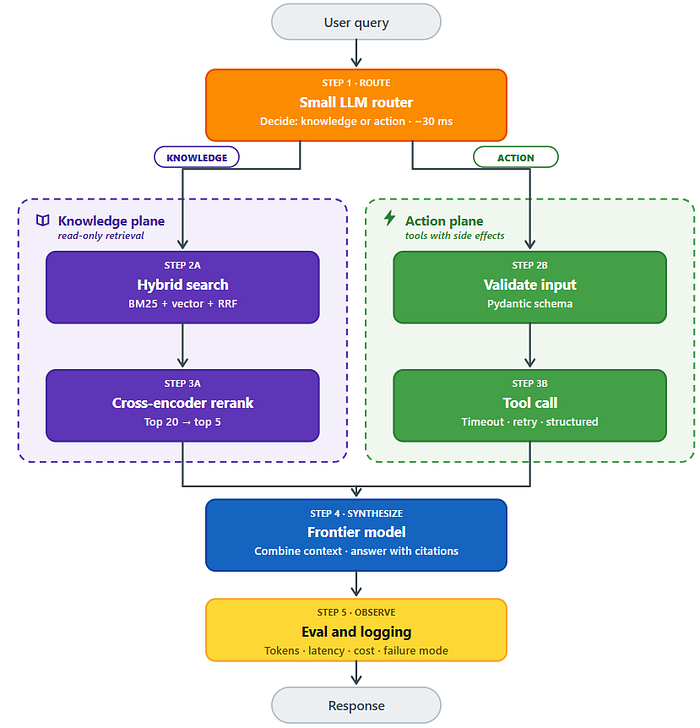
The whole mess (how it should work)

A small LLM router decides whether the user query needs knowledge (RAG) or a live action (MCP). The RAG pipeline uses hybrid search (BM25 + vector) plus a cross‑encoder reranker to find relevant chunks. MCP tools validate inputs, enforce timeouts and retries, and return structured {ok, error, detail} responses. Both paths feed into a frontier model for synthesis, then through an eval and logging layer before the final response. Every box here exists because something broke without it.
If you want the calm, demo-version of this same architecture before any of it broke, the original write-up walks through it end-to-end.
Breakage #1: Retrieval gave me the wrong SLA
What failed: The model didn’t hallucinate. The retriever just handed it the wrong chunk. “Tier-1 SLA for streaming” and “Tier-2 SLA for batch” are really close in vector space. To a human at 3 a.m., they are completely different.
Why: Vector similarity is not relevance. Embeddings smooth over the exact words you actually care about.
Fix: Two things, both required.
First, hybrid search: BM25 (keyword) plus vector, combined with reciprocal rank fusion. BM25 catches literal terms like “Tier-1” and “streaming” that embeddings blur together.
Second, rerank the top 20 candidates with a cross-encoder. Cross-encoders look at the query and chunk together. They catch the “semantically close but factually wrong” cases.
Here’s the code I wish I’d started with. Not perfect, but you get the idea.
# Not real code, but you get the idea
def retrieve(query, k=5):
 candidates = hybrid_search(query, k=20) # BM25 + vector
 reranked = rerank_model.rerank(query, candidates, top_n=k)
 return reranked
How to detect
Log the chunk IDs for every answer. When users complain, you need to see instantly if retrieval failed or synthesis failed. Add a “retrieval precision” metric to your eval set. For each golden query, did the right chunk show up in top 5?
Breakage #2: MCP tool returned null and the model said “all good”
What failed: The MCP tool called the job status API. The API timed out and returned null. The model saw null, interpreted it as "no issues", and cheerfully told the user everything was fine. The job was actually dead for 90 minutes.
Why: No validation on the tool output. No distinction between null (no data) and {"status": "ok"}. The model treated both as success.
Fix: Wrap every tool call in a structured result. Validate inputs. Enforce timeouts. Return an explicit ok flag. Never let a raw null reach the model.
def get_job_status(job_id):
 try:
 validate(job_id)
 data = call_api(job_id, timeout=5.0)
 return {"ok": True, "data": data}
 except TimeoutError:
 return {"ok": False, "error": "upstream_timeout"}
 except Exception as e:
 return {"ok": False, "error": "upstream_failure", "detail": str(e)}
When the tool returns {"ok": false, "error": "upstream_timeout"}, the model can say "I couldn't reach the job system – please retry." That is the answer you want at 3 a.m.
How to detect: Emit a metric per tool call. Label it with tool name, ok/error, and error category. Alert on error rate. The first tool to drift is never the one you expect.
What actually happens when a tool fails (vs what you think happens)

null into "success" – why your agent needs explicit null checks and timeout handling, not just error handling. That second path ruined my week.Breakage #3: Keyword router didn’t survive first contact with users
What failed.
My demo router was 12 lines of if statements.if "job" in query: do this. elif "sla" in query: do that.
I knew it was bad. I shipped it anyway.
Real users don’t type “what is the SLA for job 1234”. They type “hey is the prod thing borked again lol” and paste a 600‑word Slack thread. Keyword routers die on that.
Why.
Intent classification is genuinely hard. You cannot write enough rules to cover paraphrase, sarcasm, multi‑intent, and copy‑pasted garbage.
Fix.
Three levels:
- Keyword router → fast and free, but brittle.
- LLM‑as‑router (small model returning a JSON route) → handles ambiguity, adds one cheap hop.
- Full tool use with frontier model → most accurate, most expensive.
From my deployment (rough numbers)

We settled on small LLM for the first hop, frontier only for synthesis. The 5‑point accuracy gap was not worth 20× the cost for most queries.
How to detect.
Log routing decisions. Overlay with user satisfaction (thumbs down, follow‑ups, escalations). Clusters of follow‑ups usually mean the router fired wrong.
Breakage #4: I didn’t check the bill for two weeks
What failed:
Two weeks after launch I checked cloud costs. Daily spend was 300–300–400. Trending up. 80 daily active users.
Then I opened the latency dashboard. P50 was 6 seconds. P95 was 14 seconds. User satisfaction chart was basically an inverse of the latency curve. That chart ruins your afternoon.
Why:
A single query was doing 5+ model calls and 2+ tool calls, each with retries. No caching. No parallelism. Everything ran through the frontier model because that’s what the demo did.
Fix:
Four levers, in order of impact.
- Embedding cache → hash the input query, store the vector. “Is the pipeline down” comes in fifty flavors. Normalize it and hit the cache.
- Tool‑result cache with TTLs → job statuses don’t change every second. Short TTL on status, long TTL on SLA lookups. Cut tool calls a lot.
- Smaller models for boring hops → routing, query reformulation, intent extraction. All on a cheap model. Frontier only for final synthesis.
- Async tool execution → if two tools don’t depend on each other, run them in parallel.
asyncio.gather. Boring, but shaved a full second off P50.
How to detect.
Tag every span with token counts and estimated dollar cost. Build a dashboard with tokens.in, tokens.out, latency.p50, latency.p95, and cost.per_query. Look at it every morning with your coffee.
Where your latency and money actually go (spoiler: not where you think)

That pie chart made me redo my caching strategy.
Breakage #5: I had no evals. Then I upgraded an embedding model and broke everything.
What failed:
For the first month my eval suite was “I tried it and it seemed fine.” Then I upgraded the embedding model. Retrieval got quietly worse. I noticed three days later, because a user complained.
Why:
Without an eval harness, every change is a coin flip. You cannot tell if you improved one thing or broke another.
Fix:
Build a golden dataset. 100 real queries from your logs. Each annotated with the expected tool calls and the specific facts the answer must contain. Not “the answer should mention the SLA” but “the answer must contain the string ’30 minutes’”. Deterministic checks catch deterministic regressions.
Then layer LLM‑as‑judge on top for the squishy stuff: tone, completeness, whether it answered the actual question. Use a different model than your agent. Do not let the chef grade their own cooking.
Run the suite on every PR. Block merges on deterministic regressions. Treat judge scores as a trend line, not a gate.
How to detect.
This is the detector. The whole point is that the harness tells you when something broke before your users do.
What I got wrong before production (a short, sad list)
- “The retrieval looks pretty good” is not a measurement. It’s a feeling. Feelings ship bugs.
- I assumed MCP tools were reliable because they worked in the demo. Demos run on healthy networks against warm caches.
- I underestimated how creative real users would be with input. The keyword router survived me and three teammates. It did not survive the whole engineering org.
- I thought I would add evals “once the system stabilized”. Systems don’t stabilize without evals. That’s how you know if they are stable.
- I optimized latency where it didn’t matter (one LLM call) and ignored it where it did (sequential tool calls that could have run in parallel).
- I named tools generically (
get_data,lookup). The model hallucinated arguments. Specific names with descriptive schemas reduced tool‑argument hallucinations more than any prompt change I tried.
The checklist I use now (no shipping without these)
- Hybrid search (BM25 + vector) with reranking over top‑20.
- Pydantic validation on every tool input.
- Per‑tool timeouts and bounded retries with exponential backoff.
- Structured
{ok, error, detail}responses from every tool. No silentnulls. Ever. - Routing on a small model with logged decisions. Fallback to frontier for ambiguous queries.
- Embedding cache keyed on normalized query string.
- Tool‑result cache with explicit per‑tool TTLs.
- Async tool execution for independent calls.
- Tokens, latency, and dollar estimate emitted on every span.
- Golden eval set in version control. Deterministic + judge checks. Run on every PR.
- Daily dashboard with
cost.per_query,latency.p95,tool.error_rateby tool name. - Rollback story for model version, prompt version, index version. When things go sideways, you need to go back fast.
Closing (go to sleep)
If I started over tomorrow, I would build the eval harness on day one and the agent on day two. Almost everything I learned the hard way comes back to not being able to measure regressions.
The second-hardest lesson: tool boundaries are where trust leaks fastest. Structured error returns matter more than any clever prompt.
My pipeline agent is now branchier than that first diagram. It fetches a job status. Decides if the runbook applies. Maybe calls a second tool based on what the runbook says. Loops back if data went stale mid-answer. That’s not a straight line anymore. That’s a graph.
New here? Part 1 covers the RAG vs MCP split this piece builds on, start there if any of this felt thin.
Next piece: orchestrating multi-step RAG + MCP workflows with LangGraph. Including the parts that broke when I tried to put a real loop into production.
Liked this? Clap, comment, or rage‑tweet at me. I’ve earned it.
If you’re preparing for a GenAI interview
I failed my first AI engineer interview. Here’s the complete playbook I built to never fail again.
The 10 Questions That Decide Whether You’re an AI Engineer or Just an AI User
If you are trying to test the best chunking strategies, read this:
Chunking Strategies in RAG Systems: Insights from 80+ GenAI Interviews — A story from the other side of the table.
If you want to understand why you should build your own MCP host, read this:
Why You Should Build Your Own MCP Host: A Python Deep‑Dive Into the Agentic Loop — M models, N tools, M×N headaches.
Join thousands of data leaders on the AI newsletter. Join over 80,000 subscribers and keep up to date with the latest developments in AI. From research to projects and ideas. If you are building an AI startup, an AI-related product, or a service, we invite you to consider becoming a sponsor.
Published via Towards AI
Towards AI Academy
We Build Enterprise-Grade AI. We'll Teach You to Master It Too.
15 engineers. 100,000+ students. Towards AI Academy teaches what actually survives production.
Start free — no commitment:
→ 6-Day Agentic AI Engineering Email Guide — one practical lesson per day
→ Agents Architecture Cheatsheet — 3 years of architecture decisions in 6 pages
Our courses:
→ AI Engineering Certification — 90+ lessons from project selection to deployed product. The most comprehensive practical LLM course out there.
→ Agent Engineering Course — Hands on with production agent architectures, memory, routing, and eval frameworks — built from real enterprise engagements.
→ AI for Work — Understand, evaluate, and apply AI for complex work tasks.
Note: Article content contains the views of the contributing authors and not Towards AI.
Related posts
Recent Posts