
AI Agents in Production: Why Structured Generation Matters More Than Prompt Engineering
Last Updated on June 8, 2026 by Editorial Team
Author(s): Shakti Wadekar
Originally published on Towards AI.
AI Agents in Production: Why Structured Generation Matters More Than Prompt Engineering

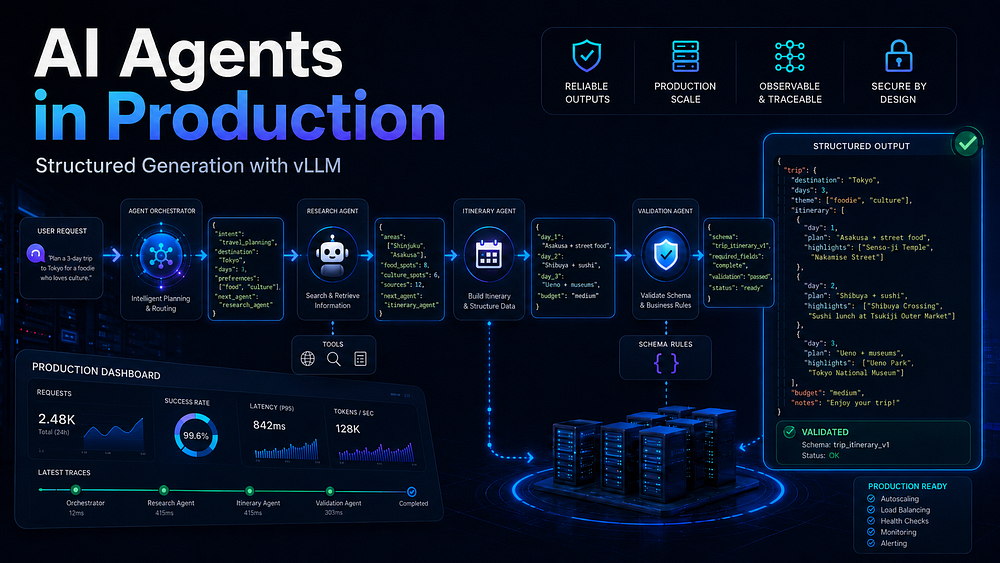
Structured generation is one of the most important steps in moving AI agents from demos to production systems. In real applications, an agent is not just writing text for a user, it is passing decisions, tool arguments, routing outputs, validation results, and workflow states to other parts of a software pipeline. In this article, we will look at how vLLM helps enforce this structure during generation. We will move from the core structured generation methods to a simple routing agent example that shows how these ideas fit into a real production workflow.
📚 Content
🚀 1. Motivation
🏭 2. Production Reality
⚙️ 3. Structured Generation in vLLM
🧩 3.1 JSON Schema-Constrained Generation
🏗️ 3.2 Pydantic Model → JSON Schema Conversion
🔎 3.3 Regex-Constrained Generation
📐 3.4 Grammar-Constrained Generation
🎛️ 3.5 Custom Logits Processors
🛠️ 3.6 Tool Calling
🤖 4. Routing Agent
🚀 1. Motivation
Why Structured Generation?
Imagine you built an AI customer support agent. A user sends: “I want to return my order #4821.” Your agent needs to call an internal API to look up the order. That API expects a clean JSON payload:
{ "order_id": "4821", "action": "return", "reason": null }
But your LLM, without any constraints, might output:
Sure! I can help with that. Here is the return request:
```json
{ "order_id": 4821, "action": "return", "reason": "not specified" }
```
Let me know if you need anything else!
Three problems in that one response:
- Extra text wrapped around the JSON,
order_idis a number instead of a string,reasonis"not specified"instead ofnull.
Your json.loads() will either crash or your API will reject the payload.
In a demo, you’d just fix this with a try/except and with more prompting.
In production, the same issue can happen thousands of times a day across multiple agents, tools, and workflows. At that scale, even a 2% formatting failure rate is no longer a small bug, it becomes broken automations, failed handoffs, and real customer impact.
The core problem:
LLMs are probabilistic text generators. They predict the most likely next token, they do not inherently “know” that your downstream system needs a strictly-typed JSON object. Even after prompting it with JSON requirements, it might still fail to produce exact required format.
Structured generation:
Structured generation guides the model to produce outputs that follow a predefined format, such as JSON, a schema, or a set of allowed choices, so the response is easier for your code to validate and use reliably.
🏭 2. Production Reality
Production AI agents operate in pipelines. The LLM output is almost never the final product. The LLM output is fed into databases, APIs, other models, or UI components. Each handoff requires the output to conform to a format. Structured generation is how you enforce that format at the generation level.
Here is what structured generation unlocks:
- Cleaner backend integration because the LLM output can map directly to typed application models, validation logic, APIs, and databases.
- Cleaner agent pipelines and more reliable agent handoffs because each step can pass structured data to the next step without relying on messy text interpretation.
- Fewer production failures because the model is constrained to return valid, expected outputs instead of unpredictable free text.
- Lower retry and repair cost because the system spends less time fixing bad outputs and more time executing the actual workflow.
⚙️ 3. Structured Generation in vLLM
Introduction
vLLM is mainly known as a high-throughput inference and serving engine for LLMs, but it also provides built-in support for constraining model outputs into specific formats.
In vLLM, structured generation can be used in two common ways: through structured_outputs and StructuredOutputsParams for offline inference, or through response_format / extra_body={"structured_outputs": ...} when using the OpenAI-compatible API.
Setup
pip install -U openai vllm
If you again get the NumPy Inf error, run:
pip install "numpy<2"
vllm serve starts vLLM as a model server. Instead of loading the model inside every notebook run, the model is loaded once in a terminal and kept running. Your notebook code then sends requests to this local server, just like it would send requests to the OpenAI API.
Run the following command in the terminal to locally host the model with vLLM.
vllm serve Qwen/Qwen2.5-1.5B-Instruct \
 --host 0.0.0.0 \
 --port 8000 \
 --dtype auto \
 --gpu-memory-utilization 0.85 \
 --max-model-len 4096 \
 --enable-auto-tool-choice \
 --tool-call-parser hermes
vLLM exposes an OpenAI-compatible API server, so the normal openai Python client can call it by changing only the base_url to http://localhost:8000/v1
Qwen/Qwen2.5-1.5B-Instruct
This is the Hugging Face model that vLLM will download/load and serve.
--dtype auto
Lets vLLM automatically choose the best model weight precision based on the model and GPU, such as float16 or bfloat16
--tool-call-parser hermes
Tells vLLM how to parse tool calls from the model’s generated text. For Qwen2.5 models, vLLM documentation says the Qwen2.5 chat template supports Hermes-style tool use, so the hermes parser can be used.
Run the following code. If this prints the model name, vLLM is running correctly.
from openai import OpenAI
client = OpenAI(
 base_url="http://localhost:8000/v1",
 api_key="unused",
)
print(client.models.list().data[0].id)
🧩 3.1 JSON Schema-Constrained Generation
The most common use case:
You define a JSON Schema, and vLLM constrains decoding so the generated text follows that schema.
Let’s understand this with an example:
Production Use Case: Support Ticket Triage System
from openai import OpenAI
import json

client = OpenAI(
 base_url="http://127.0.0.1:8000/v1",
 api_key="EMPTY"
)

MODEL = "Qwen/Qwen2.5-1.5B-Instruct"

triage_schema = {
 "type": "object",
 "properties": {
 "urgency": {"type": "string", "enum": ["low", "medium", "high", "critical"]},
 "category": {"type": "string", "enum": ["billing", "technical", "returns", "general"]},
 "customer_id": {"type": ["string", "null"]},
 "summary": {"type": "string", "maxLength": 200}
 },
 "required": ["urgency", "category", "summary"],
 "additionalProperties": False
}

email_text = """
Customer #C-4821 says: My payment was charged twice yesterday
and I still haven't received any confirmation. This is urgent!
"""

prompt = f"""Analyze this support email and return only JSON.

Email:
{email_text}
"""

response = client.chat.completions.create(
 model=MODEL,
 messages=[{"role": "user", "content": prompt}],
 temperature=0.1,
 max_tokens=256,
 response_format={
 "type": "json_schema",
 "json_schema": {
 "name": "support_triage",
 "schema": triage_schema
 }
 }
)

text = response.choices[0].message.content
print(f"text: {text}")

triage = json.loads(text)
print(f"triage: {triage}")

print(f"Urgency: {triage['urgency']}")
print(f"Category: {triage['category']}")
print(f"Summary: {triage['summary']}")
Expected Output:

text: {"urgency":"high","category":"billing","customer_id":"C-4821","summary":"Customer was charged twice yesterday and has not received confirmation."}

triage: {'urgency': 'high', 'category': 'billing', 'customer_id': 'C-4821', 'summary': 'Customer was charged twice yesterday and has not received confirmation.'}

Urgency: high
Category: billing
Summary: Customer was charged twice yesterday and has not received confirmation.
With structured_outputs and StructuredOutputsParams, this same code would be as following:
from vllm import LLM, SamplingParams
from vllm.sampling_params import StructuredOutputsParams
import json

triage_schema = {
 "type": "object",
 "properties": {
 "urgency": {
 "type": "string",
 "enum": ["low", "medium", "high", "critical"],
 },
 "category": {
 "type": "string",
 "enum": ["billing", "technical", "returns", "general"],
 },
 "customer_id": {"type": ["string", "null"]},
 "summary": {"type": "string", "maxLength": 200},
 },
 "required": ["urgency", "category", "summary"],
 "additionalProperties": False,
}

llm = LLM(model="Qwen/Qwen2.5-1.5B-Instruct")

params = SamplingParams(
 temperature=0.1,
 max_tokens=256,
 structured_outputs=StructuredOutputsParams(json=triage_schema),
)

email_text = """
Customer #C-4821 says: My payment was charged twice yesterday
and I still have not received any confirmation. This is urgent!
"""

prompt = f"""
Analyze this support email and return only JSON matching the schema.
Email: {email_text}
"""

output = llm.generate([prompt], params)[0]
triage = json.loads(output.outputs[0].text)

print(triage["urgency"])
print(triage["category"])
print(triage["summary"])
Expected Output:

Urgency: high
Category: billing
Summary: Customer was charged twice yesterday and has not received confirmation.
The important part and what it does?
response_format={
 "type": "json_schema",
 "json_schema": {
 "name": "support_triage",
 "schema": triage_schema
 }
Or
params = SamplingParams(
 temperature=0.1,
 max_tokens=256,
 structured_outputs=StructuredOutputsParams(json=triage_schema),
)
vLLM uses a structured-output backend such as
xgrammarorguidanceto constrain decoding. The schema or grammar is converted into decoding constraints, and at each generation step invalid next tokens are masked from the model’s logits before sampling. This makes the model generate text that follows the required structure, such as a JSON schema, regex, choice list, or grammar.
Important nuance:
Structured generation only guarantees structural validity, not that the extracted values are semantically correct.
Important implementation detail to further improve for production:
Keep the schema in code, but still tell the model in the prompt what each field means.
The constraint guarantees the format and the prompt improves the semantic quality.
So change the prompt from this:
prompt = f"""
Analyze this support email and return only JSON matching the schema.
Email: {email_text}
"""
To this:
prompt = f"""
You are a support-email triage agent.

Analyze the email and return only JSON.

Field meanings:
- urgency:
 - low = not time-sensitive
 - medium = needs attention but not urgent
 - high = urgent customer issue, duplicate charge, missing confirmation, delayed order, etc.
 - critical = severe outage, legal/safety risk, security breach, or many users affected

- category:
 - billing = payments, refunds, invoices, duplicate charges
 - technical = bugs, login issues, app/site problems
 - returns = return, exchange, replacement, refund for returned item
 - general = anything else

- customer_id:
 - Extract the customer ID if present.
 - If no customer ID is present, use null.
 - Do not invent a customer ID.

- summary:
 - One short sentence.
 - Max 200 characters.
 - Mention the main customer problem.

Email:
{email_text}

Return only the JSON object. Do not include explanations.
"""
🏗️ 3.2 Pydantic Model → JSON Schema Conversion
Writing raw JSON Schema objects is tedious and error-prone. Hence use Pydantic.
from openai import OpenAI
import json

from pydantic import BaseModel, Field, ConfigDict
from typing import Literal, Optional

client = OpenAI(
 base_url="http://127.0.0.1:8000/v1",
 api_key="EMPTY"
)

MODEL = "Qwen/Qwen2.5-1.5B-Instruct"

# 1. Define output structure using Pydantic
class TriageOutput(BaseModel):
 model_config = ConfigDict(extra="forbid")

 urgency: Literal["low", "medium", "high", "critical"]
 category: Literal["billing", "technical", "returns", "general"]
 customer_id: Optional[str] = None
 summary: str = Field(max_length=200)

# 2. Convert Pydantic model to JSON Schema
triage_schema = TriageOutput.model_json_schema()

email_text = """
Customer #C-4821 says: My payment was charged twice yesterday
and I still haven't received any confirmation. This is urgent!
"""

prompt = f"""Analyze this support email and return only JSON.

Email:
{email_text}
"""

response = client.chat.completions.create(
 model=MODEL,
 messages=[{"role": "user", "content": prompt}],
 temperature=0.1,
 max_tokens=256,
 response_format={
 "type": "json_schema",
 "json_schema": {
 "name": "support_triage",
 "schema": triage_schema
 }
 }
)

text = response.choices[0].message.content
print(f"text: {text}")

triage = json.loads(text)
print(f"triage: {triage}")

print(f"Urgency: {triage['urgency']}")
print(f"Category: {triage['category']}")
print(f"Summary: {triage['summary']}")
🔎 3.3 Regex-Constrained Generation
For simpler constraints like phone numbers, order IDs, date formats, regex-constrained generation is the great option. The model can only generate strings that match your regex pattern.
from openai import OpenAI

client = OpenAI(
 base_url="http://localhost:8000/v1",
 api_key="EMPTY",
)

MODEL = "Qwen/Qwen2.5-1.5B-Instruct"

response = client.chat.completions.create(
 model=MODEL,
 messages=[
 {
 "role": "user",
 "content": (
 "Extract the date from: 'Meeting on the 15th of March 2025'. "
 "Return only the date in YYYY-MM-DD format."
 ),
 }
 ],
 temperature=0.0,
 max_tokens=16,
 extra_body={
 "structured_outputs": {
 "regex": r"\d{4}-\d{2}-\d{2}"
 }
 },
)

print(response.choices[0].message.content) # 2025-03-15
📐 3.4 Grammar-Constrained Generation
Sometimes we do not just want the model to return JSON. We want it to write text that follows a strict language pattern, like a small SQL query, a custom command, or a mini workflow syntax. In these cases, grammar-constrained generation is useful.
from openai import OpenAI

client = OpenAI(
 base_url="http://localhost:8000/v1",
 api_key="EMPTY",
)

MODEL = "Qwen/Qwen2.5-1.5B-Instruct"

sql_grammar = r"""
root ::= select_statement
select_statement ::= "SELECT " column " FROM " table " WHERE " condition
column ::= "*" | "order_id" | "customer_id" | "amount"
table ::= "orders" | "customers"
condition ::= "customer_id = " number
number ::= "1" | "2" | "42" | "123"
"""

queries = [
 "Translate to SQL: Show all orders for customer 42. Return only the SQL query.",
 "Translate to SQL: Show the amount for customer 123 from orders. Return only the SQL query.",
 "Translate to SQL: Show order IDs for customer 1. Return only the SQL query.",
 "Translate to SQL: Show customer ID for customer 2 from customers. Return only the SQL query.",
]

for query in queries:
 response = client.chat.completions.create(
 model=MODEL,
 messages=[
 {
 "role": "user",
 "content": query,
 }
 ],
 temperature=0.0,
 max_tokens=80,
 extra_body={
 "structured_outputs": {
 "grammar": sql_grammar
 }
 },
 )

 print("Prompt:", query)
 print("SQL:", response.choices[0].message.content)
 print("-" * 60)
Expected Output:

Prompt: Translate to SQL: Show all orders for customer 42. Return only the SQL query.
SQL: SELECT * FROM orders WHERE customer_id = 42
------------------------------------------------------------
Prompt: Translate to SQL: Show the amount for customer 123 from orders. Return only the SQL query.
SQL: SELECT amount FROM orders WHERE customer_id = 123
------------------------------------------------------------
Prompt: Translate to SQL: Show order IDs for customer 1. Return only the SQL query.
SQL: SELECT order_id FROM orders WHERE customer_id = 1
------------------------------------------------------------
Prompt: Translate to SQL: Show customer ID for customer 2 from customers. Return only the SQL query.
SQL: SELECT customer_id FROM customers WHERE customer_id = 2
------------------------------------------------------------
🎛️ 3.5 Custom Logits Processors
Custom logits processors are useful for advanced token-level controls.
In normal structured generation, you usually do not need them. For JSON, regex, choices, and grammar-based outputs, use vLLM’s above mentioned options.
For simple restrictions, such as blocking a few words, use built-in parameters like bad_words.
Simple Built-in Restriction Example:
from openai import OpenAI

client = OpenAI(
 base_url="http://localhost:8000/v1",
 api_key="EMPTY",
)

MODEL = "Qwen/Qwen2.5-1.5B-Instruct"

response = client.chat.completions.create(
 model=MODEL,
 messages=[
 {
 "role": "user",
 "content": "Write a product description for our cloud storage service.",
 }
 ],
 temperature=0.7,
 max_tokens=200,

 # vLLM-specific SamplingParams can be passed through extra_body
 # using the OpenAI-compatible client.
 extra_body={
 "bad_words": ["CompetitorA", "CompetitorB"]
 },
)

print(response.choices[0].message.content)
🛠️ 3.6 Tool Calling
Tool calling is structured generation for actions. The model does not only return data, it returns a function name and arguments that your application can execute.
Server flags for auto tool calling: --enable-auto-tool-choice and --tool-call-parser must be used in vllm serve, for tool calling to work.
vllm serve Qwen/Qwen2.5-1.5B-Instruct \
 --host 0.0.0.0 \
 --port 8000 \
 --dtype auto \
 --gpu-memory-utilization 0.85 \
 --max-model-len 4096 \
 --enable-auto-tool-choice \
 --tool-call-parser hermes
from openai import OpenAI
import json

client = OpenAI(
 base_url="http://localhost:8000/v1",
 api_key="not-needed",
)

MODEL = "Qwen/Qwen2.5-1.5B-Instruct"

tools = [
 {
 "type": "function",
 "function": {
 "name": "get_order_status",
 "description": "Look up the status of a customer order by ID",
 "parameters": {
 "type": "object",
 "properties": {
 "order_id": {"type": "string"},
 "include_history": {"type": "boolean"},
 },
 "required": ["order_id"],
 "additionalProperties": False,
 },
 },
 }
]


def run_query(user_query):
 response = client.chat.completions.create(
 model=MODEL,
 messages=[
 {"role": "user", "content": user_query}
 ],
 tools=tools,
 tool_choice="auto",
 temperature=0.0,
 max_tokens=256,
 )

 message = response.choices[0].message

 print("User query:", user_query)
 print("Message:", message)

 if message.tool_calls:
 print("Tool was called.")

 call = message.tool_calls[0]
 args = json.loads(call.function.arguments)

 print("Tool name:", call.function.name)
 print("Tool arguments:", args)

 else:
 print("Tool was NOT called.")
 print("Model response:", message.content)

 print("-" * 80)


# Case 1: Tool should be called
run_query("What is the status of order #A-8821?")

# Expected:
# Tool was called.
# Tool name: get_order_status
# Tool arguments: {'order_id': 'A-8821'}


# Case 2: Tool should NOT be called
run_query("Write a short thank-you message for a customer.")

# Expected:
# Tool was NOT called.
# Model response: <normal text response>
🤖 4. Routing Agent
A routing agent is the traffic controller of a production AI system. It receives a user request, classifies it, and dispatches it to the right handler: billing, technical support, returns, account operations, or human escalation.
Example Customer Support AI Routing Agent:
from openai import OpenAI
from pydantic import BaseModel, Field, ConfigDict
from typing import Literal
from enum import Enum
import json


class Department(str, Enum):
 BILLING = "billing"
 TECHNICAL = "technical_support"
 RETURNS = "returns_refunds"
 ACCOUNT = "account_management"
 ESCALATION = "executive_escalation"


class RoutingDecision(BaseModel):
 model_config = ConfigDict(extra="forbid")

 department: Department
 urgency: Literal["low", "medium", "high", "critical"]
 requires_human: bool
 extracted_order_id: str | None = None
 confidence_score: float = Field(ge=0.0, le=1.0)
 routing_reason: str = Field(max_length=150)


client = OpenAI(
 base_url="http://localhost:8000/v1",
 api_key="not-needed",
)

MODEL = "Qwen/Qwen2.5-1.5B-Instruct"

SYSTEM_PROMPT = """
You are a customer support routing AI.

Rules:
- Billing issues go to billing.
- Technical failures go to technical_support.
- Refunds and returns go to returns_refunds.
- Account changes go to account_management.
- Enterprise customers with critical issues go to executive_escalation.

Return only the structured routing decision.
"""


def route_request(customer_message: str, customer_tier: str = "standard") -> RoutingDecision:
 response = client.chat.completions.create(
 model=MODEL,
 messages=[
 {"role": "system", "content": SYSTEM_PROMPT},
 {
 "role": "user",
 "content": f"""[Customer tier: {customer_tier}]
{customer_message}""",
 },
 ],
 response_format={
 "type": "json_schema",
 "json_schema": {
 "name": "routing_decision",
 "schema": RoutingDecision.model_json_schema(),
 },
 },
 temperature=0.1,
 max_tokens=300,
 )

 raw_json = response.choices[0].message.content
 data = json.loads(raw_json)

 return RoutingDecision.model_validate(data)


DEPARTMENT_QUEUES = {
 Department.BILLING: "queue://billing.requests",
 Department.TECHNICAL: "queue://tech.support.tickets",
 Department.RETURNS: "queue://returns.processing",
 Department.ACCOUNT: "queue://account.ops",
 Department.ESCALATION: "queue://executive.escalation",
}


def dispatch(decision: RoutingDecision, original_message: str) -> dict:
 return {
 "queue": DEPARTMENT_QUEUES[decision.department],
 "urgency": decision.urgency,
 "requires_human": decision.requires_human,
 "order_id": decision.extracted_order_id,
 "message": original_message,
 "routing_reason": decision.routing_reason,
 }


test_cases = [
 {
 "scenario": "Billing",
 "customer_tier": "standard",
 "message": "My payment was charged twice for order #9921. This is ridiculous.",
 # Expected department: billing
 # Expected queue: queue://billing.requests
 },
 {
 "scenario": "Technical support",
 "customer_tier": "standard",
 "message": "The app crashes every time I try to upload a file.",
 # Expected department: technical_support
 # Expected queue: queue://tech.support.tickets
 },
 {
 "scenario": "Returns and refunds",
 "customer_tier": "standard",
 "message": "I want to return order #7782 and get a refund.",
 # Expected department: returns_refunds
 # Expected queue: queue://returns.processing
 },
 {
 "scenario": "Account management",
 "customer_tier": "standard",
 "message": "I need to change the email address on my account.",
 # Expected department: account_management
 # Expected queue: queue://account.ops
 },
 {
 "scenario": "Executive escalation",
 "customer_tier": "enterprise",
 "message": "Our production system is completely down. This is a critical outage.",
 # Expected department: executive_escalation
 # Expected queue: queue://executive.escalation
 },
]


for case in test_cases:
 decision = route_request(
 customer_message=case["message"],
 customer_tier=case["customer_tier"],
 )

 payload = dispatch(decision, case["message"])

 print("Scenario:", case["scenario"])
 print("Decision:", decision.model_dump())
 print("Dispatch payload:", payload)
 print("-" * 80)
I hope this article was useful in showing why structured generation is not just a formatting trick, but a practical requirement for production AI agents. When agents are part of real software pipelines, their outputs must be predictable, valid, and easy for downstream systems to use.
References:
Structured Outputs – vLLM
vLLM supports the generation of structured outputs using xgrammar or guidance as backends. This document shows you some…
docs.vllm.ai
Structured model outputs | OpenAI API
Understand how to ensure model responses follow specific JSON Schema you define.
developers.openai.com
Structured Decoding in vLLM: A Gentle Introduction
Understand structure decoding and vLLM and how recent XGrammar integration can contribute to 5x improvement in TPOT.
www.bentoml.com
Join thousands of data leaders on the AI newsletter. Join over 80,000 subscribers and keep up to date with the latest developments in AI. From research to projects and ideas. If you are building an AI startup, an AI-related product, or a service, we invite you to consider becoming a sponsor.
Published via Towards AI
Towards AI Academy
We Build Enterprise-Grade AI. We'll Teach You to Master It Too.
15 engineers. 100,000+ students. Towards AI Academy teaches what actually survives production.
Start free — no commitment:
→ 6-Day Agentic AI Engineering Email Guide — one practical lesson per day
→ Agents Architecture Cheatsheet — 3 years of architecture decisions in 6 pages
Our courses:
→ AI Engineering Certification — 90+ lessons from project selection to deployed product. The most comprehensive practical LLM course out there.
→ Agent Engineering Course — Hands on with production agent architectures, memory, routing, and eval frameworks — built from real enterprise engagements.
→ AI for Work — Understand, evaluate, and apply AI for complex work tasks.
Note: Article content contains the views of the contributing authors and not Towards AI.
Related posts
Recent Posts