
Build a Small AI Agent That Organizes Your Life. Part 1: The Pattern Everything Else Is Built On.
Last Updated on June 8, 2026 by Editorial Team
Author(s): Yashraj Behera
Originally published on Towards AI.
Build a Small AI Agent That Organizes Your Life. Part 1: The Pattern Everything Else Is Built On.
Strip the hype off an “AI agent” and you find something you can understand in an afternoon: a model, a loop, and a few tools. This is part one of a three-part series. We build a working personal organizer from scratch in plain Python, and along the way you learn the one pattern that the research agent and the coding assistant in parts two and three both reuse.

You have a notes app full of half-finished thoughts. “Email Dave about the Q3 numbers. Book dentist. Look into that conference. Finish the deck before Thursday. Call mom.” It is a pile, not a plan, and turning the pile into a plan is exactly the kind of small, annoying, every-day task that an AI agent is genuinely good at.
So that is what we are going to build in this first part: an organizer agent. You dump a messy list of thoughts at it, and it sorts them into a prioritized, structured plan, keeps a running to-do list, and can update that list as you go. Nothing enormous. Something small and real that you could actually use by the end of the article.
But here is the more valuable thing you walk away with. Building this organizer teaches you the core pattern that every agent runs on, the same loop that the research agent in part two and the coding assistant in part three are built from. Learn it once here, and the next two parts are mostly a matter of swapping out the tools. So this piece does double duty. It builds something useful, and it teaches the foundation for everything after it.
A quick note on what you need: Python 3.10 or newer, an API key from a model provider, and a willingness to read about fifty lines of code. No frameworks, no LangChain, no vector database. Those are useful later, but they hide exactly the thing you want to understand right now, which is what an agent actually is underneath.
What an agent actually is
Before any code, the single most important idea, because it cuts through almost all the confusion around this word.
A chatbot answers. You send it a message, it sends one back, and that is the whole interaction. An agent operates. You give it a goal, and it works through multiple steps to reach that goal, taking actions in the world along the way. That difference sounds small and is not. The moment a model can act instead of just respond, you are no longer writing prompts, you are building a system.
The cleanest definition I have seen is this: an agent is a model using tools in a loop. That is genuinely most of it. There is a language model doing the reasoning, there is a set of tools the model can call to actually do things, and there is a loop that lets it keep going until the job is done. People dress this up with a lot of vocabulary, but underneath almost every agent in 2026, that is the machine.
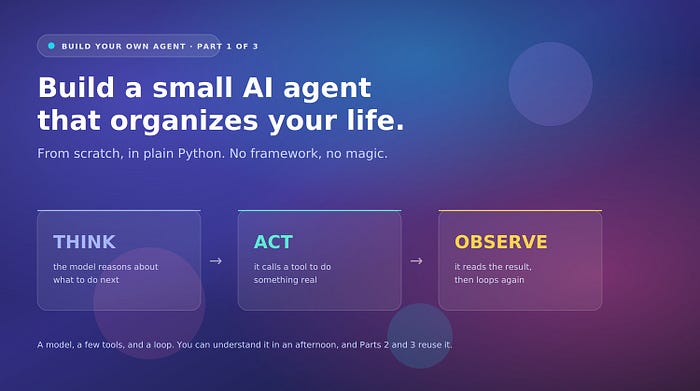
The specific pattern we will use is called ReAct, which stands for Reasoning and Acting, and it has been the default beginner-friendly architecture for a while now for one good reason: it is easy to inspect. The loop goes Think, Act, Observe, and repeats. The model thinks about what it needs to do, acts by calling a tool, observes the result, and then thinks again with that new information, around and around until it has enough to give a final answer. Because each step is explicit, when something goes wrong you can see exactly where, which matters enormously when you are learning.
The three pieces you need
Every agent, including our organizer, is built from three components. Get these three right and the rest is detail.
The first is the model, the brain that does the reasoning and decides what to do at each step. You access it through an API. You do not train anything; you are renting an existing model and giving it a job.
The second is the tools. A tool is just a function the model is allowed to call, paired with a description of what it does. This is the part that lets the agent act instead of merely talk. For our organizer, the tools will be things like “save a task to the list” and “read the current list.” Each tool has two halves: a schema, which is a plain-language description the model reads to understand what the tool does and when to use it, and the actual Python function that runs when the model decides to call it. Think of the schema as a contract. The model reads the contract; your code honors it.
The third is memory, and for a small agent this is simpler than it sounds. The agent’s memory is just the running conversation history. Every thought, every action, every observation gets appended to a list of messages, and you send the whole list back to the model on every turn. That is how the agent “remembers” what it has already done this session. It is not magic; it is a growing list you keep re-sending.
That is the whole toolkit. A model, some tools with schemas, and a message history you keep appending to. Now we build.
Building the organizer, step by step
Let us walk through it in the order you would actually write it.
First, the setup. Install the provider SDK and a package for loading secrets, store your API key in an environment variable rather than pasting it into the file, and load it at the top of your script. Hardcoding an API key into your source is the single most common beginner mistake and it is how keys end up leaked on the internet, so do not do it.
import os
import json
from anthropic import Anthropic
client = Anthropic(api_key=os.environ["ANTHROPIC_API_KEY"])
Next, the tools. Our organizer needs to do a few concrete things: add a task, list the current tasks, and prioritize them. We will keep the task list in a simple Python list for now, which means it resets when the program closes. Persisting it to a file is a small addition you can make later; for learning the pattern, in-memory is cleaner.
tasks = []
def add_task(description, priority="medium"):
 tasks.append({"task": description, "priority": priority, "done": False})
 return f"Added: {description} (priority: {priority})"def list_tasks():
 if not tasks:
 return "The list is empty."
 return "\n".join(
 f"{i+1}. [{t['priority']}] {t['task']}" for i, t in enumerate(tasks)
 )
Now the schemas, the contracts that tell the model what these tools do. This is the part people rush, and it is the part that most determines whether your agent behaves. The model decides whether and how to call a tool entirely from this description, so write it the way you would brief a new assistant: clearly, with the boundaries spelled out.
tool_schemas = [
 {
 "name": "add_task",
 "description": "Add a single task to the to-do list. Use this once per distinct task the user mentions. Set priority to high, medium, or low based on urgency and importance.",
 "input_schema": {
 "type": "object",
 "properties": {
 "description": {"type": "string", "description": "The task, phrased as a clear action."},
 "priority": {"type": "string", "enum": ["high", "medium", "low"]},
 },
 "required": ["description"],
 },
 },
 {
 "name": "list_tasks",
 "description": "Show the current to-do list with priorities. Use this to review what has been captured.",
 "input_schema": {"type": "object", "properties": {}},
 },
]
Then the loop itself, the heart of the agent. This is the Think, Act, Observe cycle in actual code. The model receives the conversation, decides whether to call a tool or give a final answer, and if it calls a tool, we run the matching function, append the result, and loop again.
def run_agent(user_input, messages):
 messages.append({"role": "user", "content": user_input})
 for step in range(10): # always cap the steps
 response = client.messages.create(
 model="claude-sonnet-4-20250514",
 max_tokens=1024,
 system="You are a calm, practical organizer. Turn the user's messy notes into clearly prioritized tasks. Add each distinct task once, then summarize the plan.",
 tools=tool_schemas,
 messages=messages,
 ) if response.stop_reason == "tool_use":
 messages.append({"role": "assistant", "content": response.content})
 for block in response.content:
 if block.type == "tool_use":
 if block.name == "add_task":
 result = add_task(**block.input)
 elif block.name == "list_tasks":
 result = list_tasks()
 messages.append({
 "role": "user",
 "content": [{
 "type": "tool_result",
 "tool_use_id": block.id,
 "content": result,
 }],
 })
 else:
 return response.content[0].text, messages return "Stopped after hitting the step limit.", messages
Notice three things in that loop, because they are the lessons that carry to every agent you build. The range cap of ten steps is not optional. An unguarded agent will happily loop forever and burn through your API budget, so you always bound it. The message history is passed in and returned, because that list is the agent’s entire memory and you keep appending to it. And the system prompt is doing real work: it sets the agent’s discipline, how it should behave, when to use tools, when to stop. Vague system prompts produce vague agents. Spend time on it.
Finally, a tiny bit of code to actually talk to it:
conversation = []
plan, conversation = run_agent(
 "Email Dave about Q3 numbers, book dentist, finish the deck before Thursday, call mom, look into that AI conference",
 conversation,
)
print(plan)
Run that, and the agent reads your brain dump, calls add_task for each item with a sensible priority, and hands back an organized plan. You built an agent. About fifty lines, no framework, and you understand every one of them.
Making it genuinely useful
The bare version works, but a few small additions turn it from a demo into something you would actually open in the morning.
Persist the task list to a file so it survives between sessions, by saving the tasks list to JSON when it changes and loading it on startup. Add a complete_task tool so you can check things off, not just add them. And consider a single “daily review” instruction you can send each morning, something like “show me today’s plan, highest priority first,” which makes the agent feel less like a script and more like an assistant. None of these change the core loop. They are just more tools and a little persistence layered onto the same skeleton, which is exactly the point of learning the skeleton first.
The one habit that will save you
Before we close, one piece of advice that applies to this organizer and to every agent in this series.
Watch what the agent actually does, step by step, especially while you are learning. Print the model’s reasoning and every tool call as they happen. The single most common frustration with agents is that they fail in ways that feel random, and almost every time, the cause is visible if you are watching the loop: the model called the wrong tool, or called it with bad input, or misread a tool’s result and went down a wrong path. You cannot fix what you cannot see, and the explicit Think, Act, Observe structure of ReAct exists precisely so you can see it. A few print statements in the loop will teach you more about how agents behave than any amount of reading.
What you built, and what is next
You now have a working personal organizer, built from scratch, that turns a messy pile of thoughts into a prioritized plan. More importantly, you have the pattern: a model, tools with clear schemas, and a bounded loop with the conversation as memory. That is the entire foundation.
Hold onto this code, because part two barely changes it. To build a research agent, we keep this exact loop and swap the tools: instead of add_task and list_tasks, we give it a web search tool and a fetch-a-page tool, and adjust the system prompt to tell it to research and cite sources. Same skeleton, different hands. And part three does it again for a coding assistant, with tools that read files, write files, and run code. Once you have the loop, every new agent is mostly a question of which tools you hand it and how you tell it to behave.
That is the quiet truth the hype tends to bury. Agents are not magic, and they are not enormously complicated at the core. They are models using tools in a loop, and you just built one. In part two, we point that same loop at the open web.
Building along? Drop a comment with what you organized first, or where the loop tripped you up. The most useful question to sit with before part two: looking at your agent’s tool calls, can you tell exactly why it made each one? That habit is the whole game.
Resources
- Anthropic, building effective agents (start with direct API calls before frameworks): https://www.anthropic.com/engineering/building-effective-agents
- The ReAct paper (Yao et al., the reasoning-and-acting pattern): https://arxiv.org/abs/2210.03629
- Anthropic tool use documentation: https://docs.claude.com/en/docs/build-with-claude/tool-use
- Python dotenv for managing API keys safely: https://pypi.org/project/python-dotenv/
Join thousands of data leaders on the AI newsletter. Join over 80,000 subscribers and keep up to date with the latest developments in AI. From research to projects and ideas. If you are building an AI startup, an AI-related product, or a service, we invite you to consider becoming a sponsor.
Published via Towards AI
Towards AI Academy
We Build Enterprise-Grade AI. We'll Teach You to Master It Too.
15 engineers. 100,000+ students. Towards AI Academy teaches what actually survives production.
Start free — no commitment:
→ 6-Day Agentic AI Engineering Email Guide — one practical lesson per day
→ Agents Architecture Cheatsheet — 3 years of architecture decisions in 6 pages
Our courses:
→ AI Engineering Certification — 90+ lessons from project selection to deployed product. The most comprehensive practical LLM course out there.
→ Agent Engineering Course — Hands on with production agent architectures, memory, routing, and eval frameworks — built from real enterprise engagements.
→ AI for Work — Understand, evaluate, and apply AI for complex work tasks.
Note: Article content contains the views of the contributing authors and not Towards AI.
Related posts
Recent Posts