

How AI Agents Actually Work: A Practical Walkthrough from Building One
Author(s): Himanshu Sharma
Originally published on Towards AI.
How AI Agents Actually Work: A Practical Walkthrough from Building One

For a long time, the word “AI agent” felt like a buzzword to me. Every other LinkedIn post was about agents. Every newsletter mentioned them. But when I tried to read the actual technical material, things got slippery very quickly. ReAct, tools, observations, system prompts, function calling — the terms kept piling up, and nothing was clicking.
So I did what usually works for me when I am stuck. I picked one small project and built it end to end.
I built TravelMind, a small AI agent that helps users plan trips. You ask it to plan a 5-day trip to Tokyo, and it actually does the work — searches the web for tips, checks the current weather, calculates a realistic budget, and gives you a day-by-day itinerary.
It took me one weekend. The first half was confusing. The second half, things started making sense. By the end, I understood agents in a way no tutorial had been able to teach me.
This article is what I would have wanted to read before I started. I will walk you through the concepts in the order they matter, and show you the actual code I wrote. If you stick with this article, you should be able to build your own agent by the time you finish reading.
Let us start.
So, What is an Agent Really?
The simplest definition I have come across is this:
An agent is a system that uses an AI model to interact with its environment to achieve a goal.
That is it. Two parts:
- The brain — an LLM (like GPT, Claude, or Qwen) that does the thinking
- The body — a set of tools that let it actually do things in the real world
This second part is what separates an agent from a regular chatbot. A chatbot can only generate text. An agent can do things. It can search the web. It can call an API. It can run a calculation. It can read a file. The LLM decides what to do, but the tools are how it actually does it.
In TravelMind, my brain was a model called Qwen2.5-Coder running on a cloud inference service. The body was five tools — web search, weather lookup, timezone fetcher, budget calculator, and itinerary builder. Together they made up the full agent.
That is the whole picture. Everything else we discuss is just details around this idea.
Why an LLM Alone is Not Enough
Before we go into tools, let me explain something that took me a while to actually understand.
An LLM does only one thing. It predicts the next word. That is literally its job. It looks at the text you gave it, calculates which word is most likely to come next, picks one, and repeats. That is how all output gets generated, one token at a time.
This sounds boring, but it has huge consequences.
It means LLMs are great at language patterns but unreliable at things that are not patterns. Math is a classic example. I once asked an LLM to multiply 247 by 13 and it gave me a very confident wrong answer. The model did not know it was wrong. It just predicted plausible-looking digits and moved on.
The LLM also has no idea what today’s weather is. It has no internet access. It does not know what time it is. Its knowledge is frozen at whatever point its training data ended.
This is exactly why tools exist. A tool is a normal Python function that does something the LLM cannot do reliably or at all. The LLM’s job is to decide when to call which tool. The tool itself does the actual work and gives back a result the LLM can use.
In TravelMind, my budget calculator is a tool because I do not want the LLM doing math like “2 travelers times 5 days times 100 dollars” by itself. The tool gives me deterministic, correct numbers every time.
Tools — The Single Most Important Concept
In the framework I used (called smolagents), creating a tool is surprisingly simple. Here is my actual weather tool from TravelMind:
from smolagents import tool
import requests

@tool
def get_weather(city: str) -> str:
 """Fetches the current weather conditions for any city in the world.
 Returns temperature, condition, humidity, and wind speed.
 Args:
 city: Name of the city, e.g. 'Paris', 'Tokyo', 'New York'.
 """
 url = f"https://wttr.in/{requests.utils.quote(city)}?format=j1"
 response = requests.get(url, timeout=8)
 data = response.json()

 current = data["current_condition"][0]
 return (
 f"Weather: {current['temp_C']}°C, "
 f"{current['weatherDesc'][0]['value']}, "
 f"Humidity {current['humidity']}%, "
 f"Wind {current['windspeedKmph']} km/h"
 )
That is it. A normal function with a decorator on top.
When the framework sees @tool above a function, it does something clever behind the scenes. It reads the function name, the docstring, and the type hints, and uses all of that to automatically generate a description for the LLM. The LLM then knows that a tool called get_weather exists, what it does, and what input it needs.
The LLM never actually sees your Python code. It only sees what the framework generated from your docstring and type hints. This is why your docstring is so important — it is literally how the model learns about your tool.
After making a few tools, three rules became second nature to me:
- Always add type hints to your arguments and return type
- Always write a docstring with an Args section that explains every argument
- Always return a string because the LLM can only read text
Follow these three rules, slap @tool on top of any function, and you have a working tool that your agent can use. It is genuinely that easy.
The ReAct Loop — Where Agents Actually “Work”
Now we get to the heart of the matter. The most important concept in this entire topic is the ReAct cycle.
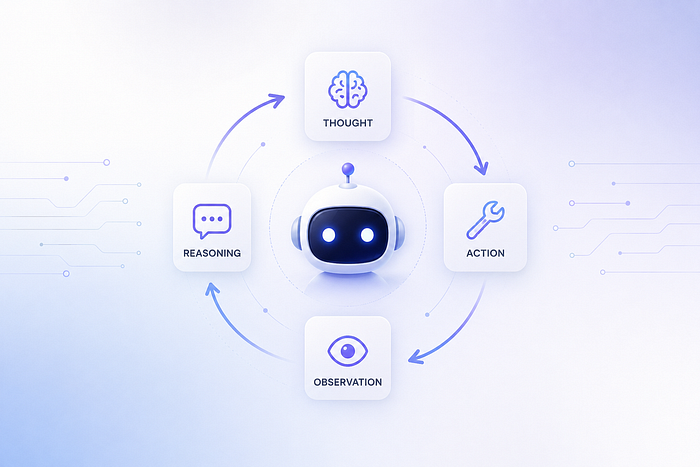
ReAct stands for Reasoning plus Acting. It works like this:
Thought → Action → Observation → (repeat)
The agent thinks about what to do. It takes an action (calls a tool). It reads the observation (the result of the tool). Then it thinks again, this time with new information. The loop continues until the agent has enough to give a final answer.
Let me show you what this actually looks like when TravelMind handles a request like “Plan a 5-day trip to Paris”:
STEP 1
Thought: I need to plan a Paris trip. Let me first search for current travel info about the city.
Code:
results = web_search("Paris travel tips 2025 food history")
print(results)
Observation: [Search results about Paris - Eiffel Tower, Louvre,
 local food markets, best neighborhoods...]
STEP 2
Thought: Good. Now let me check current weather and local time
 so I can give realistic suggestions.
Code:
weather = get_weather("Paris")
time_now = get_current_time_in_timezone("Europe/Paris")
print(weather)
print(time_now)
Observation: Weather: 18°C, Partly cloudy, Humidity 62%
 Current time: Thursday, June 21 2026 - 14:32 CEST
STEP 3
Thought: Now I can calculate the budget and build the itinerary.
Code:
budget = estimate_travel_budget("mid", 5, 2, "mid-range")
itinerary = build_itinerary("Paris", 5, "food, history")
final_answer(f"Your Paris trip:\n{itinerary}\n{budget}")
Task complete.
Notice something important. Nobody told the agent which tools to call or in what order. The system prompt told it about the tools it has, and the agent figured out the rest on its own. It looked at the task, broke it into smaller steps, picked the right tool for each step, and stopped when it had enough information.
This is what makes it an agent. Not just calling one tool, but looping through many decisions until the task is actually done.
How the Framework Prevents the Agent from Making Things Up
There is a subtle but very important part of how this loop works.
When the LLM writes a code block, the framework has to do four things in order:
- Stop the LLM from generating more text
- Extract the code it wrote
- Run the code for real
- Add the actual result back into the conversation as the Observation
Why is the “stop” part so important? Because if you do not stop the LLM, it will keep generating text. And what does an LLM trained on agent examples do when you let it keep going? It hallucinates a fake observation that looks plausible but never actually happened.
This was a real problem in early agent systems. The model would happily write:
get_weather("Paris")
Observation: Weather is 22°C and sunny.
But nobody ever called the actual weather API. The “Observation” line is just made up by the model. The user thinks they are getting real data, but it is fiction.
Smolagents solves this by stopping the model as soon as the code block ends. The framework then runs the code for real, captures whatever the function returned, and only then puts the real result back into the conversation. The LLM never gets a chance to fabricate the observation because it was never allowed to generate that part.
This idea is sometimes called “stop and parse” and it is one of the things that actually makes modern agents reliable.
The System Prompt — The Soul of Your Agent
If the LLM is the brain and the tools are the body, the system prompt is the soul.
The system prompt is the very first chunk of text the model sees at the start of every conversation. It tells the model who it is, what tools it has, and how to behave. Here is part of my actual system prompt for TravelMind:
system_prompt: |-
 You are TravelMind, an expert AI travel planning assistant.
 You help users plan trips by researching destinations, checking
 weather, estimating budgets, and creating itineraries.

 You have access to the following tools:
 {% for t in tools.values() %}
 - {{ t.name }}: {{ t.description }}
 {% endfor %}

 To solve tasks, use this cycle:

 Thought: Reason about what to do next.
 Code:
````py
 result = tool_name(arg=value)
 print(result)
```<end_code>
 Observation: [tool result will appear here]

 Repeat until done, then call final_answer(...).
```

The `{% for t in tools.values() %}` part is something called Jinja2 templating. At startup, the framework fills it in automatically with the descriptions of all the tools you registered. So the model ends up seeing something like:

````
You have access to the following tools:
- get_weather: Fetches current weather conditions for any city...
- estimate_travel_budget: Estimates a travel budget breakdown...
- build_itinerary: Generates a day-by-day itinerary...
The {% for t in tools.values() %} part is something called Jinja2 templating. At startup, the framework fills it in automatically with the descriptions of all the tools you registered. So the model ends up seeing something like:
You have access to the following tools:
- get_weather: Fetches current weather conditions for any city...
- estimate_travel_budget: Estimates a travel budget breakdown...
- build_itinerary: Generates a day-by-day itinerary...
This is how the model actually learns what tools it has. Not through magic. Not through a hardcoded list. The framework reads your decorated functions, builds descriptions, and slots them into the system prompt at runtime.
Putting It All Together
After defining all the tools, the actual agent setup is just about ten lines of code:
from smolagents import CodeAgent, DuckDuckGoSearchTool, InferenceClientModel
from tools.final_answer import FinalAnswerTool
import yaml

# The brain
model = InferenceClientModel(
 model_id="Qwen/Qwen2.5-Coder-32B-Instruct",
 max_tokens=2096,
 temperature=0.5,
)

# Load system prompt
with open("prompts.yaml", "r") as f:
 prompt_templates = yaml.safe_load(f)

# The body and the loop
agent = CodeAgent(
 model=model,
 tools=[
 FinalAnswerTool(),
 DuckDuckGoSearchTool(),
 get_current_time_in_timezone,
 get_weather,
 estimate_travel_budget,
 build_itinerary,
 ],
 max_steps=8,
 prompt_templates=prompt_templates,
)

# Run it
result = agent.run("Plan a 5-day trip to Paris for 2 people")
print(result)
Three things make up the whole agent. The model is the brain. The tools list is the body. The CodeAgent class wraps both and handles the ReAct loop.
A few details worth knowing:
max_steps=8 is a safety limit. It says "the agent can run at most 8 loop iterations before it must stop." Without this, a confused agent could keep calling tools forever, especially if it gets stuck on an error.
FinalAnswerTool() is a special tool. When the agent calls
final_answer(…), the framework knows the task is done and returns that value to the user. Without this tool, the agent has no way to signal that it is finished, and the loop would run until max_steps was hit.
That is genuinely the whole agent in about ten lines of setup code, plus whatever tools you defined.
What I Actually Learned
Looking back on the weekend now, here is what really shifted in my head.
Agents are not magic. They are just a loop wrapped around an LLM, with some tools and a stop token. The loop is simple. The tools are normal Python functions. The “intelligence” comes from the LLM deciding what to do — but everything around that decision is plain engineering.
Tools are how you cover up LLM weaknesses. Bad at math? Make a math tool. Old training data? Make a search tool. Cannot reach an API? Make an API tool. The same pattern repeats forever. Once you see this, you stop being impressed by agents and start being impressed by the tools.
The prompt is part of your code. A bad system prompt makes a bad agent, no matter how good your model is. Take time on it. Test changes. Watch how the agent behaves differently.
Try TravelMind yourself
💻 GitHub repo: Click Here
🤗 Live demo on Hugging Face Spaces: Click Here

Thanks for reading. If this helped you understand something that felt confusing before, leave a clap — it tells me to write more pieces like this.
Join thousands of data leaders on the AI newsletter. Join over 80,000 subscribers and keep up to date with the latest developments in AI. From research to projects and ideas. If you are building an AI startup, an AI-related product, or a service, we invite you to consider becoming a sponsor.
Published via Towards AI
Towards AI Academy
We Build Enterprise-Grade AI. We'll Teach You to Master It Too.
15 engineers. 100,000+ students. Towards AI Academy teaches what actually survives production.
Start free — no commitment:
→ 6-Day Agentic AI Engineering Email Guide — one practical lesson per day
→ Agents Architecture Cheatsheet — 3 years of architecture decisions in 6 pages
Our courses:
→ AI Engineering Certification — 90+ lessons from project selection to deployed product. The most comprehensive practical LLM course out there.
→ Agent Engineering Course — Hands on with production agent architectures, memory, routing, and eval frameworks — built from real enterprise engagements.
→ AI for Work — Understand, evaluate, and apply AI for complex work tasks.
Note: Article content contains the views of the contributing authors and not Towards AI.
Related posts
Recent Posts


