
How I Built AETHER: A Local AI Assistant That Controls My PC, Sends WhatsApp Messages, and Learns New Skills
Last Updated on June 18, 2026 by Editorial Team
Author(s): Anishpathak
Originally published on Towards AI.
How I Built AETHER: A Local AI Assistant That Controls My PC, Sends WhatsApp Messages, and Learns New Skills
Estimated Read Time:12–15 min
I Built My Own Jarvis — A Fully Offline AI Desktop Agent
A deep dive into building a multi-model AI runtime with voice control, desktop automation, and self-evolving capabilities
It started, like most dangerous projects do, with a simple thought:
“Why can’t I just talk to my computer and have it do things?”
Not ask ChatGPT a question. Not type a prompt. Actually control my PC with voice command, open apps, send messages, write code, search the web, like Tony Stark does in the movies.
Siri can set a timer. Alexa can play a song. But neither of them can send a WhatsApp message to a specific contact with a custom message. Neither can write a Python script, execute it, and tell me the results. Neither can look at my screen and explain what’s on it.
So I built one.

Meet AETHER:Adaptive, Evolving, Tactical, Heuristic-Engine Response, a fully offline, voice-controlled AI assistant that runs entirely on my laptop. No OpenAI API. No cloud. No subscriptions. Just three small language models running locally through Ollama, stitched together with a lot of Python and an unreasonable amount of late nights.
This article is the technical deep-dive. If you want to see AETHER in action first, here’s a 4-minute demo:
#ai #machinelearning #opensource #buildinpublic #jarvis #deeplearning #python #edgeai | Anish…
I built my own Jarvis. Completely offline. Running on my laptop. No GPT. No cloud. No API keys. No subscriptions. Just…
www.linkedin.com
What AETHER Can Actually Do
Before we get into the architecture, here’s what this thing can do in practice. These aren’t mockups, every single one of these works in the demo video above:
- Voice commands: “Open calculator,” “Search Google for AI news,” “Open LinkedIn”
- WhatsApp messaging: “Send a WhatsApp message to Anish saying I’m testing Aether right now”, it opens WhatsApp Desktop, searches the contact, types the message, and hits send
- Real-time web intelligence: “Who won the ICC Champions Trophy 2025?” silently scrapes the web and speaks the answer
- Live data queries: “What’s the current price of Bitcoin?” — calls a dynamically loaded skill that fetches the price
- System diagnostics: “Give me a system status report” reads CPU usage, RAM, and battery level
- Self-evolution: “Learn a new permanent skill that fetches the top Reddit posts from r/artificial”, AETHER writes the Python code, saves it, tests if it works and hot-loads it into its own tool registry. Without a restart.
That last one is the feature that makes people pause.
The Architecture: Three Brains, One Body
The core insight behind AETHER is that you don’t need one massive AI model to do everything. You need multiple specialized models that each do one thing well, with a routing system that sends each task to the right brain.

AETHER runs three LLMs simultaneously through Ollama, each with a distinct role:
Aether-Orchestrator (1.5B, custom fine-tuned): Tool Router- takes a command, outputs a JSON array of tool calls
Qwen 2.5 Coder (1.5B): Conversational Brain- general chat, content generation, response synthesis
DeepSeek-R1 (1.5B): Reasoning Engine- complex math, logic, and chain-of-thought problems
Three 1.5B parameter models running locally. Total: about 4.5B parameters. For context, GPT-4 is estimated at over 1 trillion parameters. AETHER runs on a fraction of that, entirely on a laptop GPU.
The Tool-Routing Problem (And How I Solved It)Here’s the hard part that most tutorials skip over.
When a user says “Send a WhatsApp to Mom saying I’ll be late,” AETHER needs to:
- Recognize that this is a tool command (not casual chat)
- Select the correct tool (
send_whatsapp_message) - Extract the arguments (
contact_name: "Mom",message: "I'll be late") - Execute the tool on the physical operating system
- Summarize the result in natural speech
This is called tool routing, and it’s what makes or breaks an AI assistant.
My Solution: A Custom Fine-Tuned Orchestrator
I fine-tuned Qwen 2.5 Coder (1.5B) specifically for this task. Here’s how:
Step 1 — Synthetic Dataset Generation: I used OpenRouter’s API to generate 1,500 diverse training examples. Each example is a user utterance paired with the correct JSON tool call:
{
 "user": "Hey can you check the battery and then text mom saying I'll be home soon?",
 "assistant": "[{\"name\": \"get_system_diagnostics\"}, {\"name\": \"send_whatsapp_message\", \"arguments\": {\"contact_name\": \"mom\", \"message\": \"I'll be home soon\"}}]"
}
The dataset covers all 15+ tools with variations in phrasing, slang, typos, and multi-tool chains.
Step 2 — Fine-Tuning on Kaggle (for $0): I used Unsloth + LoRA (rank 16, alpha 32) to fine-tune on Kaggle’s free GPU tier. Three epochs. The entire training took about 40 minutes.
Step 3 — Export to GGUF and deploy via Ollama: Merged the LoRA weights, quantized to Q4_K_M (4-bit), and loaded into Ollama with a strict system prompt that forces pure JSON output with zero conversational filler.
The result? A 1.5B parameter model that reliably maps natural language to structured tool calls. It can even handle multi-tool chains in a single pass:
“Check my battery, open LinkedIn, and send a WhatsApp to Anish saying hey” → [get_system_diagnostics, open_url("linkedin"), send_whatsapp_message("Anish", "hey")]
The 15-Tool Arsenal
AETHER isn’t a chatbot. It’s an operating system layer. Here’s what it can control:
Desktop Automation
- Open any app: Calculator, Notepad, VS Code, Spotify, Chrome
- Keyboard hotkeys: Ctrl+Shift+Escape to open Task Manager
- Shell commands: Run any terminal command
- Mouse control: Click at coordinates, scroll
Communication
- WhatsApp messaging: Full automation- opens app-> searches contact-> pastes message-> sends. With a security confirmation modal so the AI can’t spam your contacts.

Web Intelligence
- Browser search: “Search Google for…” opens Chrome with the query
- Silent scraping: “Who won the Champions Trophy?” silently scrapes DuckDuckGo and returns the answer without opening a browser
- URL reading: “Summarize this article” fetches and parses any URL
System Control
- Media control: Play/pause, next track, mute, set volume
- System diagnostics: CPU, RAM, battery in real-time
- Timers: Background threaded timers with native Windows speech alerts
Code Execution
- Script generation: “Write a Python script that…” generates code, saves it, and executes it with a 30-second safety timeout
Vision
- Screen analysis: Screenshots the desktop and feeds it to LLaVA-Phi3 for multimodal understanding
The Feature That Makes People Stop: Self-Evolving Skills
This is my favorite part of AETHER, and the one that gets the biggest reaction in demos.
If you ask AETHER to do something it can’t do, you can teach it:
“Learn a new permanent skill called get_bitcoin_price that fetches the current Bitcoin price”
Here’s what happens under the hood:
- The SkillFactory module receives the instruction
- It prompts Qwen 2.5 Coder to generate a Python function with the skill name, docstring, and implementation
- The code is saved to the
skills/directory - Python’s AST parser extracts the function signature and docstring
- The function is dynamically imported and injected into AETHER’s live tool registry
- A new Ollama tool definition is generated from the function signature
- The skill is immediately callable — no restart required
After teaching it, AETHER now permanently knows this skill. Next time you boot up, it auto-loads from the skills/ directory.

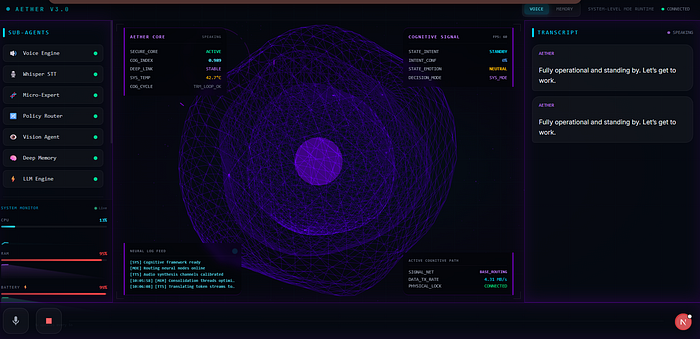
The UX Layer: A 3D Holographic Interface
AETHER isn’t just a terminal script. It has a full React dashboard built with Next.js 14 and React Three Fibre.
The centrepiece is a 3D holographic orb that physically maps to AETHER’s cognitive state:
Idle: Slow breathing pulse, dim blue
Listening: Emerald green glow, expanded
Thinking: Orange rotation, faster particles
Speaking: Purple radiance, audio-reactive particles

The HUD overlay shows real-time system telemetry — status, current mode, active model. Every state transition is streamed via WebSockets from the FastAPI backend to the frontend in real-time.
The Security Layer
Giving an AI control over your operating system is dangerous. AETHER has a tiered authorization system:
Auto-Authorized (safe): Web searches, opening URLs, media control, system diagnostics, timers
Requires GUI Confirmation: WhatsApp messaging, shell commands, app + type, script execution, screen analysis
When a dangerous action is triggered, the frontend pops up a confirmation modal. The AI thread blocks until you click Allow or Deny.

The Hard Lessons
Building AETHER taught me things that no tutorial covers:
1. Small Models Are Surprisingly Capable
You don’t need GPT-4 to route tool calls. A 1.5B model, fine-tuned on 1,500 domain-specific examples, can reliably output structured JSON. The key is specificity, don’t try to make a small model do everything. Make it do one thing perfectly.
2. The AI Is 20% of the Work
The other 80% is the plumbing. Getting Whisper STT to not block the main thread. Getting PyAutoGUI to not race-condition with window focus. Getting three Ollama models to share GPU VRAM without OOM kills. Getting WebSockets to stream state without dropping frames.
3. Building Locally Forces Real Understanding
When you call openai.chat.completions.create(), you learn an API. When you run Ollama locally, quantize your own model, and write the inference loop yourself, you learn how language models actually work, attention, tokenization, KV caching, batch sizes, and VRAM management.
4. Voice Is an Unforgiving Interface
Text chat is forgiving , you can rephrase, edit, retry. Voice is one-shot. If the STT mishears you, or the model takes 5 seconds to respond, the experience falls apart. This forced me to optimize every component for latency: CPU-based intent classification (~50ms), cached embeddings, pre-loaded models, and streaming TTS.
The Tech Stack
Backend:Python, FastAPI, WebSockets, Uvicorn
Frontend: Next.js 14, React Three Fiber, TailwindCSS
LLM Inference: Ollama (localhost), GGUF Quantized Models
Custom Training: Unsloth, LoRA, Kaggle GPU (free tier)
Speech-to-Text: Faster-Whisper (CUDA, float16)
Text-to-Speech: Edge-TTS / Kokoro-82M
Vision: LLaVA-Phi3, PyAutoGUI screenshots
Memory: FAISS Vector DB + MiniLM embeddings
OS Automation: PyAutoGUI, Pyperclip, PyCaw, Win32 ctypes
Try It Yourself
AETHER is open source. If you have a laptop with an NVIDIA GPU and about 8GB of VRAM, you can run the full stack.
GitHub: github.com/Anishp-cell/AETHER_v1.0
If you found this interesting, I’d love to hear what features you’d want in an offline AI assistant. Drop a comment or connect with me on LinkedIn.
If you’re building with local LLMs, edge AI, or voice interfaces — let’s connect. I’m actively looking for collaborators and research opportunities in this space.
Join thousands of data leaders on the AI newsletter. Join over 80,000 subscribers and keep up to date with the latest developments in AI. From research to projects and ideas. If you are building an AI startup, an AI-related product, or a service, we invite you to consider becoming a sponsor.
Published via Towards AI
Towards AI Academy
We Build Enterprise-Grade AI. We'll Teach You to Master It Too.
15 engineers. 100,000+ students. Towards AI Academy teaches what actually survives production.
Start free — no commitment:
→ 6-Day Agentic AI Engineering Email Guide — one practical lesson per day
→ Agents Architecture Cheatsheet — 3 years of architecture decisions in 6 pages
Our courses:
→ AI Engineering Certification — 90+ lessons from project selection to deployed product. The most comprehensive practical LLM course out there.
→ Agent Engineering Course — Hands on with production agent architectures, memory, routing, and eval frameworks — built from real enterprise engagements.
→ AI for Work — Understand, evaluate, and apply AI for complex work tasks.
Note: Article content contains the views of the contributing authors and not Towards AI.
Related posts
Recent Posts