
LangGraph Memory: The Complete Practical Guide to Managing What Your Agent Remembers
Last Updated on June 18, 2026 by Editorial Team
Author(s): Bessie Delight Kekeli
Originally published on Towards AI.
LangGraph Memory: The Complete Practical Guide to Managing What Your Agent Remembers
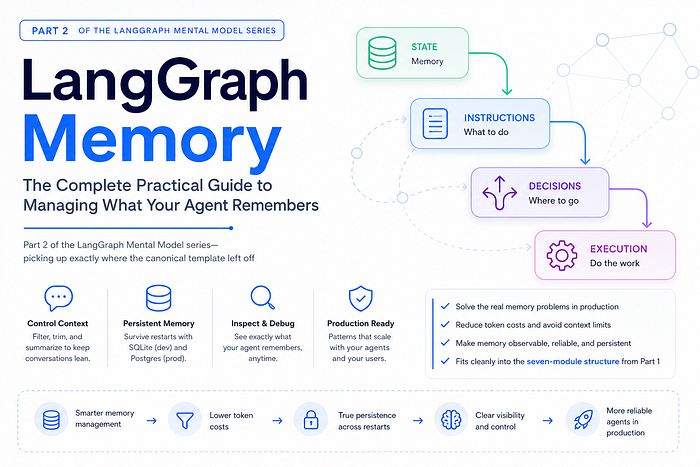
Part 2 of the LangGraph Mental Model series — picking up exactly where the canonical template left off.
For other parts of the series : Part 0 , Part 1 , Part 2 , Part 3

What this article assumes: You’ve read Part 1, or you already know how to wire a LangGraph agent with
StateGraph, nodes, edges,MemorySaver, andinvoke. This article goes one level deeper — into the real problem every production agent faces: conversations get long, tokens get expensive, and memory needs to survive a server restart.
The Memory Problem Nobody Talks About in the Tutorials
The MemorySaver you learned in Part 1 is real. It works. But it has a quiet problem: it lives in RAM. The moment your process stops — a restart, a crash, a redeployment — everything is gone. Every user's entire conversation history, deleted.
That’s acceptable for a demo. It’s a showstopper for production.
The second problem is context window cost. Every time a user sends a message, your agent receives all previous messages in that thread and sends them to the LLM. Twenty messages in, you’re paying for twenty messages on every single call. A hundred messages in, you might hit the model’s token limit and throw an error.
This article solves both problems using the patterns from LangChain Academy’s Module 2. By the end, you will know:
- How to control conversation length with filtering, trimming, and summarization
- How to make memory truly persistent with external storage (SQLite for development, Postgres for production)
- How to inspect and debug what your agent remembers at any point
All of it fits cleanly into the seven-module structure from Part 1. We’re just going deeper into Module 2 (State), Module 4 (Nodes), Module 5 (Edges), and Module 6 (Graph Assembly).
The Memory Landscape: Four Things to Understand First
Before writing any code, you need a mental model of what “memory” actually means in LangGraph. There are four distinct concepts that people often conflate:
Conversation State is the messages list in your AgentState. It's the raw history of every HumanMessage and AIMessage in this thread. This is what the LLM sees when you call invoke.
Checkpointing is the mechanism that saves your state after every node runs. MemorySaver and SqliteSaver are checkpointers. They don't change what's in state — they just decide where state gets written.
Memory Management is your strategy for keeping state from growing forever. This is what most of this article is about — how you trim, filter, or summarize messages so the LLM always gets a focused, affordable context window.
Thread Identity is the thread_id in your config. It's how the checkpointer knows which saved state belongs to which conversation. Think of it as a session ID. Different users need different thread_ids. Same user across multiple sessions needs the same thread_id.
Here’s how these four things relate:
User sends message
 ↓
Graph loads State from Checkpointer (using thread_id)
 ↓
Memory Management runs (trim / filter / summarize)
 ↓
LLM receives cleaned messages
 ↓
LLM response added to State
 ↓
Checkpointer saves updated State (to memory / SQLite / Postgres)
Everything else in this article is just filling in the details of that pipeline.
Module 2 Extended: The Memory-Aware State
In Part 1, your AgentState looked like this:
class AgentState(TypedDict):
 messages: Annotated[list[BaseMessage], add_messages]
For memory management, you need to extend it with one more field: summary. This field holds a compressed string representation of the conversation so far, generated by the LLM itself.
The Standard Memory-Aware State
# ── MODULE 2: STATE (Memory-Aware Version) ──────────────────
from langgraph.graph import MessagesState
# Option A: The shorthand (recommended for most agents)
# MessagesState is a pre-built TypedDict with just the messages field.
# Use it when you don't need custom fields.
class State(MessagesState):
 summary: str # The only addition needed for memory management
MessagesState is a convenience class from LangGraph that already has messages: Annotated[list[BaseMessage], add_messages] baked in. You don't need to declare it yourself. You just inherit from it and add any extra fields you need.
The summary field has no reducer, which means it follows the default LangGraph behavior: last write wins. Each time the summarization node runs, it overwrites the previous summary with a newer, more complete one. That's exactly what you want.
The Three Strategies for Managing Conversation Length
LangGraph gives you three tools for keeping your context window from exploding. You need to understand all three because the right choice depends on your use case. Use the wrong one and you’ll either lose important context or keep paying for messages you don’t need.
Strategy 1: Message Filtering
What it does: Drops messages from the list entirely. You can either filter them from what the LLM sees (while keeping them in state) or permanently remove them from state.
When to use it: Simple chatbots where you only ever need the last N exchanges. Customer support flows where old context genuinely becomes irrelevant after a few turns.
When NOT to use it: Any agent where long-term context actually matters. If a user mentions their name in message 1 and asks a related question in message 50, filtering will make your agent seem amnesiac.
Pattern A: Filter Only What the LLM Sees (State Unchanged)
This is the lighter touch. Your state keeps all messages — useful for audit trails or debugging — but you only send the most recent few to the LLM.
# ── MODULE 4: NODES ──────────────────────────────────────────
def chat_model_node(state: State) -> dict:
 """Calls the LLM with only the last 2 messages, but state keeps the full history."""

 # Filter: only send last 2 messages to the LLM
 # State is NOT modified - full history stays in the checkpoint
 recent_messages = state["messages"][-2:]

 response = llm.invoke(recent_messages)
 return {"messages": [response]}
This is the simplest pattern possible. No extra nodes, no complex routing. Just slice before you call invoke.
Pattern B: RemoveMessage — Permanently Delete from State
This pattern actually modifies state, permanently removing old messages. Use this when you want storage and token costs to stay flat long-term.
# ── IMPORTS needed ──────────────────────────────────────────
from langchain_core.messages import RemoveMessage

# ── MODULE 4: NODES ──────────────────────────────────────────
def filter_messages_node(state: State) -> dict:
 """A dedicated node that removes all but the last 2 messages from state.

 RemoveMessage works by ID: you pass it the ID of a message you want deleted,
 and the add_messages reducer handles the actual deletion. This is NOT the same
 as just slicing the list - it permanently removes from the checkpoint.
 """

 # Build a list of RemoveMessage objects for every message we want to delete
 # state["messages"][:-2] = all messages EXCEPT the last 2
 delete_messages = [RemoveMessage(id=m.id) for m in state["messages"][:-2]]

 return {"messages": delete_messages} # Reducer sees these and deletes them

def chat_model_node(state: State) -> dict:
 """After filtering, the state already has a short message list."""
 response = llm.invoke(state["messages"])
 return {"messages": [response]}

# ── MODULE 6: GRAPH ASSEMBLY ─────────────────────────────────
graph_builder = StateGraph(State)
graph_builder.add_node("filter", filter_messages_node)
graph_builder.add_node("chat_model", chat_model_node)
# Filter runs FIRST, then chat_model sees the cleaned state
graph_builder.add_edge(START, "filter")
graph_builder.add_edge("filter", "chat_model")
graph_builder.add_edge("chat_model", END)
graph = graph_builder.compile(checkpointer=MemorySaver())
The critical thing to understand about RemoveMessage: it's not a special deletion command in the usual sense. It's a message object that the add_messages reducer knows how to interpret. When the reducer sees a RemoveMessage(id=some_id) in the list you return, it looks up that ID in the current state and removes the original message. This is why you need a checkpointer — RemoveMessage only works when state is being managed by the graph, not on arbitrary lists.
Strategy 2: Token-Based Trimming with trim_messages
What it does: Cuts messages based on token count, not message count. Keeps the most recent messages that fit within a specified token budget.
When to use it: Any production agent where you need precise cost control. When you know your model’s context limit and want to stay safely within it. More accurate than message counting because a single message can be anywhere from 5 to 500 tokens.
When NOT to use it: When you need full historical context — trimming loses old messages permanently from what the LLM sees (though it doesn’t modify state).
# ── IMPORTS needed ──────────────────────────────────────────
from langchain_core.messages import trim_messages

# ── MODULE 4: NODES ──────────────────────────────────────────
def chat_model_node(state: State) -> dict:
 """Uses token-based trimming to control exactly how much history the LLM sees."""

 trimmed = trim_messages(
 state["messages"],

 # Maximum number of tokens to allow (tune this to your model and budget)
 max_tokens=1000,

 # "last" = keep the MOST RECENT messages (the ones that fit within max_tokens)
 # This is almost always what you want
 strategy="last",

 # The LLM used to count tokens. Use the same model you're chatting with
 # for accurate counting. This does NOT make an API call - just counts.
 token_counter=ChatOpenAI(model="gpt-4o"),

 # False = never cut a message in half. Either include it fully or drop it.
 # Always set this to False in production to avoid feeding partial tool results.
 allow_partial=False,

 # True = always include the most recent HumanMessage even if it alone
 # exceeds max_tokens. Prevents the agent from receiving an empty context.
 include_system=True,
 )

 response = llm.invoke(trimmed)
 return {"messages": [response]}
Notice that trim_messages does not modify state. It returns a new list that you pass to the LLM. The full history stays in state and the checkpoint. This gives you the cost benefits of trimming while keeping the full audit trail.
Key Parameters Quick Reference
max_tokens — your token budget. Start with 75–80% of the model's context window to leave room for the response.
strategy="last" — always use "last" for chatbots. It keeps the most recent messages. The alternative ("first") is for cases where you want to preserve old context over new, which is uncommon.
token_counter — pass your actual LLM here. It uses the model's tokenizer to count accurately. This is a local operation — no API call is made.
allow_partial=False — always set this. If a tool call and its result together exceed the budget, False keeps them together or drops them together. True might keep the tool call but drop the result, which confuses the LLM.
Strategy 3: LLM-Based Summarization (The Production Standard)
What it does: Uses the LLM itself to compress old conversation history into a single paragraph summary, then deletes the raw messages it summarized. The summary travels forward in state and gets prepended to every future LLM call as a SystemMessage.
When to use it: Customer support agents, personal assistants, any agent where conversation context genuinely accumulates in importance over time. This is the most sophisticated approach and the most used in real production systems.
Why it’s better than filtering or trimming: Filtering and trimming throw information away. Summarization compresses it. The LLM can still “know” that the user mentioned their account number in message 3, even if that message was summarized 20 turns ago.
This strategy requires changes across three modules: State, Nodes, and Edges.
Step 1: State (Module 2)
class State(MessagesState):
 summary: str # Stores the running summary. Empty string by default.
Step 2: The Two Nodes (Module 4)
def call_model(state: State) -> dict:
 """The main agent node. Uses summary as context if it exists."""

 summary = state.get("summary", "")

 if summary:
 # If we have a summary, prepend it as a system message
 # This gives the LLM the compressed history without the raw messages
 system_message = SystemMessage(
 content=f"Summary of the conversation so far:\n\n{summary}"
 )
 messages = [system_message] + state["messages"]
 else:
 # No summary yet — just use the raw messages
 messages = state["messages"]

 response = llm.invoke(messages)
 return {"messages": [response]}
def summarize_conversation(state: State) -> dict:
 """Triggered when conversation gets long. Compresses history into a summary,
 then deletes the old raw messages to keep state lean."""

 existing_summary = state.get("summary", "")

 # Build the summarization prompt.
 # If a summary already exists, extend it with new messages.
 # This is the "rolling summary" pattern - it never reads all messages from scratch.
 if existing_summary:
 summary_message = (
 f"This is the summary of our conversation so far:\n{existing_summary}\n\n"
 f"Extend this summary with the new messages above. "
 f"Keep it concise - focus on facts and decisions that matter for future turns."
 )
 else:
 summary_message = (
 "Create a concise summary of the conversation above. "
 "Focus on key facts, user intent, and any decisions made. "
 "This summary will replace the full message history."
 )

 # Call the LLM with all current messages + the summarization instruction
 messages = state["messages"] + [HumanMessage(content=summary_message)]
 response = llm.invoke(messages)

 # After summarizing, delete all messages except the last 2.
 # Why keep 2? So the LLM has immediate conversational context
 # (it can see what was just said) even after summarization runs.
 delete_messages = [RemoveMessage(id=m.id) for m in state["messages"][:-2]]

 return {
 "summary": response.content, # Updated summary stored in state
 "messages": delete_messages # Old messages removed from state
 }
Step 3: The Routing Logic (Module 5)
from typing import Literal
def should_continue(state: State) -> Literal["summarize_conversation", "__end__"]:
 """After the main agent responds, decide: keep going or trigger summarization?

 The threshold (6 messages here) is your tuning knob.
 Too low = you summarize frequently, losing some nuance.
 Too high = you let the context grow before compressing.
 For most production agents, 6–10 messages is a good starting range.
 """

 if len(state["messages"]) > 6:
 return "summarize_conversation"

 return "__end__"
Step 4: Graph Assembly (Module 6)
graph_builder = StateGraph(State)

graph_builder.add_node("call_model", call_model)
graph_builder.add_node("summarize_conversation", summarize_conversation)
graph_builder.add_edge(START, "call_model")
graph_builder.add_conditional_edges(
 "call_model",
 should_continue,
 {
 "summarize_conversation": "summarize_conversation",
 "__end__": END
 }
)
# After summarization, the conversation ends for this turn
graph_builder.add_edge("summarize_conversation", END)
memory = MemorySaver()
graph = graph_builder.compile(checkpointer=memory)
How This Plays Out in Practice
Turn 1–3: Messages accumulate. should_continue → "__end__" each time.
Turn 4: call_model runs. len(messages) > 6 → should_continue → "summarize_conversation"
 summarize_conversation:
 - LLM reads all 7 messages, generates a 2-sentence summary
 - state["summary"] = "User is troubleshooting a Python import error..."
 - Deletes messages[:-2] (keeps only last 2 raw messages)
Turn 5: call_model prepends summary as SystemMessage + 2 recent messages
 LLM sees: [SystemMessage(summary), HumanMessage, AIMessage, HumanMessage(latest)]
 Token cost: 4 messages instead of potentially 20+
The summary grows richer turn by turn while the raw message list stays flat at 2–3 messages. Your token costs stay nearly constant no matter how long the conversation runs.
Making Memory Truly Persistent: External Checkpointers
Everything above still uses MemorySaver. The moment your Python process restarts, all of it is gone. Here is how you upgrade to persistent storage with zero changes to your actual agent code.
The Checkpointer Interface
This is the elegant part of LangGraph’s design: the checkpointer is completely decoupled from your agent logic. You swap checkpointers by changing one line at compile time. Your nodes, edges, state, and routing are completely unchanged.
# Development: everything in RAM (lost on restart)
from langgraph.checkpoint.memory import MemorySaver
checkpointer = MemorySaver()

# Local / Single-machine production: persists to a .db file on disk
from langgraph_checkpoint_sqlite import SqliteSaver
import sqlite3
conn = sqlite3.connect("chat_memory.db", check_same_thread=False)
checkpointer = SqliteSaver(conn)
# Cloud / Distributed production: persists to a Postgres database
from langgraph_checkpoint_postgres import PostgresSaver
checkpointer = PostgresSaver.from_conn_string(
 "postgresql://user:password@host:5432/dbname"
)
# This one line is the ONLY thing that changes between environments:
graph = graph_builder.compile(checkpointer=checkpointer)
SqliteSaver in Depth
SqliteSaver is the right choice when you're running on a single machine and want conversations to survive restarts without setting up a database server. It writes to a .db file on disk using Python's built-in sqlite3 module — no extra infrastructure needed.
# ── Full SqliteSaver Setup ───────────────────────────────────
import sqlite3
from langgraph_checkpoint_sqlite import SqliteSaver

# File-based: state persists across restarts
conn = sqlite3.connect(
 "agent_memory.db",
 check_same_thread=False # Required for LangGraph's multi-threaded execution
)
checkpointer = SqliteSaver(conn)
graph = graph_builder.compile(checkpointer=checkpointer)
# Usage is IDENTICAL to MemorySaver:
config = {"configurable": {"thread_id": "user-123"}}
response = graph.invoke({"messages": [HumanMessage(content="Hello")]}, config)
# Stop and restart your app. Run this again with the SAME thread_id:
# The agent picks up exactly where it left off.
response = graph.invoke({"messages": [HumanMessage(content="What did I just say?")]}, config)
# Agent: "You said 'Hello'."
When to Use SqliteSaver vs. PostgresSaver
Use SqliteSaver when: you're building a local tool, a single-user app, or a prototype that needs persistence. One file, no server, zero setup.
Use PostgresSaver when: you're deploying to a cloud environment, running multiple instances of your app, or need concurrent writes from many users at once. SQLite has file-locking limitations that become a problem under concurrency.
The migration is one line. Design your agent with SqliteSaver locally, switch to PostgresSaver for production deployment. Your entire agent codebase stays unchanged.
Inspecting Memory: get_state and get_state_history
One of the most useful things a checkpointer gives you is the ability to look inside what your agent currently remembers. This is essential for debugging.
# ── Inspecting Current State ─────────────────────────────────
config = {"configurable": {"thread_id": "user-123"}}
# Get the current state snapshot for this thread
state_snapshot = graph.get_state(config)
# What's in the snapshot?
print(state_snapshot.values["messages"]) # Current message list
print(state_snapshot.values.get("summary", "")) # Summary, if any
print(state_snapshot.next) # Which nodes would run next (empty list = graph is at END)
# ── Inspecting State History ─────────────────────────────────
# get_state_history gives you every checkpoint ever saved for this thread.
# Each checkpoint is a moment in time after a node ran.
for state in graph.get_state_history(config):
 print(f"Step: {state.metadata['step']}")
 print(f"Messages: {len(state.values['messages'])}")
 print(f"Next: {state.next}")
 print("---")
get_state_history is the foundation of LangGraph's "time travel" feature — you can actually replay a conversation from any past checkpoint. For production memory debugging, it's invaluable: you can see exactly what the agent remembered at the moment it gave a particular response.
Putting It All Together: The Complete Memory-Managed Agent
Here is the full, production-ready canonical template incorporating everything in this article. This extends the Part 1 template with summarization and SQLite persistence.
# ============================================================
# LANGGRAPH MEMORY-MANAGED AGENT — COMPLETE TEMPLATE
# Combines: Summarization + External Persistence (SqliteSaver)
# ============================================================

# ── MODULE 1: IMPORTS & CONFIGURATION ───────────────────────
import os
import sqlite3
from typing import Literal
from langchain_openai import ChatOpenAI
from langchain_core.messages import (
 HumanMessage, AIMessage, SystemMessage,
 BaseMessage, RemoveMessage
)
from langgraph.graph import StateGraph, START, END
from langgraph.graph import MessagesState
from langgraph.checkpoint.memory import MemorySaver
# For production, swap MemorySaver for one of these:
# from langgraph_checkpoint_sqlite import SqliteSaver
# from langgraph_checkpoint_postgres import PostgresSaver
llm = ChatOpenAI(model="gpt-4o", temperature=0)

# ── MODULE 2: STATE ─────────────────────────────────────────
class State(MessagesState):
 # summary stores the rolling compressed history.
 # It starts empty and gets written by summarize_conversation.
 summary: str

# ── MODULE 4: NODES ─────────────────────────────────────────
def call_model(state: State) -> dict:
 """Main reasoning node. Uses rolling summary for long-context efficiency."""

 summary = state.get("summary", "")

 if summary:
 system_message = SystemMessage(
 content=f"Summary of the conversation so far:\n\n{summary}"
 )
 messages = [system_message] + state["messages"]
 else:
 messages = state["messages"]

 response = llm.invoke(messages)
 return {"messages": [response]}

def summarize_conversation(state: State) -> dict:
 """Compression node. Summarizes history and prunes old messages from state."""

 existing_summary = state.get("summary", "")

 if existing_summary:
 summary_prompt = (
 f"Current conversation summary:\n{existing_summary}\n\n"
 f"Extend this summary with the new messages. "
 f"Be concise. Preserve facts, user intent, and key decisions."
 )
 else:
 summary_prompt = (
 "Summarize this conversation concisely. "
 "Focus on facts, user intent, and decisions made."
 )

 messages = state["messages"] + [HumanMessage(content=summary_prompt)]
 response = llm.invoke(messages)

 # Keep only the 2 most recent raw messages in state.
 # Everything older is now captured in the summary.
 delete_messages = [RemoveMessage(id=m.id) for m in state["messages"][:-2]]

 return {
 "summary": response.content,
 "messages": delete_messages
 }

# ── MODULE 5: ROUTING ────────────────────────────────────────
def should_continue(state: State) -> Literal["summarize_conversation", "__end__"]:
 """Trigger summarization when conversation exceeds 6 messages.

 Tune this threshold based on your average message length and token budget.
 For GPT-4o at ~$0.005/1K tokens, 6 messages is a practical starting point.
 """
 if len(state["messages"]) > 6:
 return "summarize_conversation"
 return "__end__"

# ── MODULE 6: GRAPH ASSEMBLY ─────────────────────────────────
graph_builder = StateGraph(State)
graph_builder.add_node("call_model", call_model)
graph_builder.add_node("summarize_conversation", summarize_conversation)
graph_builder.add_edge(START, "call_model")
graph_builder.add_conditional_edges(
 "call_model",
 should_continue,
 {
 "summarize_conversation": "summarize_conversation",
 "__end__": END
 }
)
graph_builder.add_edge("summarize_conversation", END)
# ── CHECKPOINTER SELECTION ───────────────────────────────────
# Development (in-memory, lost on restart):
checkpointer = MemorySaver()
# Uncomment for local persistence (survives restarts):
# conn = sqlite3.connect("agent_memory.db", check_same_thread=False)
# checkpointer = SqliteSaver(conn)
# Uncomment for cloud/production (requires PostgreSQL):
# checkpointer = PostgresSaver.from_conn_string(os.environ["DATABASE_URL"])
graph = graph_builder.compile(checkpointer=checkpointer)

# ── MODULE 7: ENTRYPOINT ─────────────────────────────────────
if __name__ == "__main__":
 config = {"configurable": {"thread_id": "user-001"}}

 print("Memory-managed agent ready. Type 'exit' to quit, 'state' to inspect memory.\n")

 while True:
 user_text = input("You: ").strip()

 if not user_text or user_text.lower() == "exit":
 break

 # Debug command: inspect what the agent currently remembers
 if user_text.lower() == "state":
 snapshot = graph.get_state(config)
 print(f"\n[DEBUG] Messages in state: {len(snapshot.values['messages'])}")
 print(f"[DEBUG] Summary: {snapshot.values.get('summary', '(none)')}\n")
 continue

 response = graph.invoke(
 {"messages": [HumanMessage(content=user_text)]},
 config=config
 )

 print(f"Agent: {response['messages'][-1].content}\n")
The Memory Strategy Decision Guide
Here’s how to pick the right approach for your use case:
For a simple FAQ chatbot or demo: Use Strategy 1 — Pattern A (filter what LLM sees). One line of code. No state modification. Good enough.
For a production support agent: Use Strategy 3 — Summarization. Users return to long-running support threads. You need to remember their account details from three turns ago. Summarization is the only approach that preserves meaning across a long conversation.
For a coding assistant or document analyst: Use Strategy 2 — Token Trimming. These agents deal with large individual messages (code blocks, document excerpts). Token-based trimming respects the exact boundaries of your model's context window.
For anything that needs to survive restarts: Always use SqliteSaver or PostgresSaver. Never ship a product that runs on MemorySaver.
For multi-user applications: Your thread_id is your session key. One user = one thread_id. If a user logs out and logs back in, use the same thread_id to resume their context. If you want a fresh start, generate a new thread_id.
The Updated Keyword Reference Card
This extends the keyword card from Part 1 with all new memory-management keywords.
State Keywords (new) MessagesState — pre-built TypedDict with messages already defined. Inherit from it to add custom fields. Replaces writing the messages field yourself. summary: str — the standard field name for the rolling conversation summary. No reducer needed — last write wins.
Message Management Keywords RemoveMessage(id=m.id) — tells the add_messages reducer to delete the message with this ID from state. Returns {"messages": [RemoveMessage(...)]} from a node to trigger deletion. trim_messages(messages, max_tokens=..., strategy="last", token_counter=..., allow_partial=False) — returns a trimmed list of messages that fits within the token budget. Does NOT modify state. state.get("summary", "") — the standard pattern for reading the summary safely. Returns empty string if no summary exists yet.
Checkpointer Keywords MemorySaver() — in-memory checkpointer. Zero setup, zero persistence. Development only. SqliteSaver(conn) — SQLite-backed checkpointer. Persists to a .db file. Single-machine production. PostgresSaver.from_conn_string(url) — Postgres-backed checkpointer. For distributed, multi-instance production deployments. check_same_thread=False — the sqlite3.connect() parameter you must always set when using SqliteSaver. Required for LangGraph's threading model.
State Inspection Keywords graph.get_state(config) — returns a StateSnapshot of the current state for this thread_id. Access .values["messages"] and .values.get("summary"). graph.get_state_history(config) — generator that yields every checkpoint ever saved for this thread, from newest to oldest. Use for debugging and time-travel. snapshot.next — tuple of node names that would run if you invoked the graph now. Empty tuple means the graph is at END. snapshot.metadata["step"] — the step number of this checkpoint. Useful for tracing execution.
Conclusion: Memory Is Architecture, Not an Afterthought
The most common mistake developers make with LangGraph is treating memory as something they’ll “add later.” They build the agent with MemorySaver, get it working, and then discover that the entire persistent memory strategy needs to be baked into the State design from the beginning.
The summary field has to be in your State. The summarize_conversation node has to be wired in from the start. You can't cleanly bolt these on after the fact.
The good news is that the standardized structure from Part 1 makes this easy. Memory management lives in clean, predictable places across your modules: an extra field in Module 2, two nodes in Module 4, a routing function in Module 5, a checkpointer swap in Module 6. The seven-module scaffold holds.
When you sit down to build your next LangGraph agent, the first question after “what tools does this agent need?” should be: “how long will conversations run, and what does this agent need to remember?” Answer that, and you know immediately which strategy to use.
Next up in the series: Human-in-the-Loop — how to pause a running graph, ask a human for input or approval, and resume exactly where you left off.
For other parts of the series : Part 0 , Part 1 , Part 2 , Part 3
Join thousands of data leaders on the AI newsletter. Join over 80,000 subscribers and keep up to date with the latest developments in AI. From research to projects and ideas. If you are building an AI startup, an AI-related product, or a service, we invite you to consider becoming a sponsor.
Published via Towards AI
Towards AI Academy
We Build Enterprise-Grade AI. We'll Teach You to Master It Too.
15 engineers. 100,000+ students. Towards AI Academy teaches what actually survives production.
Start free — no commitment:
→ 6-Day Agentic AI Engineering Email Guide — one practical lesson per day
→ Agents Architecture Cheatsheet — 3 years of architecture decisions in 6 pages
Our courses:
→ AI Engineering Certification — 90+ lessons from project selection to deployed product. The most comprehensive practical LLM course out there.
→ Agent Engineering Course — Hands on with production agent architectures, memory, routing, and eval frameworks — built from real enterprise engagements.
→ AI for Work — Understand, evaluate, and apply AI for complex work tasks.
Note: Article content contains the views of the contributing authors and not Towards AI.
Related posts
Recent Posts