
The Complete SQL Guide: Concepts, Queries & Practice
Last Updated on May 27, 2026 by Editorial Team
Author(s): Muaaz
Originally published on Towards AI.
The Complete SQL Guide: Concepts, Queries & Practice

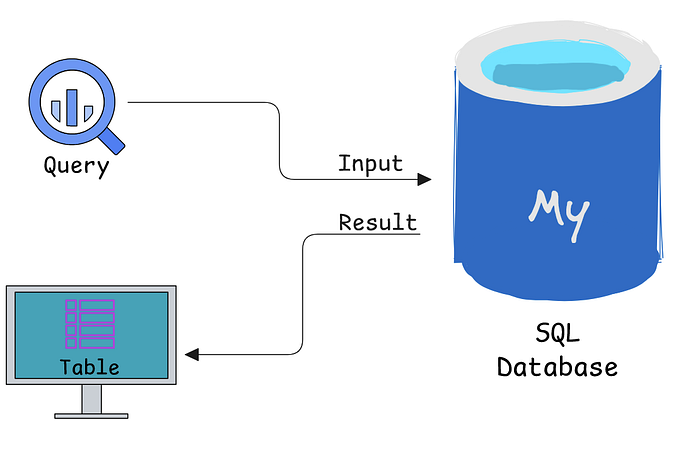
SQL (Structured Query Language) is a language used to interact with relational databases that store structured data. It is primarily used to perform operations such as querying, inserting, updating, and deleting data.
SQL operations are mainly categorized into two broad groups: DDL (Data Definition Language), which defines database structure, and DML (Data Manipulation Language), which is used to interact with and modify data. In practice, SELECT queries are often included under DML, although they are sometimes referred to separately as DQL (Data Query Language).
First, we will explore DDL commands, how they work, and their use cases.
DDL Commands:
These are mainly used to create database tables, alter schemas, and perform other schema level operations. In short, all structure related changes in a database are handled using DDL commands.
Create database:
Create database databasename;
Example: Create database myDB;
USE db:
Use databasename;
Drop DB:
Drop database myDB;
Create Table:
Create Table table_name (
column1 datatype,
column2 datatype,
column3 datatype,
….
);
-- Example:
Create Table Student
(
rollNumber int,
name nvarchar(100),
cnic nvarchar(100),
cgpa float
)
Drop Table:
Drop Table tableName
Drop Table Student -- Example
Truncate Table:
Truncate Table tableName
Truncate Table Student -- Example
SQL Constraints:
NOT NULL — Ensures that a column cannot have a NULL value
UNIQUE — Ensures that all values in a column are different
PRIMARY KEY — A combination of a NOT NULL and UNIQUE. Uniquely identifies each row in a table
FOREIGN KEY — Uniquely identifies a row/record in another table
CHECK — Ensures that all values in a column satisfies a specific condition
DEFAULT — Sets a default value for a column when no value is specified
Add NOT NULL Constraint :
-- Using Create Table:
Create Table Student
(
rollNumber int NOT NULL,
name nvarchar(50) NOT NULL,
cgpa float NULL
)

-- Using ALTER Table:
Alter Table Student Alter column rollNumber int NOT NULL
Add Unique Constraint :
-- Using Create Table
Create Table Student
(
rollNumber int NOT NULL,
name nvarchar(50) NOT NULL,
emial nvarchar(50) NOT NULL,
cnic nvarchar(50) NOT NULL unique, -- one way
cgpa float NULL,
unique (emial), -- second way
unique (rollNumber, name) -- third way for Combination of Columns
)
-- Using Alter Table
Alter Table Student add constraint UNIQUE_CONSTRAINT_STUDENT_CNIC Unique (cnic)
Primary Key Constraint:
-- Using Create Table
Create Table Student
(
rollNumber int primary key, -- one way
name nvarchar(50) NOT NULL,
cnic nvarchar(50) NOT NULL,
cgpa float NULL
primary key (rollNumber) -- second way
primary key (rollNumber, cnic) -- composite primary key
)

-- Using Alter Table
Alter Table Student alter column rollNumber int NOT NULL
Alter Table Student add constraint PK_STUDENT primary key (rollNumber)

-- Add Composite Primary Key Using Alter Table
Alter Table Student add constraint PK_STUDENT primary key (rollNumber, cnic)
Foreign Key Constraint:
-- Add Foreign Key Constraint Using Create Table
CREATE TABLE Student (
rollNumber int PRIMARY KEY,
deptId int FOREIGN KEY REFERENCES Department(departmentId) -- one way
FOREIGN KEY (deptId) REFERENCES Department(departmentId) -- second way
);

-- Add Foreign Key Constraint Using Alter Table:
Alter Table Student add constraint FK_STUDENT foreign key (deptId) references
Department (departmentId)

-- Example with cascade:
Create Table Student
(
rollNumber int primary key,
deptId int,
name nvarchar(50) NOT NULL,
cnic nvarchar(50) NOT NULL,
)
Create Table Department
(
departmentId int primary key,
departmentName nvarchar(50)
)
alter table Student add constraint FK_STUDENT foreign key (deptId) references Department
(departmentId) on delete No Action on update Cascade
Check Constraint:
-- Add Check Constraint Using Create Table
Create Table Student
(
rollNumber int,
name nvarchar(50) NOT NULL,
cnic nvarchar(50) NOT NULL,
cgpa float NULL check (cgpa>=0 AND cgpa<=4), -- one way
check (cgpa>=0 AND cgpa<=4) -- second way
)

-- Add Check Constraint Using Alter Table
alter table Student add Constraint STUDENT_CHECK_CGPA check (cgpa>=0 AND cgpa<=4)
Default Constraint:
-- Add Default Constraint Using Create Table
Create Table Student
(
rollNumber int,
name nvarchar(50) NOT NULL,
cnic nvarchar(50) NOT NULL,
cgpa float default 0, -- way
check (cgpa>=0 AND cgpa<=4)
)
-- Add Default Constraint Using Create Table
alter table Student add constraint DEFAULT_SUDENT_CGPA default 0 for CGPA
Drop a Constraint
alter table Student drop constraint DEFAULT_SUDENT_CGPA
Add a New Column:
Create Table Student
(
rollNumber int,
name nvarchar(50) NOT NULL,
cnic nvarchar(50) NOT NULL
)
alter table Student add cgpa float NOT NULL
Drop a Column:
alter table Student drop column cnic
Modify a Column:
Create Table Student
(
rollNumber int,
name nvarchar(50) NOT NULL,
cnic nvarchar(50) NOT NULL,
)
alter table Student alter column rollNumber varchar(100) NOT NULL
DML Commands:
Select Clause:
SELECT *
FROM <tableName>

SELECT ColumnX, ColumnY, ColumnZ
FROM <tableName>

-- select with where
SELECT *
FROM <tableName>
where <conditions>

-- Renaming Resulting Column
SELECT ColumnX as X , ColumnY as Y, ColumnZ
FROM <tableName> as Table1
Where Clause:
SELECT * FROM order where saleId>90

SELECT * FROM accounts WHERE name='Exxon Mobil'
where clause only make comparison with one value if you want to compare more than one value you can use IN clause
The WHERE statement can also be used with non numeric data. We can use the = and != operators here. You need to be sure to use single quotes (just be careful if you have quotes in the original text) with the text data, not double quotes.
Commonly when we are using WHERE with non-numeric data fields, we use the LIKE, NOT, or IN operators. We will see those before the end of this lesson!
SELECT * FROM accounts WHERE name LIKE 'C%'
SELECT * FROM accounts WHERE name LIKE '%one%'
SELECT * FROM accounts WHERE name LIKE '%s'
WHERE CourseName LIKE 'C%' :Finds any values that start with "C"
WHERE CourseName LIKE '%C': Finds any values that end with "C"
WHERE CourseName LIKE '%Co%' :Finds any values that have "Co" in any position
WHERE CourseName LIKE '_r%': Finds any values that have "r" in the second position
WHERE CourseName LIKE 'C_%' :Finds any values that start with "C" and are at least 2 characters in length
WHERE CourseName LIKE 'C__%' :Finds any values that start with "C" and are at least 3 characters in length
WHERE CourseName LIKE 'C%r' :Finds any values that start with "C" and ends with "r"
Logical Operators Include:
- LIKE This allows you to perform operations similar to using WHERE and
=, but for cases when you might not know exactly what you are looking for. - IN This allows you to perform operations similar to using WHERE and
=, but for more than one condition. - NOT This is used with IN and LIKE to select all of the rows NOT LIKE or NOT IN a certain condition.
- AND & BETWEEN These allow you to combine operations where all combined conditions must be true.
- OR This allows you to combine operations where at least one of the combined conditions must be true.
The LIKE operator is extremely useful for working with text. You will use LIKE within a WHERE clause. The LIKE operator is frequently used with %.
IN operator in SQL
The SQL IN operator behaves very similarly to Python’s in keyword for membership checking.
# Python example : Checks if 1001 exists in the list → returns True
if 1001 in [1002, 1001, 1003]:
 print("Good")

-- Equivalent in SQL : Checks if column_name matches any value in the list
SELECT *
FROM your_table
WHERE column_name IN (1002, 1001, 1003);
NOT operator in SQL
SELECT *
FROM your_table
WHERE column_name NOT IN (1002, 1001, 1003); all other than these 3

SELECT * FROM accounts WHERE name NOT LIKE 'C%'
AND & Between operator in SQL
SELECT *
FROM your_table
WHERE date >= '2025-4-3' AND date >= '2025-11-7'

SELECT *
FROM web_events
WHERE channel IN ('organic','adwords') AND occurred_at BETWEEN '2016-01-01' AND '2017-01-01'
OR operator in SQL
SELECT id
FROM orders
WHERE gloss_qty > 4000 OR poster_qty > 4000;
Order by Clause
SELECT ColumnX as X, ColumnY as Y, ColumnZ
FROM <tableName> as Table1
ORDER BY ColumnX asc/desc, ColumnZ asc/desc

SELECT * FROM orders ORDER BY account_id DESC LIMIT 2

-- Here, we saw that we can ORDER BY more than one column at a time. When you
-- provide a list of columns in an ORDER BY command, the sorting occurs using
-- the leftmost column in your list first, then the next column from the left
-- , and so on. We still have the ability to flip the way we order using DESC.

SELECT id,account_id,total_amt_usd
FROM orders
ORDER BY account_id,total_amt_usd;

SELECT id,account_id,total_amt_usd
FROM orders
ORDER BY total_amt_usd DESC , account_id;
TOP Clause
Top n clause will give you first n rows from result instead of all the rows.
SELECT TOP <n> *
FROM <tableName>
WHERE <conditions>
ORDER BY <column Name> asc/desc
LIMIT:
SELECT * FROM orders LIMIT 2
Arithmetic Operations
Sql arithmetic operators are: · + Addition · — Subtraction · / Division · * Multiplication · % Modulus
All operations can be performed on either single column or multiple columns
Derived Columns : Creating a new column that is a combination of existing columns is known as a derived column (or “calculated” or “computed” column). Usually you want to give a name, or “alias,” to your new column using the AS keyword.
SELECT id , account_id , (standard_amt_usd/standard_qty) as unit_price FROM orders LIMIT 10
-- Syntax:
-- 1. Apply operation on single columns
SELECT ColumnX, ColumnY + 100
FROM <tableName>
-- 2. Apply operation on multiple columns
SELECT ColumnX, ColumnY + ColumnZ
FROM <tableName>
Set Operations
Result of two (or more) select queries can be combined using set operations such as UNION, INTESECT, EXCEPT.
Syntax:
SELECT ColumnX, ColumnY
FROM <tableName>
Union/Intersect/Except
SELECT ColumnX, ColumnY
FROM <tableName>
Join Operation
-- Inner Join: Returns only those rows that match in both tables.
SELECT *
FROM <table1> inner join <table2>
ON <Joining Condition>

SELECT * FROM accounts JOIN orders ON accounts.id = orders.account_id
LEFT. RIGH . FULL outer JOINS:
WHere claseu in JOINS
NULLs:
Notice that NULLs are different than a zero they are cells where data does not exist.
When identifying NULLs in a WHERE clause, we write IS NULL or IS NOT NULL. We don’t use =, because NULL isn't considered a value in SQL. Rather, it is a property of the data.
COUNT does not consider rows that have NULL values
Unlike COUNT, you can only use SUM on numeric columns. However, SUM will ignore NULL values, as do the other aggregation functions you will see in the upcoming lessons.
Aggregate Funstions
SELECT SUM(poster_qty) AS total_poster_sales
FROM orders;
For COUNT
Returns the total number of rows or non NULL values in a column.COUNT can be used with any data type, as it counts rows or non NULL values.
SELECT COUNT(*) FROM employees;
For SUM
Returns the total sum of numeric values in a column. Works only on numeric columns and returns the total of their values.
SELECT SUM(salary) FROM employees;
For MIN , MAX
Notice that MIN and MAX are aggregators that ignore NULL values. Functionally, MIN and MAX are similar to COUNT in that they can be used on non numerical columns. Depending on the column type, MIN will return the lowest number, earliest date, or non numerical value as early in the alphabet as possible. As you might suspect, MAX does the opposite it returns the highest number, the latest date, or the non numerical value closest alphabetically to “Z.”
SELECT MIN(salary) FROM employees;
SELECT MAX(salary) FROM employees;
For AVG
AVG returns the mean of the data This function ignores the NULL values
SELECT AVG(salary) FROM employees;

GroupBY
1.The key takeaways here:
- GROUP BY can be used to aggregate data within subsets of the data. For example, grouping for different accounts, different regions, or different sales representatives.
- Any column in the SELECT statement that is not within an aggregator must be in the GROUP BY clause.
- The GROUP BY always goes between WHERE and ORDER BY.
- ORDER BY works like SORT in spreadsheet software.
-- comma seperated list of all the column of which groping is to be done
Select T.ColumnX, T.ColumnY Aggreation Function(Column/Columns) AS [Alias]
from TableName T
Group by T.ColumnX, T.ColumnY

-- NOTE: ONLY THE COLUMNS THAT ARE USED IN GROUPING CAN BE USED IN SELECT CLAUSE
Before we dive deeper into aggregations using GROUP BY statements, it is worth noting that SQL evaluates the aggregations before the LIMIT clause. If you don’t group by any columns, you’ll get a 1-row result no problem there. If you group by a column with enough unique values that it exceeds the LIMIT number, the aggregates will be calculated, and then some rows will simply be omitted from the results.
This is actually a nice way to do things because you know you’re going to get the correct aggregates. If SQL cuts the table down to 100 rows, then performed the aggregations, your results would be substantially different. The above query’s results exceed 100 rows, so it’s a perfect example. In the next concept, use the SQL environment to try removing the LIMIT and running it again to see what changes.
Key takeaways:
- You can GROUP BY multiple columns at once. This is often useful to aggregate across a number of different segments.
- The order of columns listed in the ORDER BY clause does make a difference. You are ordering the columns from left to right.
Key takeaways:
- The order of column names in your GROUP BY clause doesn’t matter — the results will be the same regardless. If we run the same query and reverse the order in the GROUP BY clause, you can see we get the same results.
- As with ORDER BY, you can substitute numbers for column names in the GROUP BY clause. It’s generally recommended to do this only when you’re grouping many columns, or if something else is causing the text in the GROUP BY clause to be excessively long.
- A reminder here that any column that is not within an aggregation must show up in your GROUP BY statement. If you forget, you will likely get an error. However, in the off chance that your query does work, you might not like the results!
HAVING Clause
It is usded with grup by to perform filter on aggreagted data
HAVING is the “clean” way to filter a query that has been aggregated, but this is also commonly done using a subquery(opens in a new tab). Essentially, any time you want to perform a WHERE on an element of your query that was created by an aggregate, you need to use HAVING instead.
Having Clause allows us to filter the data based on the result of aggregation function, it’s the same as where clause except that we cannot use aggregate functions in where clause and we cannot use simple columns having clause.
SELECT s.id, s.name, COUNT(*) num_accounts
FROM accounts a
JOIN sales_reps s
ON s.id = a.sales_rep_id
GROUP BY s.id, s.name
HAVING COUNT(*) > 5
ORDER BY num_accounts;
Subqueries and Table expressions
Both subqueries and table expressions are methods for being able to write a query that creates a table, and then write a query that interacts with this newly created table. Sometimes the question you are trying to answer doesn’t have an answer when working directly with existing tables in database.
However, if we were able to create new tables from the existing tables, we know we could query these new tables to answer our question. This is where the queries of this lesson come to the rescue.
Two types of queries divide into Non-Correlated Query and Correlated queries
What is a Subquery?
A subquery (inner query) is a SQL query nested inside another query (outer query).
A subquery can be used in:
- SELECT clause
- FROM clause
- WHERE clause (most commonly used)
It can also be used inside:
- SELECT
- INSERT
- UPDATE
- DELETE
- Another subquery
Types of Subqueries
1. Non Correlated Subquery: where no attribute of outer query is used in inner query, in this case inner query always return same value.
- Does not depend on the outer query
- Executes once
- Returns the same result every time
2. Correlated Subquery: where we use some attribute of outer query in inner query, result of inner query will then change according to the attribute of outer query.
- Depends on the outer query
- Executes once for each row of the outer query
- Result changes based on the outer query
Scalar vs Non-Scalar Subqueries
- Scalar Subquery
Returns a single value (one row, one column) - Non-Scalar Subquery
Returns multiple rows and/or columns
Where to Use Scalar vs Non-Scalar
- SELECT clause → must return a scalar value
- FROM clause → can return a table (non-scalar) or scalar
- WHERE clause → depends on condition (
=,IN,EXISTS, etc.) can be scalar or non-Scalar
FormAtted query Example
SELECT *
FROM (SELECT DATE_TRUNC('day',occurred_at) AS day,
 channel, COUNT(*) as events
 FROM web_events
 GROUP BY 1,2
 ORDER BY 3 DESC) sub
GROUP BY day, channel, events
ORDER BY 2 DESC;
Important Note (WHERE Clause)
=→ works with a single value (scalar)IN→ used when subquery returns multiple valuesEXISTS→ checks if any row exists
WITH Clause (CTE)
The WITH clause (Common Table Expression) allows you to define a temporary result set at the beginning of a query and reuse it later.
WITH daily_events AS (
 SELECT DATE_TRUNC('day', occurred_at) AS day,
 COUNT(*) AS events
 FROM web_events
 GROUP BY 1
)
SELECT * FROM daily_events;
EXISTS Clause:
The EXISTS clause is mainly used with a subquery to check whether the subquery returns any rows. It returns TRUE if at least one matching record exists.
Behavior
- When subquery returns rows
→ EXISTS = TRUE
→ The outer query row is kept - When subquery returns no rows
→ EXISTS = FALSE
→ The outer query row is removed
Examples of Subqueries and Table expressions
-- Non-Correlated Subqueries in SELECT clause, inner query should be scalar
SELECT <List of columns of T>
(select ColumnName from <TableName>) FROM <tablename> AS T
WHERE <condition>
-- Non-Correlated Subqueries in From Clause
SELECT <List of columns of T ( result of inner query)>
FROM (select ColumnName from <TableName>) as T WHERE <condition>
-- **inner query can be scalar of non-scalar
-- ***always give alias to inner query in from clause
-- Non-Correlated Subqueries in Where Clause
SELECT <List of columns of T > FROM TableName as T
WHERE <condition> (select ColumnName from <TableName>)
-- Correlated Subquery in Select Clause
-- Give name of all the students and their GPA in Database course,
-- show NULL if student has not registered in DB

SELECT S.StudentName,
 (
 SELECT GPA
 FROM Registration AS R
 INNER JOIN Courses C ON R.CourseID = C.CourseID
 WHERE R.StudentID = S.StudentID
 AND C.CourseName = 'Database'
 ) AS [GPA in DB]
FROM Students S;
-- Correlated Subquery in Where Clause
-- Select names of all students with GPA higher than 2 in any course
SELECT *
FROM Students S
WHERE EXISTS (
 SELECT *
 FROM Registration R
 WHERE R.StudentID = S.StudentID
 AND GPA > 2
);
-- Correlated Subquery in Having Clause
-- You can also use subquery in having clause (correlated on non-correlated)
SELECT DepartmentID, AVG(Salary) AS AvgDeptSalary
FROM Employees E
GROUP BY DepartmentID
HAVING AVG(Salary) > (
 SELECT AVG(Salary)
 FROM Employees
 WHERE DepartmentID = E.DepartmentID
);
Views:
•A virtual table that represents the data in one or more tables in an alternative way •NO physical existence in database •It contains data at run time only
•It can be used to -Select -Insert -Update -Delete data from the tables
Stored Procedures
Stored Procedure in SQL server can be defined as the set of logically group of SQL statement which are grouped to perform a specific task. A stored procedure is a prepared SQL code that you save so that you can reuse the code over and over again.
User defined functions
User defined functions are routines that encapsulates SQL logic inside it. Like stored procedures User defined functions can also be passed input parameters but user defined functions are compiled and executed at runtime. Therefore, they are slower than stored procedures.
Triggers
Triggers are special kind of stored procedures that automatically execute when a DML or DDL statement associated with the trigger is executed. Each trigger will be associated with one DML or DDL statement. Unlike stored procedure triggers cannot be executed directly by application/user, they will ONLY be executed by DBMS in reaction to DML or DDL statement with which the trigger was associated.
Useful Functions
CONCAT Function , CAST Function , COALESCE Function , UPPER / LOWER Functions , LENGTH / LEN Function , RIM Function
Window functions
are used to perform calculations across a set of rows related to the current row, without collapsing the result like GROUP BY. Unlike GROUP BY, they return results for each row while still allowing access to aggregated values. Common window functions include RANK() and DENSE_RANK() for ranking rows within a partition, and value functions like FIRST_VALUE(), LAST_VALUE(), and NTH_VALUE() to retrieve specific values from a defined window of rows. These functions are widely used for analytical tasks such as ranking, running totals, and comparing values within partitions.
Reference: DataBase Fundamentals
Best Practices in SQL:
However, you may have noticed that we have been capitalizing SELECT and FROM, while we leave table and column names in lower case. This is because even though SQL is case-insensitive, it is common and best practice to capitalize all SQL commands, like SELECT and FROM, and keep everything else in your query lower case.
use underscre in tables and clumn names like account_id FROM company_ordder
Semicolons Depending on your SQL environment, your query may need a semicolon at the end to execute. Other environments are more flexible in terms of this being a “requirement.” It is considered best practice to put a semicolon at the end of each statement, which also allows you to run multiple queries at once if your environment allows this.
Learning Resources:
Conclusion:
In this guide, we covered essential SQL concepts that every data engineer should know, including DDL and DML operations, aggregate functions, subqueries, table expressions, and window functions. Understanding these concepts not only helps in writing efficient queries but also builds a strong foundation for solving real world data problems and performing well in interviews. This serves as a practical reference that you can revisit anytime to quickly revise key SQL patterns and strengthen your problem solving skills.
Join thousands of data leaders on the AI newsletter. Join over 80,000 subscribers and keep up to date with the latest developments in AI. From research to projects and ideas. If you are building an AI startup, an AI-related product, or a service, we invite you to consider becoming a sponsor.
Published via Towards AI
Towards AI Academy
We Build Enterprise-Grade AI. We'll Teach You to Master It Too.
15 engineers. 100,000+ students. Towards AI Academy teaches what actually survives production.
Start free — no commitment:
→ 6-Day Agentic AI Engineering Email Guide — one practical lesson per day
→ Agents Architecture Cheatsheet — 3 years of architecture decisions in 6 pages
Our courses:
→ AI Engineering Certification — 90+ lessons from project selection to deployed product. The most comprehensive practical LLM course out there.
→ Agent Engineering Course — Hands on with production agent architectures, memory, routing, and eval frameworks — built from real enterprise engagements.
→ AI for Work — Understand, evaluate, and apply AI for complex work tasks.
Note: Article content contains the views of the contributing authors and not Towards AI.
Related posts
Recent Posts