

I Built a Multi-Agent AI Data Analyst on Google Cloud That Turns Natural Language into Business Intelligence
Last Updated on July 23, 2026 by Editorial Team
Author(s): Geetika Padam
Originally published on Towards AI.
“What was our highest revenue product category last quarter?”
It sounds like a simple business question. Yet in many organizations, answering it still requires a chain of dependencies:
Business Team → Data Analyst → SQL Query → Dashboard → Report → Decision.
Somewhere along that chain, valuable time is lost.
I wondered, What if the database itself became conversational?
What if someone from sales, marketing, or leadership could simply ask questions in plain English and receive not only numbers, but charts, strategic recommendations, and even business-ready reports?
That question eventually became the foundation of my Multi-Agent E-commerce Data Orchestrator, a cloud-native AI system built entirely on Google Cloud.
The Journey Didn’t Start With an AI Project
Interestingly, this project wasn’t born because I wanted to build “another AI application.”
It began because I wanted to understand Google Cloud properly.
Earlier this year, I participated in the Google Cloud Gen AI Academy — Cohort 1 Hackathon, organized with Hack2Skill. Rather than treating it as just another competition, I saw it as an opportunity to understand how modern AI applications are actually built.
The academy wasn’t only about prompting large language models. It introduced the complete cloud ecosystem surrounding AI applications:
- Generative AI fundamentals
- Vertex AI
- Google Cloud services
- Networking
- Security
- IAM
- API management
- Cloud-native deployment
Along the way, I completed learning paths and earned skill badges including:
- Introduction to Generative AI
- Google Cloud Computing Foundations: Networking & Security
- Build a Secure Google Cloud Network
What fascinated me most wasn’t any single technology.
It was how each Google Cloud service solved a different piece of the engineering puzzle.
Instead of learning them individually, I decided to combine them into one complete system.
That became this project.
The Problem: The “Data Bottleneck”
Businesses today collect enormous amounts of data- orders, customers, products, revenue, inventory, marketing metrics.
Ironically, the biggest challenge isn’t collecting data anymore.
It’s making it accessible.
In the current e-commerce landscape, data is useless if business development and sales teams cannot easily access or understand it. Most business users do not know SQL, and static dashboards often fail when faced with non-predefined questions.
I wanted to remove this bottleneck. I didn’t want just another AI chatbot that summarizes data; I wanted an AI that could “think” through business problems, execute queries, and generate actionable insights.
For example:
“Find our highest and lowest performing product categories, calculate the revenue gap, recommend whether the lowest performer should be discounted, and save the recommendation as an executive report.”
That’s no longer a simple database lookup.
It’s reasoning.
Why Google Cloud?
Building within the Google Cloud ecosystem allowed me to focus on application logic rather than infrastructure management.
Each service solved a very specific engineering problem.
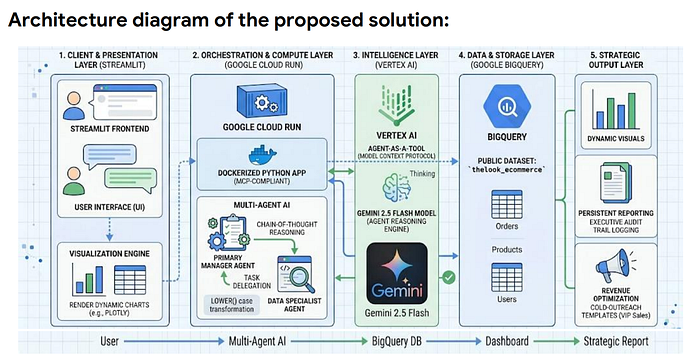
- Vertex AI & Gemini: Core reasoning, orchestration and natural language understanding.
- Google BigQuery: Serverless analytical engine utilizing public datasets.
- Cloud Run & Docker: Scalable, containerized deployment.
- Streamlit: Responsive, Interactive, user-facing frontend.
- Model Context Protocol (MCP): Standardizing tool binding and agent communication.

That is one of the biggest strengths of modern cloud-native development.
Why BigQuery Instead of Building My Own Database?
One of the earliest design decisions involved choosing the data source. I could have created my own database, generated synthetic records, or imported CSV files. But since the project was built on Google Cloud, I wanted the entire stack to stay within the Google ecosystem, that's when I explore one of its most underrated resources — BigQuery Public Datasets.
Its a collection of publicly accessible datasets covering domains such as healthcare, finance, transportation, weather, geospatial analytics, machine learning, GitHub activity, Stack Overflow, and e-commerce. These datasets are maintained within BigQuery itself, allowing developers to explore production-scale data without spending time collecting, cleaning, or importing datasets. Storage is hosted by Google, and you only pay for the queries you run (with a generous free usage tier for experimentation).
For this project, I selected TheLook E-commerce dataset, a fictional online clothing retailer developed by the Google Looker team. Although the business itself is fictional, the dataset is intentionally designed to resemble the relational data model of a real e-commerce company. It contains information about customers, products, orders, inventory, logistics, distribution centers, website events, and digital marketing activity, making it an excellent playground for analytics, SQL practice, business intelligence, and AI applications.
Unlike many sample datasets that consist of a single CSV or flat table, TheLook models how production databases are actually structured. Data is distributed across multiple related tables, requiring joins, aggregations, filtering, and relationship mapping to answer business questions, making it much closer to a production database.
This also meant the AI agent had to understand relationships between tables rather than simply querying one spreadsheet. This made it an ideal benchmark for building a Text-to-SQL multi-agent system capable of answering real business questions.
Side Note: One of the hidden gems of Google Cloud is its extensive collection of BigQuery Public Datasets which are updated periodically. If you’re looking to build cloud or AI portfolio projects, they’re a fantastic starting point. You can explore the available datasets in the official BigQuery Public Datasets documentation and browse the TheLook E-commerce dataset for yourself.
Simplified Dataset Structure
The complete TheLook E-commerce dataset consists of seven interconnected tables. However, for this project, I focused on the three tables required for product and revenue analytics:
- products — Stores product information such as category, brand, and pricing.
- orders — Contains order-level information for each purchase.
- order_items — Connects products to orders and records the sale price of each purchased item.
 Products
 ▲
 │ product_id
 │
 Order_Items
 ▲
 │ order_id
 │
 Orders
Although the complete dataset is much richer, these three tables were sufficient for demonstrating end-to-end business intelligence workflows such as revenue analysis, category comparisons, and sales recommendations. Like “Which product category generated the highest revenue?” or “Compare revenue between Jeans and Sweaters.”
Why One AI Agent Wasn’t Enough
Initially, it might seem reasonable to let a single LLM handle everything.
After all, modern language models can write SQL. They can summarize results. They can generate reports. So why introduce multiple agents?
Because different responsibilities require different behavior.
To achieve reliable performance, I moved away from monolithic workflows and adopted an “Agent-as-a-Tool” architecture.
I wanted one AI to think like a business manager, while another focused purely on database operations.
This separation makes the system significantly more reliable.
Instead of mixing planning, SQL generation, visualization, and reporting into one enormous prompt, each agent has a clearly defined responsibility.
Meet the Two Agents:
👨💼 Manager Agent
The Manager is the only AI that communicates with the user.
Its responsibilities include:
- Understanding business intent
- Breaking problems into smaller tasks
- Delegating database work
- Interpreting numerical results
- Creating business insights
- Drawing charts
- Saving reports
Importantly —
The Manager never writes SQL directly.
👨💻Data Specialist Agent
The Specialist exists for one purpose. Working with data.
Its responsibilities include:
- Translating English into SQL
- Querying BigQuery
- Handling SQL syntax
- Auto-correcting query errors
- Returning structured results
It does not perform business reasoning. It simply answers database questions accurately.
This separation follows a common software engineering principle: Single Responsibility Principle
Each component should do one job well.
Exactly the same philosophy applies to AI agents.
Architectual User
 Diagram │
 ▼
 Streamlit Interface
 │
 ▼
 Manager Agent
 (Reasoning & Planning)
 │
 Delegates Database Task
 │
 ▼
 Data Specialist Agent
 (Text → SQL Generation)
 │
 ▼
 Google BigQuery
 │
 SQL Query Results
 │
 ▼
 Manager Agent
 │
 ┌───────────┬─────────────┐
 ▼ ▼ ▼
 Business Charts Reports
 Insights
 |───────────|─────────────|
 ▼
 Streamlit UI
Rather than relying on one enormous AI prompt, the application becomes an orchestrated workflow.
From Question to Insight: A Workflow Example
Let’s look at a typical interaction. If a user asks:
“Find the revenue for Jeans, find the revenue for Sweaters, and compare them in a chart”
The application doesn’t simply guess.
- Reasoning: The Manager Agent breaks the request into two separate data tasks.
- Delegation: It prompts the Data Specialist to query the order_items and products tables for both categories.
- Execution: The Specialist generates and executes SQL on BigQuery.
- Synthesis: The Manager Agent receives the raw numbers, selects the appropriate visualization, and renders the comparison chart in the UI.

“Identify our best and worst performing product categories. Calculate the revenue difference and recommend what we should do.”
Rather than returning only numbers, the Manager produces a business recommendation explaining whether discounts, bundling strategies, or inventory optimization may improve performance.

“Find our most expensive product and draft a three-sentence cold outreach email targeting VIP customers.”
The Manager first retrieved the product information, then transformed raw database values into marketing-ready copy.
That’s where multi-agent reasoning becomes much more interesting than traditional dashboards.

Final Thoughts
If you’ve made it this far, thanks for sticking around.
From the outside, this looks like a chatbot that talks to a database.
Behind the scenes, it’s prompt engineering, agent orchestration, cloud infrastructure, SQL generation, debugging sessions at unreasonable hours, and a surprising number of redeployments.
The screenshots don’t show the times the agents confidently generated SQL for columns that didn’t exist, Cloud Run deployments that failed for reasons that seemed completely unrelated, or me wondering why I thought giving AI multiple agents would somehow make my life easier.
It eventually worked.
Mostly.
And that’s the part I intentionally skipped in this article.
This was the “how it works” story. The next one is the “how I got it to work” story — covering prompt engineering, Text-to-SQL generation, Cloud Run deployment, IAM permissions, debugging bizarre agent behavior, and all the engineering decisions that transformed a cool prototype into something reliable enough to demonstrate.
See you in Part 2. Hopefully with fewer hallucinations… from both the AI and me. 😄
Join thousands of data leaders on the AI newsletter. Join over 80,000 subscribers and keep up to date with the latest developments in AI. From research to projects and ideas. If you are building an AI startup, an AI-related product, or a service, we invite you to consider becoming a sponsor.
Published via Towards AI
Towards AI Academy
We Build Enterprise-Grade AI. We'll Teach You to Master It Too.
15 engineers. 100,000+ students. Towards AI Academy teaches what actually survives production.
Start free — no commitment:
→ 6-Day Agentic AI Engineering Email Guide — one practical lesson per day
→ Agents Architecture Cheatsheet — 3 years of architecture decisions in 6 pages
Our courses:
→ AI Engineering Certification — 90+ lessons from project selection to deployed product. The most comprehensive practical LLM course out there.
→ Agent Engineering Course — Hands on with production agent architectures, memory, routing, and eval frameworks — built from real enterprise engagements.
→ AI for Work — Understand, evaluate, and apply AI for complex work tasks.
Note: Article content contains the views of the contributing authors and not Towards AI.
Related posts
Recent Posts





