

Apache Airflow Fundamentals: A One-Stop Theory and Hands-On Lab Guide
Last Updated on July 23, 2026 by Editorial Team
Author(s): Faizulkhan
Originally published on Towards AI.
Apache Airflow Fundamentals: A One-Stop Theory and Hands-On Lab Guide
Lab version: Apache Airflow 2.10.4
Runtime model: Docker Compose + CeleryExecutor + Redis + PostgreSQL
Audience: Developers, DevOps engineers, data engineers, and MLOps engineers
Goal: Learn Airflow concepts and build working DAGs from installation through troubleshooting.
Table of contents
- Why Apache Airflow exists
- What a data pipeline is
- Where Airflow fits in MLOps
- Airflow architecture
- Core concepts
- DAG run, logical date, and data interval
- Task lifecycle
- Project architecture and repository structure
- Install and start the lab
- Remove built-in example DAGs
- DAG 01: BashOperator
- DAG 02: PythonOperator
- DAG 03: TaskFlow API
- Scheduling and cron
- Catchup and backfill
- PostgreSQL connection and SQL tasks
- Custom Airflow image and Python dependencies
- BranchPythonOperator
- TaskGroups and why SubDAGs are deprecated
- XCom
- End-to-end MLOps DAG
- How to operate and inspect Airflow
- Troubleshooting guide
- Production readiness guidance
- Final learning checklist
1. Why Apache Airflow exists
Data and machine-learning workflows usually begin with a few scripts:
download_data.py
clean_data.py
train_model.py
publish_report.py
At first, these scripts may be run manually or through cron. As the system grows, several problems appear:
- One script depends on another, but the dependency is not centrally defined.
- A failed script may not be retried.
- A later script may run against incomplete or corrupted data.
- Logs are scattered across servers.
- It is hard to answer which step failed.
- It is hard to rerun only one failed step.
- Historical runs are not visible in one place.
- Scheduling logic becomes difficult to maintain.
- Multiple teams cannot easily understand the complete workflow.
Apache Airflow solves the orchestration problem.
Airflow does not replace Python, Spark, SQL, APIs, Kubernetes, or cloud services. Those technologies perform the actual work. Airflow coordinates them by answering:
- What should run?
- In what order?
- When should it run?
- What should happen when it fails?
- Which task is running now?
- What happened in an earlier run?
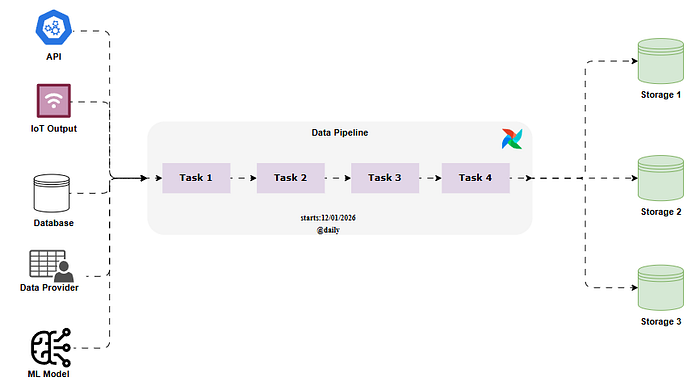
A simple conceptual pipeline is:

The source systems may include APIs, IoT devices, databases, external data providers, or model outputs. Airflow coordinates a sequence of tasks and can write results to different storage systems.
2. What a data pipeline is
A data pipeline is a set of automated steps that moves data from one or more source systems to a destination.
A typical data pipeline contains:
Extract
 ↓
Validate
 ↓
Transform
 ↓
Store
 ↓
Consume
In a machine-learning workflow, this may expand to:
Raw data
 ↓
Schema and quality validation
 ↓
Cleaning
 ↓
Feature engineering
 ↓
Model training
 ↓
Model evaluation
 ↓
Model registration or deployment
Each step should ideally be:
- Atomic: responsible for one clear action.
- Observable: produces logs and a visible status.
- Retry-safe: retrying it does not corrupt data.
- Idempotent: repeated execution produces the same correct final state.
- Independent where possible: parallel tasks should not share unnecessary state.
Airflow converts these steps into tasks and connects them in a DAG.
3. Where Airflow fits in MLOps
Airflow is often used in MLOps for scheduled batch-oriented workflows such as:
- Downloading new training data.
- Validating schema and data quality.
- Preparing model features.
- Training multiple candidate models.
- Comparing accuracy and other metrics.
- Registering the best model.
- Generating batch predictions.
- Starting retraining after new data becomes available.
- Notifying a team when a pipeline fails.
A model retraining loop can look like:

The important separation is:
Airflow orchestrates work.
External systems store and process large data.
Do not store a full dataset or trained model binary in XCom. Store it in S3, Azure Blob Storage, GCS, a database, MLflow, or another artifact system and pass only a path or identifier between tasks
4. Airflow architecture
Browser
 ↓
Airflow Webserver
 ↓
Metadata Database

Airflow Scheduler
 ↓
CeleryExecutor
 ↓
Redis broker
 ↓
Airflow Worker
The complete conceptual architecture is:


4.1 Webserver
The webserver provides the Airflow UI. It lets us:
- View DAGs.
- Pause or unpause DAGs.
- Trigger DAG runs.
- Inspect Graph and Grid views.
- Read task logs.
- Create Connections and Variables.
- Review DAG run and task-instance status.
The webserver does not normally execute your PythonOperator task logic.
4.2 Scheduler
The scheduler:
- Parses DAG files repeatedly.
- Creates scheduled DAG runs.
- Evaluates dependencies.
- Determines which task instances are ready.
- Submits ready task instances to the configured executor.
Because the scheduler imports DAG files repeatedly, avoid doing expensive work at the top level of a DAG file.
Bad:
# Runs during DAG parsing.
data = requests.get("https://large-api.example/data").json()
Better:
def download_data():
 data = requests.get("https://large-api.example/data").json()
The second version runs inside a task, not while the scheduler parses the DAG.
4.3 Executor
The executor determines how tasks are launched.
This lab uses CeleryExecutor.
The flow is:
Scheduler
 ↓
CeleryExecutor
 ↓
Redis
 ↓
Airflow worker
4.4 Redis
Redis is the Celery message broker in this lab. It carries messages describing tasks that workers should execute.
Redis is not the Airflow metadata database.
4.5 Worker
The worker performs the actual task execution.
For example, when this task runs:
def print_sklearn_version():
 import sklearn
 print(sklearn.__version__)
the import occurs inside the worker container. Therefore, scikit-learn must exist in the worker image.
4.6 PostgreSQL metadata database
The metadata database stores:
- DAG runs.
- Task instances.
- Task states.
- Connections.
- Variables.
- Users and roles.
- XCom values.
- Scheduling metadata.
This database is operationally critical. A production Airflow environment must back it up.
4.7 Triggerer
The triggerer handles asynchronous triggers for deferrable operators. A deferrable task can release a worker slot while waiting for an external condition.
4.8 Shared custom image
The Docker Compose file uses one common Airflow image:
x-airflow-common:
 &airflow-common
 image: ${AIRFLOW_IMAGE_NAME:-apache/airflow:2.10.4}
The webserver, scheduler, worker, triggerer, and init service inherit this common definition.
That means setting:
AIRFLOW_IMAGE_NAME=extending_airflow:latest
causes all Airflow services to use the custom image.
5. Core concepts

5.1 DAG
A DAG is a Directed Acyclic Graph.
- Directed: dependencies have a direction.
- Acyclic: the workflow cannot loop back to an earlier task.
- Graph: tasks are nodes and dependencies are edges.
Example:
extract
 ↓
transform
 ↓
load
A DAG is a reusable workflow definition, not one execution.
5.2 Task
A task is one unit of work inside a DAG.
Examples:
- Run a Bash command.
- Execute a Python function.
- Execute SQL.
- Trigger another system.
- Wait for a file.
- Send a notification.
5.3 Operator
An operator is a reusable task template.
Common examples:

An operator instance becomes a task in a DAG.
5.4 DAG run
A DAG run is one execution of a DAG.
If a daily DAG runs for five days, it has five DAG runs.
5.5 Task instance
A task instance is a specific task executing inside a specific DAG run.
Conceptually:
Task instance = task definition + DAG run
5.6 Connection
A Connection stores information used to connect to an external service.
For PostgreSQL, it may include:
- Host.
- Port.
- Username.
- Password.
- Database.
- Extra options.
Connections prevent credentials from being hardcoded in DAG code.
5.7 Variable
An Airflow Variable is a key-value configuration value. Variables are suitable for small configuration values, but secrets should preferably come from a secrets backend.
5.8 XCom
XCom means cross-communication. It lets task instances exchange small values.
Typical values include:
- A record ID.
- A file URI.
- A numeric accuracy.
- A small dictionary.
- A status string.
6. DAG run, logical date, and data interval
Airflow separates the time represented by a run from the time when the run physically executes.

Example:
Logical date: 2026-07-10 00:00 UTC
Actual start: 2026-07-16 10:15 UTC
This can happen because:
- The DAG was unpaused on July 16.
catchup=Truecreated older runs.- A manual backfill requested an older interval.
- The environment lacked capacity earlier.
The historical date is still July 10 because that is the data period represented by the run.
7. Task lifecycle
Common states include:


A successful path is:
scheduled → queued → running → success
A retry path is:
running → up_for_retry → scheduled → queued → running
8. Project architecture and repository structure
The learning project is organized as:
apache-airflow-basic-lab/
├── .env.example
├── .gitignore
├── .dockerignore
├── Dockerfile
├── docker-compose.yaml
├── requirements.txt
├── README.md
├── medium.md
├── Makefile
├── config/
├── dags/
│ ├── 01_bash_operator.py
│ ├── 02_python_operator.py
│ ├── 03_taskflow_api.py
│ ├── 04_cron_schedule.py
│ ├── 05_catchup_demo.py
│ ├── 06_manual_backfill_demo.py
│ ├── 07_postgres_operator.py
│ ├── 08_python_dependencies.py
│ ├── 09_branch_python_operator.py
│ ├── 10_taskgroups.py
│ ├── 11_xcoms.py
│ └── 12_ml_pipeline_example.py
├── include/sql/
├── plugins/
├── logs/
├── docs/
│ ├── architecture.md
│ ├── troubleshooting.md
│ ├── corrections-from-original-lab.md
│ └── images/
└── scripts/
Important files
docker-compose.yaml
Defines PostgreSQL, Redis, Airflow webserver, scheduler, worker, triggerer, and initialization.
Dockerfile
Extends Airflow 2.10.4 and installs Python dependencies.
requirements.txt
Contains additional Python packages such as scikit-learn and PostgreSQL provider packages.
.env
Controls image name, UID, example-DAG loading, and local credentials.
dags/
Contains all learning DAG definitions.
include/sql/
Contains SQL owned by the project rather than embedding large SQL strings directly in DAG code.
logs/
Receives local task logs.
9. Install and start the lab
9.1 Prerequisites
Verify Docker:
docker --version
docker compose version
Allocate at least 4 GB of RAM to Docker. Around 8 GB is more comfortable for PostgreSQL, Redis, webserver, scheduler, worker, and triggerer together.
9.2 Prepare the environment file
cp .env.example .env
sed -i "s/^AIRFLOW_UID=.*/AIRFLOW_UID=$(id -u)/" .env
The UID mapping prevents containers from creating root-owned files in the mounted logs, dags, and plugins directories.
Airflow environment variables follow:
AIRFLOW__SECTION__KEY
For example:
AIRFLOW__CORE__LOAD_EXAMPLES=false
maps to:
[core]
load_examples = false
9.3 Correct permissions
sudo chown -R "$USER":"$USER" dags logs plugins config
Avoid using chmod 777 as the normal solution.
9.4 Build the custom image
docker build --no-cache -t extending_airflow:latest .
Verify scikit-learn exists:
docker run --rm extending_airflow:latest \
 python -c "import sklearn; print(sklearn.__version__)"
9.5 Initialize Airflow
docker compose up airflow-init
Initialization:
- Migrates the metadata database.
- Creates the local Airflow user.
- Prepares required directories.
9.6 Start the stack
docker compose up -d
docker compose ps
Open:
http://localhost:8080
Local credentials:
Username: airflow
Password: airflow
These credentials are only for this disposable lab.
9.7 Verify services and custom image
docker ps --format "table {{.Names}}\t{{.Image}}"
Verify the worker:
docker exec -it airflow-airflow-worker-1 \
 python -c "import sklearn; print(sklearn.__version__)"
9.8 Stop or reset
Preserve metadata:
docker compose down
Delete containers and metadata volumes:
docker compose down -v
-v deletes run history, task instances, Connections, Variables, users, and XCom records.
10. Remove built-in example DAGs
The default Airflow installation can load many example DAGs:

Set this in .env:
AIRFLOW__CORE__LOAD_EXAMPLES=false
For a completely clean reset:
docker compose down -v
docker compose up airflow-init
docker compose up -d
After reinitialization, the dashboard should be empty until your project DAG files are parsed:
The correct variable contains double underscores:
AIRFLOW_CORE_LOAD_EXAMPLE
11. DAG 01: BashOperator
Create dags/01_bash_operator.py:
from datetime import datetime, timedelta

from airflow import DAG
from airflow.operators.bash import BashOperator


default_args = {
 "owner": "faizul",
 "retries": 2,
 "retry_delay": timedelta(minutes=2),
}


with DAG(
 dag_id="lab_01_bash_operator",
 default_args=default_args,
 description="Basic BashOperator example",
 start_date=datetime(2026, 1, 1),
 schedule="@daily",
 catchup=False,
 tags=["lab", "bash"],
) as dag:

 first_task = BashOperator(
 task_id="first_task",
 bash_command="echo 'Hello from the first Airflow task'",
 )

 second_task = BashOperator(
 task_id="second_task",
 bash_command='echo "I run after the first task"',
 )

 first_task >> second_task
What it does?
first_task
 ↓
second_task
first_task >> second_task means the second task waits for the first task to succeed.
The equivalent older style is:
first_task.set_downstream(second_task)
Why the original command failed
This is not valid:
bash_command="hello world, this is the first task"
Bash interprets hello as the executable name and fails:
bash: hello: command not found
To print text, use:
echo "hello world"
The successful DAG appears in the list and Graph view:

12. DAG 02: PythonOperator
Create dags/02_python_operator.py:
from datetime import datetime, timedelta

from airflow import DAG
from airflow.operators.python import PythonOperator


default_args = {
 "owner": "faizul",
 "retries": 2,
 "retry_delay": timedelta(minutes=2),
}


def greet(name: str, age: int) -> None:
 print(f"Hello! My name is {name}, and I am {age} years old.")


with DAG(
 dag_id="lab_02_python_operator",
 default_args=default_args,
 start_date=datetime(2026, 1, 1),
 schedule="@daily",
 catchup=False,
 tags=["lab", "python"],
) as dag:

 greet_task = PythonOperator(
 task_id="greet",
 python_callable=greet,
 op_kwargs={
 "name": "Tom",
 "age": 20,
 },
 )
How it works
The operator calls:
greet(name="Tom", age=20)
The op_kwargs keys must exactly match the function arguments.
This contains a hidden error:
op_kwargs={"name ": "Tom", "age": 20}
The key is "name " with a trailing space. Python therefore does not receive the required name argument and reports:
TypeError: greet() missing 1 required positional argument: 'name'
the correct format is
op_kwargs={"name": "Tom", "age": 20}
13. DAG 03: TaskFlow API
Create dags/03_taskflow_api.py:
from datetime import datetime, timedelta

from airflow.decorators import dag, task


default_args = {
 "owner": "faizul",
 "retries": 2,
 "retry_delay": timedelta(minutes=2),
}


@dag(
 dag_id="lab_03_taskflow_api",
 default_args=default_args,
 start_date=datetime(2026, 1, 1),
 schedule="@daily",
 catchup=False,
 tags=["lab", "taskflow"],
)
def hello_world_etl():

 @task
 def get_name() -> str:
 return "Jerry"

 @task
 def get_age() -> int:
 return 19

 @task
 def greet(name: str, age: int) -> None:
 print(f"Hello! My name is {name}, and I am {age} years old.")

 name = get_name()
 age = get_age()
 greet(name=name, age=age)


hello_world_etl()
What TaskFlow changes
TaskFlow uses decorators:
@dagdefines a DAG factory.@taskconverts a function into an Airflow task.
This:
name = get_name()
does not execute get_name() immediately while parsing the file. It creates a task node and returns an XComArg.
Passing that value here:
greet(name=name, age=age)
creates both:
- Data passing through XCom.
- Task dependencies.
The graph becomes:
get_name ─┐
 ├── greet
get_age ──┘
Multiple outputs
@task(multiple_outputs=True)
def get_person():
 return {
 "first_name": "Jerry",
 "last_name": "Friedman",
 "age": 19,
 }
Then:
person = get_person()

greet(
 first_name=person["first_name"],
 last_name=person["last_name"],
 age=person["age"],
)
14. Scheduling and cron
Airflow provides presets:

Equivalent cron expressions:

To run daily at 2:00 AM:
schedule="0 2 * * *"
This:
start_date=datetime(2026, 1, 1, 2)
does not define a recurring 2:00 AM schedule. start_date defines the earliest scheduling boundary. schedule defines recurrence.
This lab uses UTC unless another Airflow timezone is configured. Therefore:
0 2 * * *
means 02:00 UTC.
Avoid:
start_date=datetime.now()
Airflow parses DAG files repeatedly, so a moving start date can create confusing scheduling behavior.
15. Catchup and backfill
15.1 Catchup
with DAG(
 dag_id="lab_05_catchup_demo",
 start_date=datetime(2026, 1, 1),
 end_date=datetime(2026, 1, 6),
 schedule="@daily",
 catchup=True,
 max_active_runs=1,
):
 ...
If we enable this DAG on January 10, Airflow creates missed scheduled runs for the completed historical intervals.
The UI may show many historical logical dates:

All runs may physically execute on the same current date. Their logical dates remain historical.
15.2 catchup=False
catchup=False
prevents automatic creation of all missed historical intervals.
It does not prevent a manual trigger.
It also does not prevent the CLI backfill command.
15.3 Manual backfill
docker exec -it airflow-airflow-scheduler-1 \
 airflow dags backfill lab_06_manual_backfill_demo \
 -s 2026-01-01 \
 -e 2026-01-05
The correct syntax is:
airflow dags backfill <dag_id> -s <start-date> -e <end-date>
The DAG ID is mandatory.
Difference:

16. PostgreSQL connection and SQL tasks
Create an Airflow Connection:
Admin → Connections → Add
Suggested lab values:

We Do not use localhost from an Airflow container. Inside Docker Compose, PostgreSQL is reachable by its service name:
postgres
Example DAG:
from datetime import datetime

from airflow import DAG
from airflow.providers.common.sql.operators.sql import SQLExecuteQueryOperator


with DAG(
 dag_id="lab_07_postgres_operator",
 start_date=datetime(2026, 1, 1),
 schedule="@daily",
 catchup=False,
 tags=["lab", "postgres"],
) as dag:

 create_table = SQLExecuteQueryOperator(
 task_id="create_table",
 conn_id="postgres_lab",
 sql="include/sql/create_dag_runs_table.sql",
 )

 insert_row = SQLExecuteQueryOperator(
 task_id="insert_row",
 conn_id="postgres_lab",
 sql="include/sql/insert_dag_run.sql",
 )

 delete_row = SQLExecuteQueryOperator(
 task_id="delete_row",
 conn_id="postgres_lab",
 sql="include/sql/delete_dag_run.sql",
 )

 create_table >> insert_row >> delete_row
create_dag_runs_table.sql:
CREATE TABLE IF NOT EXISTS dag_runs (
 dt DATE NOT NULL,
 dag_id VARCHAR(250) NOT NULL,
 PRIMARY KEY (dt, dag_id)
);
insert_dag_run.sql:
INSERT INTO dag_runs (dt, dag_id)
VALUES ('{{ ds }}', '{{ dag.dag_id }}')
ON CONFLICT (dt, dag_id) DO NOTHING;
delete_dag_run.sql:
DELETE FROM dag_runs
WHERE dt = '{{ ds }}'
 AND dag_id = '{{ dag.dag_id }}';
Common original SQL errors:
IF NOT EXISTinstead ofIF NOT EXISTS.- Table name
dag runcontaining a space. - Switching between
dag_runanddag_runs. - Defining
dtbut referencingds. - Declaring a primary key for a column that does not exist.
17. Custom Airflow image and Python dependencies
Dockerfile:
FROM apache/airflow:2.10.4

COPY requirements.txt /requirements.txt

RUN pip install --no-cache-dir -r /requirements.txt
requirements.txt:
scikit-learn
apache-airflow-providers-postgres
psycopg2-binary
The package name is:
scikit-learn
The import is:
import sklearn
Build:
docker build --no-cache -t extending_airflow:latest .
Recreate services:
docker compose down
docker compose up -d
Verify the worker image:
docker inspect airflow-airflow-worker-1 \
 --format '{{.Config.Image}}'
Verify the package:
docker exec -it airflow-airflow-worker-1 \
 python -c "import sklearn; print(sklearn.__version__)"
A DAG that checks the dependency:
def print_sklearn_version() -> None:
 import sklearn
 print(f"scikit-learn version: {sklearn.__version__}")
def print_sklearn_version():
 ...

sklearn_version_task = PythonOperator(...)
18. BranchPythonOperator
Branching lets a DAG choose one downstream path.

from datetime import datetime

from airflow import DAG
from airflow.operators.bash import BashOperator
from airflow.operators.empty import EmptyOperator
from airflow.operators.python import BranchPythonOperator
from airflow.utils.trigger_rule import TriggerRule


def choose_path() -> str:
 model_accuracy = 0.86

 if model_accuracy >= 0.80:
 return "accurate_model"

 return "inaccurate_model"


with DAG(
 dag_id="lab_09_branching",
 start_date=datetime(2026, 1, 1),
 schedule="@daily",
 catchup=False,
) as dag:

 choose_best_model = BranchPythonOperator(
 task_id="choose_best_model",
 python_callable=choose_path,
 )

 accurate_model = BashOperator(
 task_id="accurate_model",
 bash_command="echo 'Accurate model selected'",
 )

 inaccurate_model = BashOperator(
 task_id="inaccurate_model",
 bash_command="echo 'Inaccurate model selected'",
 )

 join = EmptyOperator(
 task_id="join",
 trigger_rule=TriggerRule.NONE_FAILED_MIN_ONE_SUCCESS,
 )

 choose_best_model >> [accurate_model, inaccurate_model]
 [accurate_model, inaccurate_model] >> join
The branch function returns a downstream task ID.
The non-selected task becomes skipped.
The join uses:
TriggerRule.NONE_FAILED_MIN_ONE_SUCCESS
because one branch is expected to be skipped.

19. TaskGroups and why SubDAGs are deprecated
19.1 Historical SubDAG concept

SubDAGs were used to represent groups of tasks as child-DAG-like structures.
Problems included:
- Separate execution behavior.
- Unexpected executor-slot usage.
- More scheduling complexity.
- Difficult debugging.
- Reliance on deprecated
SubDagOperator.
Do not build new code with:
from airflow.operators.subdag import SubDagOperator
Do not import project logic from:
airflow.example_dags
19.2 TaskGroup
TaskGroups visually and logically group tasks within the same DAG.


from datetime import datetime, timedelta

from airflow import DAG
from airflow.operators.empty import EmptyOperator
from airflow.utils.task_group import TaskGroup


default_args = {
 "owner": "faizul",
 "retries": 2,
 "retry_delay": timedelta(minutes=2),
}


with DAG(
 dag_id="lab_10_taskgroups",
 default_args=default_args,
 start_date=datetime(2026, 1, 1),
 schedule="@daily",
 catchup=False,
) as dag:

 start = EmptyOperator(task_id="start")

 with TaskGroup(
 group_id="model_preparation",
 tooltip="Tasks for model preparation",
 ) as model_preparation:

 task_a = EmptyOperator(task_id="task_a")
 task_a1 = EmptyOperator(task_id="task_a1")
 task_b = EmptyOperator(task_id="task_b")
 task_c = EmptyOperator(task_id="task_c")

 task_a >> task_a1

 task_d = EmptyOperator(task_id="task_d")
 task_e = EmptyOperator(task_id="task_e")
 end = EmptyOperator(task_id="end")

 start >> model_preparation >> task_d >> task_e >> end
Inside the group:
task_a → task_a1
task_b
task_c
task_b and task_c are independent and may run in parallel.
The UI shows a collapsed group:
20. XCom
A Python task return value is automatically stored in XCom using:
key = return_value

Example
def training_model(model_name: str) -> float:
 accuracy = round(uniform(0.70, 0.99), 4)
 print(f"{model_name} accuracy: {accuracy:.2%}")
 return accuracy
Three separate tasks can each store one accuracy:
training_model_a → return_value = 0.91
training_model_b → return_value = 0.87
training_model_c → return_value = 0.94

The records do not overwrite each other because XCom is scoped by:
- DAG ID.
- Task ID.
- DAG run.
- Key.
- Map index when applicable.
Complete example:
from datetime import datetime
from random import uniform

from airflow import DAG
from airflow.operators.bash import BashOperator
from airflow.operators.python import PythonOperator


def training_model(model_name: str) -> float:
 accuracy = round(uniform(0.70, 0.99), 4)
 print(f"{model_name} accuracy: {accuracy:.2%}")
 return accuracy


def choose_best_model(ti) -> dict:
 task_ids = [
 "training_model_a",
 "training_model_b",
 "training_model_c",
 ]

 accuracies = ti.xcom_pull(
 task_ids=task_ids,
 key="return_value",
 )

 results = dict(zip(task_ids, accuracies))
 best_task_id = max(results, key=results.get)
 best_accuracy = results[best_task_id]

 print(f"All results: {results}")
 print(f"Best model: {best_task_id}")
 print(f"Best accuracy: {best_accuracy:.2%}")

 return {
 "best_model_task": best_task_id,
 "best_accuracy": best_accuracy,
 }


with DAG(
 dag_id="lab_11_xcoms",
 start_date=datetime(2026, 1, 1),
 schedule="@daily",
 catchup=False,
) as dag:

 downloading_data = BashOperator(
 task_id="downloading_data",
 bash_command="echo 'Downloading data...' && sleep 3",
 )

 training_tasks = [
 PythonOperator(
 task_id=f"training_model_{model.lower()}",
 python_callable=training_model,
 op_kwargs={"model_name": f"Model {model}"},
 )
 for model in ["A", "B", "C"]
 ]

 choose_model = PythonOperator(
 task_id="choose_model",
 python_callable=choose_best_model,
 )

 downloading_data >> training_tasks >> choose_model
Why None appeared
This function:
def choose_best_model():
 print("choose best model")
has no return statement. Python therefore returns:
None
Airflow logs:
Done. Returned value was: None
Appropriate XCom use
Use XCom for:
- Numbers.
- Strings.
- IDs.
- Object-storage paths.
- Small dictionaries.
- Lightweight metadata.
Do not use XCom for:
- Large DataFrames.
- Full datasets.
- Model binaries.
- Large API responses.
- Large files.
21. End-to-end MLOps DAG
A realistic lightweight learning workflow:
extract_data
 ↓
validate_data
 ↓
prepare_features
 ↓
train_model_a ─┐
train_model_b ─┼── select_best_model
train_model_c ─┘
 ↓
store_model_metadata
Example with TaskFlow:
from datetime import datetime
from random import uniform

from airflow.decorators import dag, task


@dag(
 dag_id="lab_12_ml_pipeline",
 start_date=datetime(2026, 1, 1),
 schedule="@daily",
 catchup=False,
 tags=["lab", "mlops"],
)
def ml_pipeline():

 @task
 def extract_data() -> str:
 uri = "s3://example-bucket/raw/training-data.csv"
 print(f"Extracted data to {uri}")
 return uri

 @task
 def validate_data(data_uri: str) -> str:
 print(f"Validated {data_uri}")
 return data_uri

 @task
 def prepare_features(data_uri: str) -> str:
 feature_uri = "s3://example-bucket/features/features.parquet"
 print(f"Prepared features from {data_uri}: {feature_uri}")
 return feature_uri

 @task
 def train_model(feature_uri: str, model_name: str) -> dict:
 accuracy = round(uniform(0.70, 0.99), 4)
 artifact_uri = (
 f"s3://example-bucket/models/{model_name}/model.bin"
 )

 return {
 "model_name": model_name,
 "accuracy": accuracy,
 "artifact_uri": artifact_uri,
 "feature_uri": feature_uri,
 }

 @task
 def select_best_model(results: list[dict]) -> dict:
 best = max(results, key=lambda result: result["accuracy"])
 print(f"Selected: {best}")
 return best

 @task
 def store_model_metadata(best_model: dict) -> None:
 print(f"Registering model metadata: {best_model}")

 raw_uri = extract_data()
 validated_uri = validate_data(raw_uri)
 feature_uri = prepare_features(validated_uri)

 results = [
 train_model(feature_uri, "model_a"),
 train_model(feature_uri, "model_b"),
 train_model(feature_uri, "model_c"),
 ]

 best_model = select_best_model(results)
 store_model_metadata(best_model)


ml_pipeline()
This example demonstrates:
- TaskFlow dependencies.
- Fan-out to three parallel training tasks.
- Fan-in to one selection task.
- Small XCom dictionaries.
- External artifact URIs.
- Separation between orchestration and storage.
22. How to operate and inspect Airflow
22.1 Trigger a DAG
In the UI:
DAGs → choose DAG → unpause → Trigger DAG
CLI:
docker exec -it airflow-airflow-scheduler-1 \
 airflow dags trigger lab_01_bash_operator
22.2 View task logs
DAG → Grid or Graph → task instance → Log
Logs show:
- Bash command output.
- Python
print()output. - Tracebacks.
- Retry state.
- Task return summaries.
- Exit code.
22.3 List DAGs
docker exec airflow-airflow-scheduler-1 \
 airflow dags list
22.4 List import errors
docker exec airflow-airflow-scheduler-1 \
 airflow dags list-import-errors
22.5 Validate Python syntax
python -m compileall -q dags
Single file:
python -m py_compile dags/10_taskgroups.py
22.6 Inspect scheduler and worker logs
docker compose logs airflow-scheduler
docker compose logs airflow-worker
22.7 Restart scheduler
docker compose restart airflow-scheduler
23. Troubleshooting guide
DAG source
 ↓
Python syntax
 ↓
Scheduler import
 ↓
DAG registration
 ↓
Scheduling and dependency rules
 ↓
Executor and Redis
 ↓
Worker runtime
 ↓
External service
24. Production readiness guidanceThis Compose lab is not a production deployment.
A production Airflow platform should consider:
Security
- Strong authentication.
- RBAC review.
- TLS.
- Private network placement.
- Secret management.
- Credential rotation.
- Least-privilege database accounts.
- No default
airflow/airflowcredentials.
Metadata database
- External managed PostgreSQL.
- High availability.
- Automated backups.
- Point-in-time recovery.
- Monitoring and maintenance.
- Disaster recovery testing.
Logging and monitoring
- Remote log storage.
- Metrics and alerts.
- Scheduler health alerts.
- Queue-depth monitoring.
- Worker capacity monitoring.
- Failed-task and retry alerts.
- Audit logs.
Deployment
- Immutable custom images.
- Controlled DAG deployment.
- CI syntax checks.
- Airflow import tests.
- Unit testing for task logic.
- Version pinning.
- Rollback strategy.
Task design
- Atomic tasks.
- Idempotent behavior.
- Retry-safe writes.
- External storage for large data.
- Small XCom messages.
- No expensive network/database work during DAG parsing.
- Stable DAG IDs and task IDs.
- Pools and queues for workload isolation.
Executor selection
LocalExecutor: simpler, single environment.CeleryExecutor: distributed workers through a broker.KubernetesExecutor: per-task pods and Kubernetes isolation.- Hybrid models may be considered based on platform requirements.
25. Final learning checklist
After completing this lab, you should be able to explain and demonstrate:
- What problem Airflow solves.
- DAG versus DAG run.
- Task versus task instance.
- Operator versus task.
- Scheduler, executor, broker, worker, webserver, triggerer, and metadata database.
- How
@dailyand cron expressions work. - Logical date versus actual execution time.
- Catchup versus backfill.
- How retries and
UP_FOR_RETRYwork. - How to read task logs.
- BashOperator and valid Bash commands.
- PythonOperator and exact
op_kwargsmatching. - TaskFlow automatic dependencies and XCom.
- PostgreSQL Connections and SQL operators.
- Why Python packages must exist in the worker image.
- BranchPythonOperator and skipped branches.
- TaskGroups versus deprecated SubDAGs.
- XCom push, pull, scope, and size limitations.
- Fan-out and fan-in in an MLOps workflow.
- How to find and fix Broken DAG errors.
- Why the local Compose stack is not production-ready.
Conclusion
Apache Airflow is most valuable when it makes time, state, dependencies, retries, and ownership explicit.
A reliable workflow is not only a collection of arrows. It is a system where:
- Every task has a clear responsibility.
- Dependencies are visible.
- Failures are logged.
- Retries are controlled.
- Historical runs are traceable.
- Large data stays in the correct storage system.
- Small metadata moves through XCom.
- DAG code is versioned and validated.
- Operational state is treated as critical data.
Start with simple DAGs, keep tasks small, use catchup=False unless historical scheduling is intentional, avoid deprecated SubDAGs, validate DAG imports before deployment, and design every task so that retries are safe.
Git link: faizulkhan56/apache-airflow-basic-lab
Join thousands of data leaders on the AI newsletter. Join over 80,000 subscribers and keep up to date with the latest developments in AI. From research to projects and ideas. If you are building an AI startup, an AI-related product, or a service, we invite you to consider becoming a sponsor.
Published via Towards AI
Towards AI Academy
We Build Enterprise-Grade AI. We'll Teach You to Master It Too.
15 engineers. 100,000+ students. Towards AI Academy teaches what actually survives production.
Start free — no commitment:
→ 6-Day Agentic AI Engineering Email Guide — one practical lesson per day
→ Agents Architecture Cheatsheet — 3 years of architecture decisions in 6 pages
Our courses:
→ AI Engineering Certification — 90+ lessons from project selection to deployed product. The most comprehensive practical LLM course out there.
→ Agent Engineering Course — Hands on with production agent architectures, memory, routing, and eval frameworks — built from real enterprise engagements.
→ AI for Work — Understand, evaluate, and apply AI for complex work tasks.
Note: Article content contains the views of the contributing authors and not Towards AI.
Related posts
Recent Posts





