

Stop Drowning Your Cursor IDE in MCP & SKILL Noise — Everything You Need to Know 🧠
Last Updated on July 23, 2026 by Editorial Team
Author(s): Damien Berezenko
Originally published on Towards AI.
Stop Drowning Your Cursor IDE in MCP & SKILL Noise — Everything You Need to Know 🧠
Are you manually toggling MCP tools on and off? Typing “use the XYZ tool or skill”? You’re fighting a losing battle against context bloat — and paying for every wasted token.

The Problem: Too Much Signal, Not Enough Relevance
Agent harnesses dump every MCP tool into the LLM context on every request. Even frontier models suffer from information overload, hunting for needles in haystacks while your token bill grows. [1][2][3]
Take Google Calendar’s events_list: it exposes 20+ properties. For a simple prompt like "When is my first meeting tomorrow?", only 5 fields matter. The rest are schema noise that confuse the model, burn tokens, and bloat the context window.
{
 "name": "GOOGLECALENDAR_EVENTS_LIST",
 "description": "Returns events on the specified calendar.",
 "input_schema": {
 "$schema": "https://json-schema.org/draft/2020-12/schema",
 "type": "object",
 "properties": {
 "q": {
 "type": "string",
 "description": "Free text search terms to find events that match these terms in various fields. Optional."
 },
 "iCalUID": {
 "type": "string",
 "description": "Specifies an event ID in the iCalendar format to be provided in the response. Optional. Use this if you want to search for an event by its iCalendar ID."
 },
 "orderBy": {
 "type": "string",
 "description": "The order of the events returned in the result. Optional. The default is an unspecified, stable order. Acceptable values are: \"startTime\", \"updated\". When set to \"startTime\", singleEvents must be true. The action automatically sets singleEvents=true when orderBy='startTime'."
 },
 "timeMax": {
 "type": "string",
 "description": "Upper bound (exclusive) for an event's start time to filter by. Optional. If unset, no start-time upper bound is applied. Must be an RFC3339 timestamp with mandatory time zone offset (e.g., 2011-06-03T10:00:00-07:00 or 2011-06-03T10:00:00Z). Milliseconds may be provided but are ignored. If timeMin is set, timeMax must be greater than timeMin."
 },
 "timeMin": {
 "type": "string",
 "description": "Lower bound (exclusive) for an event's end time to filter by. Optional. If unset, no end-time lower bound is applied. Must be an RFC3339 timestamp with mandatory time zone offset (e.g., 2011-06-03T10:00:00-07:00 or 2011-06-03T10:00:00Z). Milliseconds may be provided but are ignored. If timeMax is set, timeMin must be smaller than timeMax."
 },
 "timeZone": {
 "type": "string",
 "description": "Time zone used in the response. Optional. Use an IANA time zone identifier (e.g., America/Los_Angeles). Defaults to the user's primary time zone. Offsets (e.g., '-03:00', 'UTC+0') and abbreviations (e.g., 'IST', 'PST') are invalid."
 },
 "pageToken": {
 "type": "string",
 "description": "Token specifying which result page to return. Optional."
 },
 "syncToken": {
 "type": "string",
 "description": "Token from nextSyncToken to return only entries changed since the last list. Cannot be combined with iCalUID, orderBy, privateExtendedProperty, q, sharedExtendedProperty, timeMin, timeMax, or updatedMin. Deletions since the previous list are always included; showDeleted cannot be false in this mode. The action automatically removes conflicting parameters when syncToken is provided."
 },
 "calendarId": {
 "type": "string",
 "description": "Calendar identifier. To retrieve calendar IDs call the calendarList.list method. If you want to access the primary calendar of the currently logged in user, use the \"primary\" keyword.\nExample: \"primary\""
 },
 "eventTypes": {
 "type": "string",
 "description": "Event types to return. Optional. This parameter can be repeated multiple times to return events of different types. If unset, returns all event types. Acceptable values are: \"birthday\", \"default\", \"focusTime\", \"fromGmail\", \"outOfOffice\", \"workingLocation\"."
 },
 "maxResults": {
 "type": "integer",
 "description": "Maximum number of events returned on one result page. The number of events in the resulting page may be less than this value, or none at all, even if there are more events matching the query. Incomplete pages can be detected by a non-empty nextPageToken field in the response. By default the value is 250 events. The page size can never be larger than 2500 events. Optional."
 },
 "updatedMin": {
 "type": "string",
 "description": "Lower bound for an event's last modification time (RFC3339). When specified, entries deleted since this time are always included regardless of showDeleted. Optional."
 },
 "showDeleted": {
 "type": "boolean",
 "description": "Include cancelled events (status=\"cancelled\"). Optional; default is false. This surfaces cancelled (soft-deleted) events, not items in the Trash. When syncToken or updatedMin is used, deletions since those markers are included regardless of showDeleted. Recurring interaction: if singleEvents=false and showDeleted=false, cancelled instances of a recurring series may still be included; if showDeleted=true and singleEvents=true, only single deleted instances (not parent series) are returned."
 },
 "maxAttendees": {
 "type": "integer",
 "minimum": 1,
 "description": "The maximum number of attendees to include in the response. If there are more than the specified number of attendees, only the participant is returned. Optional. Must be >= 1 if provided."
 },
 "singleEvents": {
 "type": "boolean",
 "description": "Whether to expand recurring events into instances and only return single one-off events and instances of recurring events. Optional. The default is False."
 },
 "alwaysIncludeEmail": {
 "type": "boolean",
 "description": "Deprecated and ignored."
 },
 "showHiddenInvitations": {
 "type": "boolean",
 "description": "Whether to include hidden invitations in the result. Optional. The default is False. Hidden invitations are events where your attendee entry has responseStatus='needsAction' and attendees[].self==true. When true, such invitations are included."
 },
 "sharedExtendedProperty": {
 "type": "string",
 "description": "Extended properties constraint specified as propertyName=value. Matches only shared properties. This parameter might be repeated multiple times to return events that match all given constraints."
 },
 "privateExtendedProperty": {
 "type": "string",
 "description": "Extended properties constraint specified as propertyName=value. Matches only private properties. This parameter might be repeated multiple times to return events that match all given constraints."
 }
 },
 "required": ["calendarId"],
 "additionalProperties": false
 }
}
See more skinny tool examples here.

Skills
Skills have the opposite problem — not enough signal. The agent sees only a short frontmatter description. Write it too short, and the LLM misses it if semantically distant. Write it too long, and you drown the context. Either way, you end up with the same avoidable pattern: manually adding and removing .md files mid-project or asking “read xyz skill”.
See more skinny skill examples here.

The Fix: CYT
CYT (clear-your-tools) automatically dynamically injects only the relevant context your agent needs, when it needs it.
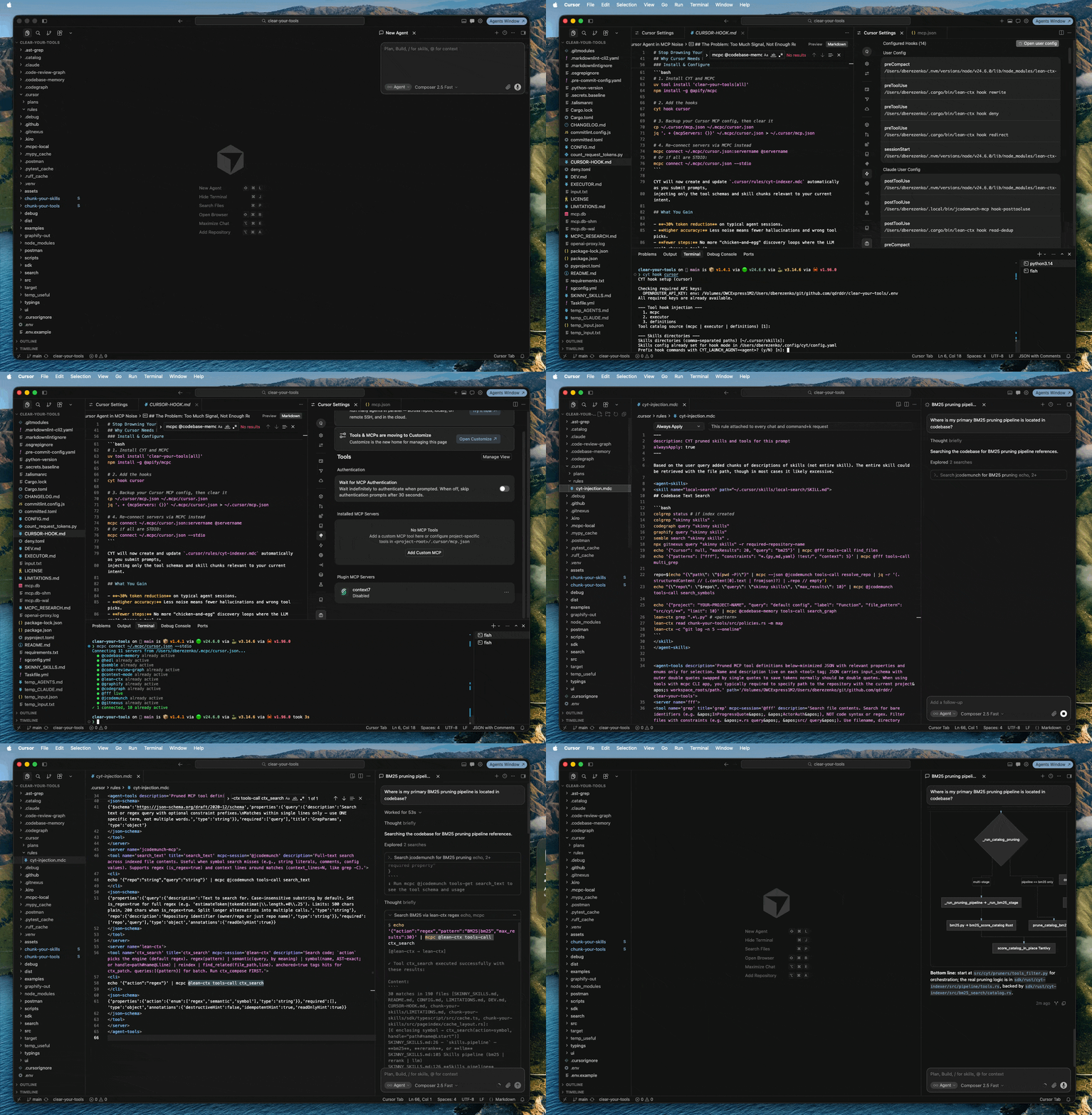
It works by chunking tools and skills into granular pieces, running them through a pruning pipeline, and recomposing a “skinny” version:
- Tools: Drops irrelevant tools, optional properties, and enum values. Keeps schema intact.
- Skills: Decomposes markdown into semantic nodes (frontmatter, headers, headers + their paragraphs with prose text), then restores only the relevant sections in their original hierarchy. Keeps the page hierarchy, structure, and index intact.
CYT uses three gating strategies — evaluating relevance with BM25 lexical search, reranking, or a weak LLM — all much cheaper than the primary coding model, to decide what survives without breaking JSON schema or markdown structure.
Example: A GitHub create_issue tool has properties title (required), body, and labels. If your prompt doesn't need labeling, CYT drops labels entirely. The tool still validates; the primary coding LLM sees less noise.
See it in action: Install Cargo, then
cargo install chunk-your-tools

# Decompose your tools into Chunks
chunk-your-tools decompose \
 --input examples/input/tools.json \
 --output examples/catalog

# Restore the tools back keeping only some tools, properties and enums
chunk-your-tools recompose \
 --catalog-dir examples/catalog \
 --survivors examples/input/survivors-named.json \
 --output examples/output/named.json
See more skinny tool examples here.
Why Cursor Needs MCPC + Hooks
Claude Code and Codex allow HTTP request interception via a reverse proxy. Cursor does not (unless you BYOK). So CYT uses hooks instead.
Here’s the catch with hooks: They do not allow manipulating tools in the agent anyway; so we have to move tools out of Cursor and into an MCP aggregator.
MCPC is that aggregator. It hosts your servers; CYT dynamically exposes only the relevant subset back to Cursor via project rules.
Here’s another problem we address in CYT: Cursor’s beforeSubmitProm hook currently cannot add additional context. Until it supports additional_content, we work around it by moving all content into the .cursor/rule/cyt-indexer.mdc file that Cursor always reads.
Install & Configure CYT
# Install CYT and MCPC
uv tool install 'clear-your-tools[all]'
npm install -g @apify/mcpc

# 1. Add the hooks
cyt hook cursor

# 2. Backup your Cursor MCP config, then clear it
cp ~/.cursor/mcp.json ~/.mcpc/cursor.json
jq '. + {mcpServers: {}}' ~/.mcpc/cursor.json > ~/.cursor/mcp.json

# 3. Re-connect all the servers via MCPC instead, if all are STDIO:
mcpc connect ~/.mcpc/cursor.json --stdio

# Or individually, replace "servername" with the name of your MCP Server:
mcpc connect ~/.mcpc/cursor.json:servername
CYT will now create and update .cursor/rules/cyt-indexer.mdc automatically as you submit prompts, injecting only the tool schemas and skill chunks relevant to your current intent.
What You Gain
- ~30% token reduction on typical agent sessions.
- Higher accuracy: Less noise means fewer hallucinations and wrong tool picks.
- Fewer steps: No more “chicken-and-egg” discovery loops where the LLM can’t choose a tool it hasn’t seen.
- Smart deduplication: If a skill or tool is already exposed in the session, CYT won’t re-inject it. If a skill’s name + description in the frontmatter is already strong enough, CYT gates itself to avoid double-spending context.
Unsandboxed MCPC
MCPC must run unsandboxed because it accesses the host system directly. Running it in a sandbox will fail with a lock error. We recommend adding mcpc and echo commands to your Command Allowlist in Settings > Agents > Execution and Approvals section.

Bonus: Skills over MCP
Stop adding/removing SKILL.md files across projects. Host skills remotely and let CYT pull and prune them on every request:
mcpc connect https://mcp.skillsovermcp.com/mcp/upstash/context7 @context7-skill
cyt hook daemon restart
cyt hook cursor
Build Your Own App
Want granular pruning in your own harness or an app? The underlying chunkers at the core of CYT are open-source (Apache 2.0) with bindings for Python, TypeScript, C, Go, and natively in Rust:
cargo install chunk-your-tools
cargo install chunk-your-skills

# Test with CLI before embedding into your app
chunk-your-skills --help

chunk-your-tools --help
chunk-your-tools: Decomposes tools into required properties, optional properties, and enums. Restores the skinny tool shape based on the survivors.chunk-your-skills: Decomposes skills into frontmatter and markdown header nodes with the following prose text. Restores the skinny SKILL file hierarchy, index, and structure.
Give the repos a star if you find them useful.
FAQ
Q: Why not just use progressive tool discovery?
A: Discovery adds expensive reasoning steps, and the LLM still can’t select a tool it has never seen. CYT closes that gap by direct injection and is complementary to progressive tool discovery.
Q: Why MCPC specifically?
A: It is reliable under heavy load where other aggregators flake or flap.
Q: What if Cursor adds additional_content support to hooks?
A: CYT already implements it. The moment Cursor enables it, injection will work natively. In your config.yaml, you just need to set skills.hook.cursor_rule_file.enabled: false
Q: Will I benefit from prompt prefix caching when using CYT?
A: Yes, the prefixes stay stable for both proxy & hook injection paths.
Q: Can I use other prompt optimizers and token savers?
A: Absolutely. We recommend using CYT hooks with optimizers such as RTK and Headroom; typically, it should work with any other optimizer. When you use proxy injection, other proxies like Headroom may still be used but could be cumbersome for non-advanced users; in this case, hook injection is the recommended path.
Ready to cut the noise?
Install UV and then
uv tool install 'clear-your-tools[all]'
cyt hook cursor
Join thousands of data leaders on the AI newsletter. Join over 80,000 subscribers and keep up to date with the latest developments in AI. From research to projects and ideas. If you are building an AI startup, an AI-related product, or a service, we invite you to consider becoming a sponsor.
Published via Towards AI
Towards AI Academy
We Build Enterprise-Grade AI. We'll Teach You to Master It Too.
15 engineers. 100,000+ students. Towards AI Academy teaches what actually survives production.
Start free — no commitment:
→ 6-Day Agentic AI Engineering Email Guide — one practical lesson per day
→ Agents Architecture Cheatsheet — 3 years of architecture decisions in 6 pages
Our courses:
→ AI Engineering Certification — 90+ lessons from project selection to deployed product. The most comprehensive practical LLM course out there.
→ Agent Engineering Course — Hands on with production agent architectures, memory, routing, and eval frameworks — built from real enterprise engagements.
→ AI for Work — Understand, evaluate, and apply AI for complex work tasks.
Note: Article content contains the views of the contributing authors and not Towards AI.
Related posts
Recent Posts





