

Build Your Own Cursor This Weekend. Yes, the One SpaceX Just Paid $60 Billion For.
Last Updated on June 22, 2026 by Editorial Team
Author(s): Yashraj Behera
Originally published on Towards AI.
Build Your Own Cursor This Weekend. Yes, the One SpaceX Just Paid $60 Billion For.
Cursor’s in-house coding model did not come from nowhere. The company confirmed it started from an open-weight checkpoint anyone can download, then spent its own compute on top. That single fact changes what building your own version actually requires. It is not cloning magic. It is an integration project, and the integration is the part you control.

In March 2026, Cursor launched a coding model it called Composer 2 and described as frontier-level. Within a day, a developer watching the app’s network traffic spotted a telling model identifier, and the truth came out. Composer was not trained from scratch. It started from Moonshot AI’s open-weight Kimi K2.5, the same file anyone can download for free, with Cursor’s own training layered on top. The company later confirmed it plainly, writing that Composer is built on Moonshot’s Kimi K2.5 checkpoint.
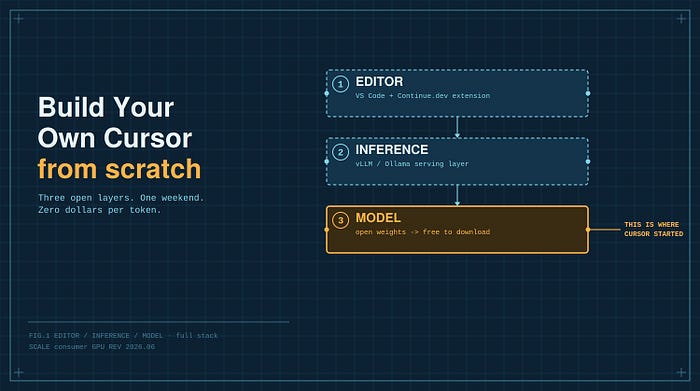
Set aside the disclosure drama, because the interesting part is what this tells you about building your own. That free checkpoint, it turned out, was the foundation of something enormous. Cursor grew so fast that in June 2026 SpaceX agreed to acquire its parent company for sixty billion dollars. A tool whose brain began as a free download is now the subject of one of the largest acquisitions in software history. Which raises an obvious question, if the starting point is free, how much of this can you build yourself? A frontier coding tool turns out to be three things stacked together: an editor, an inference engine, and a model. The editor is open source. The engine is open source. And the model, it turns out, can be a free download too. The thing that felt like proprietary magic is mostly an integration, and that means you can build a working version yourself, one that runs on your own hardware, keeps your code on your own machine, and costs nothing per token once the GPU is paid for.
You will not match what Cursor spent after the download, and it is worth being precise about that gap rather than hand-waving it. But you can get genuinely close to the core experience in a weekend. Here is the full stack, the real commands, and the one design decision that makes the whole thing work.
The honest architecture
A Cursor-like tool is three layers, and it helps to see them clearly before touching any code.
The first layer is the editor, the part you actually look at. Cursor is a fork of Visual Studio Code, which is the quiet reason it could exist at all, the hard problem of a mature, extensible editor was already solved and open source. You do not need to fork anything. You run VS Code as it ships and drive it with an extension.
The second layer is inference, the engine that takes your code and produces completions, edits, and answers. Cursor runs this in the cloud at enormous scale. You run it locally with an inference server on your own machine.
The third layer is the model, the brain. Cursor fine-tunes its own now, starting from that open checkpoint. You download an open one directly. And the gap between open and closed coding models has narrowed to single digits on most benchmarks, so the brain you can get for free sits closer to the frontier than it ever has.
The decision that makes all of this practical is that you do not use one model for everything. The standard local setup, the one most Continue.dev configurations use, runs two models in two roles. A small, fast model handles tab-completion, where every millisecond counts because you are waiting on it in real time. A larger model handles chat and multi-file edits, where quality matters more than speed. Splitting the work across two models is the single most important choice in the build, and getting it right is most of what separates a tool you actually use from a sluggish toy.
Slot one is autocomplete, and it works differently than you would guess
When you pause typing and grey ghost text appears for you to accept with Tab, it is tempting to assume the model is just predicting the next few words. It is not, and the difference matters for which model you pick.
Your cursor sits in the middle of a file. There is code above it and code below it, and a good suggestion has to fit cleanly between the two. That is a fundamentally different task from continuing text left to right, and it has a name, Fill-in-the-Middle, usually shortened to FIM. A normal language model predicts what comes next and cannot natively fill a gap that has content on both sides. FIM fixes this by reordering the training data, splitting each file into a prefix, a middle, and a suffix, and teaching the model to generate the middle when handed the prefix and suffix wrapped in special marker tokens. At completion time, the extension sends everything before your cursor as the prefix and everything after as the suffix, and the model produces the piece in between.
This is why you cannot point an ordinary chat model at autocomplete and expect good results. The model has to have been trained for FIM to be any good at it. Mistral’s Codestral was built specifically for this and it shows, posting roughly 95% on single-line fill-in-the-middle accuracy, which is why it is the standard recommendation for the autocomplete role and why Continue.dev’s own docs point people toward it. There are smaller specialized options too, like compact Qwen coder models, if you want something even lighter on an older card. The point is to use a model built for the job, because autocomplete is the feature you feel most, and a dedicated model is where that experience is won.
Slot two is the chat and agent brain
The second model does the heavier thinking. Refactor this function, explain this stack trace, edit these four files to add an endpoint. Latency tolerance is higher here, so you can afford a bigger model.
For a setup that runs on a single machine, the current sweet spot is Qwen3-Coder-30B, the open coding model from Alibaba. It is a mixture-of-experts design, meaning it has a large total parameter count but only activates a small fraction, around three billion parameters, for any given token, so it runs far lighter than its thirty-billion size suggests. It supports tool-calling, which is what you need for any agent-style behavior, and quantized to a four-bit version it fits in roughly 19 gigabytes, comfortable on a 24-gigabyte card. One developer reports running it at a very large context on a high-VRAM 4090. That single model, well served, covers chat, edits, and basic agent loops.
If you have more hardware or you are willing to call an API for the chat role, the bigger open models are your scale-up path. GLM-5 from Zhipu, the newer Kimi releases from Moonshot, and DeepSeek’s latest are all open-weight, all near the top of agentic coding benchmarks, and all too large to run on a single consumer GPU. Treat them as the option for when you have a server or a budget. Crucially, the architecture you build does not change when you swap the model behind it, which is the entire benefit of keeping the two slots clean. The open coding leaderboard reshuffles almost monthly, so check a current benchmark before you commit, but your pipeline stays the same regardless of which brain you drop in.
Picking your two models by hardware
Both slots have more than one good option, and the right pick comes down to the graphics memory you have. Here is the practical menu for each role, so you can match the build to your actual machine rather than the ideal one.
For the autocomplete slot, you want something small and fill-in-the-middle capable. Codestral, at twenty-two billion parameters, is the quality choice and the one most people land on, but it is not the only one. If your card is tight on memory, the compact Qwen coder models, the 1.5-billion and 7-billion versions, are purpose-built for completion and run on almost anything, and StarCoder2 at three billion is another light, FIM-trained option. The rule for this slot is simple, smaller and faster beats bigger and smarter, because you are waiting on it in real time, so do not overspend memory here.
For the chat and agent slot, scale the model to your card. On a modest 8-gigabyte GPU, the smaller Qwen coding models, around the 8-billion size, run comfortably at roughly 5 gigabytes and still handle real work. With 16 gigabytes you can step up to something like Qwen 3.6 in its mid-twenties-of-billions size or Devstral Small at twenty-four billion, both of which reason noticeably better on multi-step tasks. At 24 gigabytes, Qwen3-Coder-30B is the sweet spot the rest of this guide assumes, fitting in roughly 19 gigabytes once quantized to four-bit. And if you have a server, multiple cards, or a willingness to call an API, the large open models, GLM-5 from Zhipu, the newer Kimi releases, and DeepSeek’s latest, are the top of the open coding charts but well beyond a single consumer GPU.
The reason this flexibility matters is the one structural point worth repeating, the pipeline does not care which models you slot in. Pick the biggest chat model your card can hold and the fastest completion model you can tolerate, and you can upgrade either one later without touching the rest of the build. That is the whole advantage of keeping the two roles cleanly separated.
Serving the models
You have two realistic ways to serve these, and the choice is about how much performance you need against how much setup you can tolerate.
Ollama is the low-friction path. One command pulls a model and serves it behind an interface compatible with the standard API format. For the autocomplete slot, this is genuinely all you need.
# Slot one, the fast autocomplete model
ollama pull codestral
# Ollama now serves a compatible API at localhost:11434
vLLM is the performance path. It is a dedicated inference server built for throughput, it batches requests far more efficiently, and it is what you want for the chat slot if speed under load matters to you. Here is the chat model served with vLLM, quantized to fit on one card.
pip install vllm --break-system-packages
# Slot two, the chat and agent model, quantized to fit a single GPU
vllm serve Qwen/Qwen3-Coder-30B-A3B-Instruct-FP8 \
 --tensor-parallel-size 1 \
 --max-model-len 32768 \
 --gpu-memory-utilization 0.90
One thing worth flagging honestly, fill-in-the-middle support in serving stacks is not automatic. Servers accept a suffix field, but native handling of a given model’s FIM marker tokens has been uneven and model-specific. The clean way around it is to let the editor extension build the FIM prompt with the correct markers for your model and send it as an ordinary completion request, which sidesteps the serving-layer gaps entirely. That is exactly what the setup below does.
Wiring it into the editor
Now the layers connect, and this is the step that turns three running services into something that feels like a product. You do not write an extension from scratch. Continue.dev is an open-source VS Code extension that already does the editor-side work, the ghost-text rendering, the chat sidebar, the diff application, the context gathering, and it lets you point each role at your own server.
The configuration is where the two-model design becomes real. You declare one model for the chat role and a different one for the autocomplete role, each pointing at the server you started.
{
 "models": [
 {
 "title": "Qwen3-Coder Chat",
 "provider": "openai",
 "model": "Qwen/Qwen3-Coder-30B-A3B-Instruct-FP8",
 "apiBase": "http://localhost:8000/v1"
 }
 ],
 "tabAutocompleteModel": {
 "title": "Codestral Autocomplete",
 "provider": "ollama",
 "model": "codestral"
 }
}
The chat model points at the vLLM server. The autocomplete model points at Ollama. The extension constructs the fill-in-the-middle prompt for the autocomplete slot, wrapping your prefix and suffix in the marker tokens the model expects, which neatly avoids the serving-layer FIM problem. When you type, the extension grabs the code on both sides of your cursor, builds the request, and renders the result as ghost text. When you open the chat panel, it routes to the larger model. That loop, fast model for completion, big model for reasoning, is the whole machine.
The build, start to finish
Here is the whole thing as a sequence you can follow in order. Each step assumes the one before it worked.
- Install the editor. Download and install Visual Studio Code if you do not already have it, then open the Extensions panel, search for Continue, and install it. You now have the editor layer and the glue layer in place, with nothing configured yet.
- Install the model runner. Install Ollama from its site, which runs quietly in the background and serves models behind a standard API. Confirm it works by running
ollama --versionin your terminal. - Pull your autocomplete model. Run
ollama pull codestralto download the fill-in-the-middle model for the fast slot. If your card is tight on memory, substitute a smaller completion model like a compact Qwen coder instead. Ollama now serves it athttp://localhost:11434. - Serve your chat model. For the bigger slot, install vLLM with
pip install vllm --break-system-packages, then serve your chosen chat model. For a 24-gigabyte card, that isvllm serve Qwen/Qwen3-Coder-30B-A3B-Instruct-FP8with the flags shown earlier. If you would rather keep things simple, you can pull the chat model through Ollama too and skip vLLM, trading some performance for less setup. - Point Continue at both servers. Open Continue’s configuration file and declare your two models, the chat model in the models list pointing at the vLLM server, and the autocomplete model in the tab-autocomplete slot pointing at Ollama, exactly as in the config block above. Save the file.
- Disable any conflicting completion tools. If you have GitHub Copilot or another autocomplete extension active, turn it off, since two completion engines fighting over the same keystrokes will give you garbage.
- Test both paths. Open a code file and start typing, then pause, you should see grey ghost text from Codestral that you accept with Tab. Then open the Continue chat panel and ask it to explain or refactor something, which routes to the bigger model. If both respond, your local coding assistant is live.
- If something misbehaves, the usual culprit is the chat server not actually running or the config pointing at the wrong port, and Continue’s own logs, reachable through the developer tools, will show you exactly where the request failed. From here, the whole thing is yours to tune.
Context is the quiet half of the product
Here is what actually separates something you will use from something you will abandon. A model is only as good as what you feed it, and Cursor’s real engineering edge was never only the model. It was how aggressively the tool gathers the right context, indexing your whole codebase, retrieving the files relevant to your question, and packing the prompt with what matters for your specific situation.
Continue.dev gives you a working version of this out of the box. It indexes your repository and pulls in relevant snippets, so a question about your authentication middleware actually reaches the model with your authentication middleware attached. It is not as finely tuned as Cursor’s, but the mechanism is identical, embed the codebase, retrieve by relevance, inject into the prompt. If you take one lesson from comparing your build to Cursor, take this one, the model matters less than people think and the context pipeline matters more.
What you get, and what you genuinely do not
Be clear-eyed about the result, because the honest version is more useful than the hype.
What you get is a real, working AI coding assistant. Tab-completion that fills the middle correctly, a chat sidebar that can see your codebase, multi-file edits, and every token processed on your own hardware with nothing leaving for anyone’s servers. For a great many developers, especially anyone whose code legally cannot leave the building, that is precisely the product they actually needed, and it cost nothing per token.
What you do not get is Cursor’s quality on long, autonomous agent tasks, and it is worth being exact about why. When Cursor disclosed the Kimi base, one of its leaders also revealed the proportions, only about a quarter of the compute in the final model came from the base checkpoint, with the other three quarters spent on Cursor’s own reinforcement learning. That training, teaching a model to run hundreds of tool calls across a long task without losing the thread, is the part you are not replicating. You are starting from the same open checkpoint they did. You are simply not spending the months of additional training that come after, and that is a fair trade for something you can stand up this weekend.
It is also worth knowing where this is heading, because it sharpens the point. The free-checkpoint approach took Cursor a very long way. The tool grew so fast on it, reportedly to around four billion dollars in annualized revenue, that in June 2026 SpaceX agreed to buy Cursor’s parent company for sixty billion dollars in stock, just days after SpaceX’s own record public debut. And Cursor has said its next model is being trained from scratch with far greater resources, working with Elon Musk’s AI effort and its massive compute cluster, using roughly ten times the total compute of what came before. In other words, the open-checkpoint approach was the bridge, not the destination, for a company that can now afford to build from zero with a sixty-billion-dollar backer. That is the part you cannot replicate. But here is the part that should encourage you, the bridge that carried Cursor from a free download to a sixty-billion-dollar acquisition is the same bridge still sitting open in front of you, and it is genuinely good.
That is the real takeaway. The brain of a frontier coding tool is downloadable. The editor is open source, the serving stack is open source, the glue is open source. What used to look like proprietary magic has become an integration project, and the integration is the part you own. Build the pipeline once, and every time the open-model leaderboard shifts, which lately is about monthly, you swap in a better brain without changing anything else. The tools you can run yourself are closer to the ones you pay for than they have ever been, and the gap is shrinking with every release.
This is a build guide, not investment or product advice, and it is not affiliated with any tool named here. If you stand up a version of this, drop a comment with your hardware and the two models you landed on. The configurations people actually run are more useful to the next builder than any benchmark.
Resources
- Cursor’s own post confirming Composer is built on Moonshot’s Kimi K2.5 checkpoint: https://cursor.com/blog/composer-2-5
- Continue.dev’s documentation on the autocomplete role and FIM prompt templates: https://docs.continue.dev/customize/deep-dives/autocomplete
- A hands-on walkthrough of serving Qwen3-Coder-30B with vLLM and wiring it to Continue: https://www.jamesflare.com/vllm-continue-autocomplete-qwen3-coder/
- Mistral’s Codestral, the fill-in-the-middle model used for the autocomplete slot: https://mistral.ai/news/codestral
- vLLM, the high-throughput inference server for the chat slot: https://github.com/vllm-project/vllm
Join thousands of data leaders on the AI newsletter. Join over 80,000 subscribers and keep up to date with the latest developments in AI. From research to projects and ideas. If you are building an AI startup, an AI-related product, or a service, we invite you to consider becoming a sponsor.
Published via Towards AI
Towards AI Academy
We Build Enterprise-Grade AI. We'll Teach You to Master It Too.
15 engineers. 100,000+ students. Towards AI Academy teaches what actually survives production.
Start free — no commitment:
→ 6-Day Agentic AI Engineering Email Guide — one practical lesson per day
→ Agents Architecture Cheatsheet — 3 years of architecture decisions in 6 pages
Our courses:
→ AI Engineering Certification — 90+ lessons from project selection to deployed product. The most comprehensive practical LLM course out there.
→ Agent Engineering Course — Hands on with production agent architectures, memory, routing, and eval frameworks — built from real enterprise engagements.
→ AI for Work — Understand, evaluate, and apply AI for complex work tasks.
Note: Article content contains the views of the contributing authors and not Towards AI.
Related posts
Recent Posts