How to Use OpenCode for Free in 2026
Last Updated on July 6, 2026 by Editorial Team
Author(s): Kamrun Nahar
Originally published on Towards AI.
OpenCode for Cheapskates. A Love Letter.
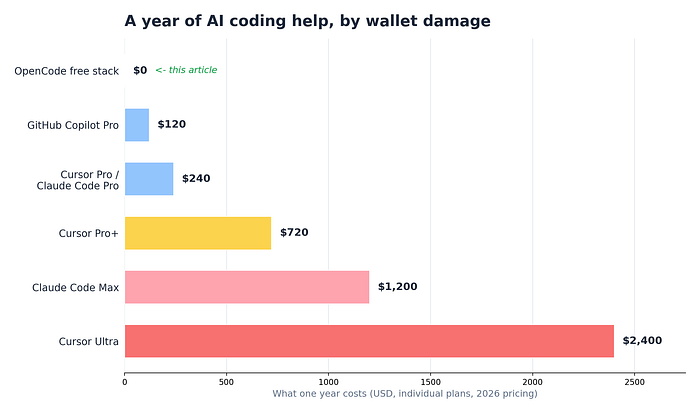
The $2,400 Coding Robot and the $0 One That Does the Same Job
Every free model, hidden setting, and quota trick for OpenCode, collected from the corners of the internet and tested for a month.
Here’s the 2026 market in one sentence. AI coding help costs $20 a month for the normal tier, $60 to $100 for the serious tier, and $200 a month, which is $2,400 a year, for the tier named after people who’ve stopped checking their bank app. I paid none of it for a month and lost nothing but excuses. This article is the complete setup, every trick included, written so a total beginner can follow along.

The tool is OpenCode, an open source coding agent with one of the biggest star counts on GitHub. The free models come from five different places that no single tutorial ever lists together. That’s the whole gap this article closes.
The Five Words You Need (60 Seconds, Then We’re Done With Theory)
A terminal is texting your computer instead of clicking it. That’s all it is. A model is the rented artificial brain, like GPT or Gemini. An agent is a model with hands, it doesn’t just discuss your files, it opens them, edits them, runs your tests, and reads the errors. A token is how models count text, in word-chunks, and every limit you’ll ever hit is measured in them. The context window is the model’s short-term memory, a whiteboard of fixed size, and everything it should know must fit on the whiteboard. Remember the whiteboard. It returns later, holding your quota hostage.

Why Any of This Is Free (the Part That Sounds Like a Scam and Isn’t)
When an AI lab launches a new model, it needs feedback and word of mouth more than it needs your twenty dollars, so launch-window models go free, the way supermarkets hand out cheese cubes. You’re not stealing. You’re the focus group. The samples just sit in five different aisles, and OpenCode is the one cart that can roll through all of them.
That’s my Easiest Topic on Earth metaphor and the last metaphor-heavy paragraph, I promise. Tricks from here on.


Setup, Fully Narrated (10 Minutes)
# Downloads the installer and runs it in one move. Read it first at
# opencode.ai/install if you're paranoid. I did. It's short and boring.
curl -fsSL https://opencode.ai/install | bash
# Node users, identical result via npm.
npm install -g opencode-ai
# The step everyone skips, then suffers. Enter YOUR PROJECT folder first.
cd my-project
# Launch. That's the whole install.
opencode
What every character means. curl downloads things. f fails quietly on server errors instead of saving garbage, s hides the progress bar, S still shows real errors, L follows the file if it moved. The | pipe pours the download straight into bash, the program that runs text commands. So line one reads "download the installer and run it now." The npm route does the same through Node's package manager, with -g meaning global, available from any folder. cd walks you into your project. Windows users want WSL, Windows' built-in Linux mode, one search away.
Why the folder matters. OpenCode sees only the folder you launch from. Right folder, instant coworker who read the codebase. Home folder, and it will offer to refactor your tax documents with total sincerity.
Lane 1. The Zen Free Models (Zero Setup, Frontier Brains)
Type /models inside OpenCode. The team runs a gateway called Zen, and it always carries several launch-window models at $0. Right now that means Grok Code Fast 1 from xAI, GLM, MiniMax, and a stealth model from an unnamed lab legally called Big Pickle. One login. No card. Trick inside the trick, the lineup rotates, so glance at the Zen page monthly, yesterday's free flagship becomes paid the same week a new one lands free.
The fine print, said like a friend. During free periods your prompts may help train these models. Perfect for side projects and homework. Wrong for anything under an NDA. Lane 5 handles that case.

Lane 2. The Copilot Allowance You Already Own
Own a GitHub account? You own AI requests. Copilot’s free tier includes 50 premium requests a month, and OpenCode can spend them. Type /connect, choose GitHub Copilot, open github.com/login/device, enter the short code. Done. Fifty a month is an emergency flare, not a lifestyle, but flares matter at 11 PM.

Lane 3. Gemini’s Enormous Free Tier
Google gives roughly 1,500 free requests per day on Gemini Flash, resetting every morning. Grab a free key at aistudio.google.com, no card needed, hand it to OpenCode once, select a Gemini model in /models. For raw daily volume nothing free comes close. The catch is per-minute rate limits, so it dislikes rapid-fire spam, which you shouldn't be doing anyway after the whiteboard section.
Lane 4. OpenRouter and the $10 Trick
OpenRouter is a marketplace of models from dozens of labs, and 28+ of them are marked free, their names ending in :free. Default limit, 50 requests a day. Now the community's favorite open secret. Load $10 of credit once, not monthly, once ever, and your free-model limit jumps to 1,000 a day, twentyfold, permanently. It's the only money in this article and it's optional. I've seen worse deals on things I've eaten.
Lane 5. Ollama, the Private One
Ollama runs models on your own machine. No internet after download, no cap, no company on the other end, which makes it the only lane allowed near work code. The brains are smaller, sevenish billion parameters, sharp intern rather than professor, but interns should be writing your tests anyway. Wire it up with one file named opencode.json in your project root.
{
 "$schema": "https://opencode.ai/config.json",
 "provider": {
 "ollama": {
 "npm": "@ai-sdk/openai-compatible",
 "name": "Ollama (local)",
 "options": { "baseURL": "http://localhost:11434/v1" },
 "models": {
 "qwen2.5-coder:7b": { "name": "Qwen 2.5 Coder 7B" }
 }
 }
 }
}
Narration, since JSON forbids comments. $schema plugs in a rulebook so your editor autocompletes and flags typos in this file. provider lists model sources. npm names the adapter, this one is the universal translator for anything speaking the OpenAI dialect, which Ollama does. baseURL is the address, localhost means this same computer, 11434 is Ollama's door number, /v1 the API version. models lists what you've downloaded, and qwen2.5-coder at 7b is the community's default answer for free local coding.
Critical companion trick, if the local model acts dumb and ignores instructions, raise Ollama’s
num_ctxsetting to 16k or 32k. That's the whiteboard size, and the factory default is comically tiny.
Here’s all five lanes on one napkin, then the data.
Lane The gift The catch Zen free models Frontier coding brains, zero setup Launch-window free, prompts may help train the models Copilot free 50 premium reqs/month An emergency kit, not a diet Gemini free tier ~1,500 Flash reqs/day Per-minute rate limits OpenRouter :free 28+ models, 50/day $10 once unlocks 1,000/day Ollama local No cap, total privacy Smaller brain, needs RAM


The Two-Key Habit That Makes Free Models Trustworthy
A model with edit powers plus a vague prompt is a gremlin, fast, confident, wrong in bulk. OpenCode’s fix is built in. Plan mode reads everything and can change nothing, the editing tools are physically off. Build mode has full powers. Tab flips between them. So the loop is, describe the task in Plan, read the plan it produces like a suspicious landlord reads a lease, then Tab and approve. Result still bad? /undo rolls every file change back in seconds, and /redo brings it back if you undo one too far. Free model, zero risk.

Why this matters extra for free models. A premium brain might survive your vague prompt on raw intelligence. A free one needs the guardrail, and “is this plan good” is a question you can actually answer by reading.
AGENTS.md, the File That Ends Repeating Yourself
Every new session the agent wakes with amnesia about your preferences. AGENTS.md is a plain text file in your project root, read automatically at the start of every conversation. Type /init and OpenCode drafts it for you by studying the project.
# AGENTS.md
# House rules, read once per session, so I never repeat myself again.

## Project
Next.js app. API lives in /app/api. The /legacy folder is haunted. Avoid.
## Style
TypeScript strict mode. Small functions. No single-letter variables.
## Commands
Test with `npm test`. Lint with `npm run lint` before declaring victory.
## Behavior
Ask before adding dependencies. Never push straight to main.
The Commands section is secretly the strongest part, because the agent runs your tests to check its own work, and now it knows how. And every correction you stop typing is quota saved, because corrections are tokens too.
Custom Commands and a Robot Employee, in Two Small Files
Any text file dropped in ~/.config/opencode/command/ becomes a slash command. This one became /explain on my machine.
---
description: Explain a file like I skipped every lecture
agent: plan
---
Explain $ARGUMENTS in plain English.
What it does first. Then how. Then why it exists at all.
The frontmatter between the --- fences sets the menu description and forces read-only plan mode. $ARGUMENTS is a blank filled by whatever you type after the command, so /explain src/auth.ts asks about that exact file. Mail merge for robots.
Same format builds whole team members, saved in ~/.config/opencode/agent/.
---
description: Grumpy reviewer who trusts nobody, especially me
mode: subagent
model: opencode/grok-code
temperature: 0.1
tools:
 write: false
 edit: false
---
You review code. You never write it.
Hunt bugs, security holes, and anything that smells.
Blunt and specific. Compliments must be earned. They won't be.
Three tricks hiding in this file. model pins the reviewer to a free Zen model, and pinning different models to different agents is the real power move, strong free model for planning, fast free model for grunt work. temperature: 0.1 sets creativity to tax auditor, correct for review work. The tools block removes write and edit, so its worst possible day is a rude comment. Summon it in any session with @reviewer look at my last change, and it works in its own separate side-session, which matters enormously in the next section.
The Whiteboard Problem, Where Free Quotas Actually Die
Models have zero memory between messages. The system fakes memory by re-sending your whole conversation history with every new message, so message forty carries thirty-nine messages of baggage. Your quota isn’t dying from your questions. It’s dying from your history.

Three flatteners. /compact squashes the chat into a summary, keeping decisions, dropping rambling, run it between tasks. small_model in your config routes OpenCode's internal chores, session titles, summaries, to a tiny model so the big brain isn't doing janitor work. And subagents keep their research mess on their own whiteboard, not yours.

The Lightning Round (10 More Tricks, No Stories Attached)
One, /share generates a link to your whole session, so a friend can read exactly what went wrong instead of you describing it badly from memory.
Two, /export dumps the conversation as text for your notes.
Three, opencode run "write tests for utils.ts" executes one task without opening the interface at all, which turns OpenCode into a scriptable tool you can chain with other commands.
Four, opencode --continue reopens your last session where you left it.
Five, Esc interrupts a model mid-ramble, and you should use it the second a plan goes sideways, interrupted tokens are saved tokens.
Six, /new starts a clean session, and starting clean per task beats one endless mega-chat every single time.
Seven, themes exist, type /themes and stop coding in a color scheme you hate.
Eight, keybinds are remappable in opencode.json if Tab conflicts with your terminal.
Nine, MCP servers bolt extra abilities onto any model, this snippet gives yours live documentation lookup, so it stops hallucinating APIs from 2023.
{
 "$schema": "https://opencode.ai/config.json",
 "mcp": {
 "context7": {
 "type": "remote",
 "url": "https://mcp.context7.com/mcp"
 }
 }
}
And ten, set that small_model explicitly so chores never touch your good quota.
{
 "$schema": "https://opencode.ai/config.json",
 "model": "opencode/grok-code",
 "small_model": "google/gemini-2.5-flash"
}
Two lines, read as a sentence. Main thinking goes to a free frontier model, background chores go to a free fast one. That single file is the difference between a quota that dies Tuesday and one that sees the weekend.

Three Questions You’re Too Polite to Ask
Is free stuff worse? The Zen launch models are current-generation brains being shown off, not expired stock, and independent tests keep finding open source agents more thorough than famous paid ones, just slower. You trade some speed for all of the money.
Will they take my code? Free launch models may train on prompts, which is stated openly, so work code goes local via Ollama, hobby code goes anywhere. Free and private are different products, choose per project.
What happens when a model stops being free? It rotates out, a newer one rotates in, launch season never ends. Your setup survives. You type /models and pick the next dish.
Mistakes I Made So You Can Skip Them
Launched from my home folder once, and it offered to reorganize eleven years of documents like an eager golden retriever. Ignored num_ctx and spent an evening diagnosing a laptop whose only illness was a goldfish-sized whiteboard. Asked a free OpenRouter model why it was slow at 9 PM, which is asking a free buffet why there's a line. Gave Build mode a vague "clean this up" with no plan, once. The /undo took four seconds. The lesson stuck longer.
The Whole Article on One Napkin
Install with one command, launch inside the project folder. Configure two free lanes minimum, Zen for instant frontier samples, Gemini for volume, OpenRouter with the $10 unlock for variety, Copilot as the flare, Ollama for secrets. Plan first, Tab, build, /undo without shame. Every project gets an AGENTS.md. Grow two slash commands and one grumpy subagent. /compact between tasks, small_model for chores, /new per task. Check the Zen page monthly for fresh free models.
That’s it. That’s the $2,400.
Join thousands of data leaders on the AI newsletter. Join over 80,000 subscribers and keep up to date with the latest developments in AI. From research to projects and ideas. If you are building an AI startup, an AI-related product, or a service, we invite you to consider becoming a sponsor.
Published via Towards AI
Towards AI Academy
We Build Enterprise-Grade AI. We'll Teach You to Master It Too.
15 engineers. 100,000+ students. Towards AI Academy teaches what actually survives production.
Start free — no commitment:
→ 6-Day Agentic AI Engineering Email Guide — one practical lesson per day
→ Agents Architecture Cheatsheet — 3 years of architecture decisions in 6 pages
Our courses:
→ AI Engineering Certification — 90+ lessons from project selection to deployed product. The most comprehensive practical LLM course out there.
→ Agent Engineering Course — Hands on with production agent architectures, memory, routing, and eval frameworks — built from real enterprise engagements.
→ AI for Work — Understand, evaluate, and apply AI for complex work tasks.
Note: Article content contains the views of the contributing authors and not Towards AI.
Related posts
Recent Posts