
The Real Bottleneck for AI Agents Isn’t Reasoning — It’s the Browser
Last Updated on June 14, 2026 by Editorial Team
Author(s): Chew Loong Nian – AI ENGINEER
Originally published on Towards AI.
The Real Bottleneck for AI Agents Isn’t Reasoning — It’s the Browser

Most “AI agent” demos die at the same place: the live web.
The model writes flawless code. It plans a research task perfectly. Then it tries to actually open a page — and hits a JavaScript-rendered shell, a login wall, a Cloudflare challenge, or a “verify you’re human” box. The agent stalls. You step in. The automation you built to save time now needs babysitting.
I run an AI-assisted publishing workflow — research trending topics, draft articles, publish them, with agents doing the heavy lifting. The drafting half works great. The browser half is where my agents kept faceplanting. So when I went looking at BrowserAct, a CLI built specifically to give agents a real browser, it was a problem I already had.
This time I didn’t just read the docs. I installed it, registered a key, and ran the whole loop on live sites — Hacker News, DuckDuckGo, a bot-detection lab, GitHub’s login, two isolated browsers side by side. Every command below is one I actually ran, and the outputs I quote are real.
Why the usual tools fall short
If you’ve wired an agent to the web with the standard tools, you know the failure modes:
fetch/curlreturn raw HTML. On any modern site that's a skeleton — content loads after JavaScript runs, so the agent "sees" nothing useful. (I confirmed this the hard way:curlon a protected listings page came backHTTP 403with a "Security Check" body.)- Headless Playwright/Puppeteer works until a site fingerprints the headless browser and blocks it, or a selector shifts after a layout change and the script silently breaks.
- Raw HTML piped into an LLM burns tokens fast. A single content-heavy page eats thousands of tokens of
<div>noise before the model reads a word that matters.
None of these handle the thing that actually stops agents in production: an interactive challenge — a login, a 2FA prompt, a CAPTCHA — that a human needs to clear.
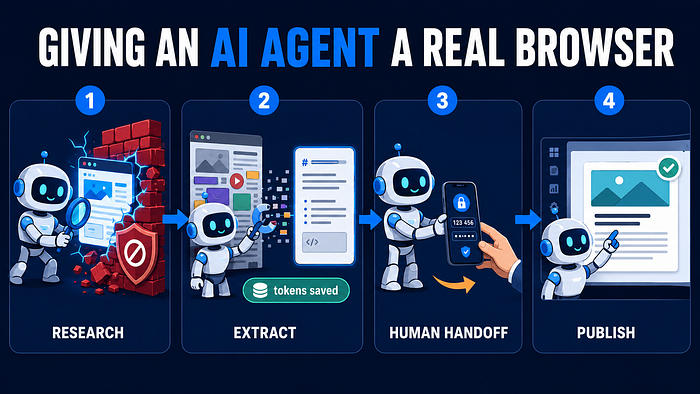
BrowserAct’s argument is that a browser built for agents has to get four things right at once: look like a real browser, run many tasks without cross-contaminating each other, hand control back to a human when genuinely stuck, and speak in a format an LLM can reason over cheaply. After a day of hands-on testing, that framing held up.
What BrowserAct actually is (and isn’t)
BrowserAct isn’t a desktop app you click around in. It’s a command-line tool your agent calls through the shell. You install it as a Skill that drops into your agent’s skills folder (Claude Code, Cursor, Codex, Windsurf, and similar). After that, when you ask your agent to do something web-shaped, it reaches for browser-act instead of curl.
The engine is a Python CLI. The real install — exactly what I ran on a clean macOS machine:
# uv manages the toolchain; it fetched Python 3.12 itself
uv tool install browser-act-cli --python 3.12
# → Installed 1 executable: browser-act
browser-act --version
# → browser-act 0.1.23
Source and skill files:
https://github.com/browser-act/skills
BrowserAct link:
https://browseract.com?fpr=jack74
The package is strictly Python 3.12 (Requires-Python: ==3.12.*), shipped as compiled wheels for macOS, Linux, and Windows. The one practical gotcha: if your machine doesn't already have Python 3.12 and uv, you install those first. With uv present, the install was a single command and pulled its own browser stack — no manual driver wrangling.
Every session starts the same way: the agent loads the tool’s own usage guide, which returns the command set and a live environment block (CLI version, configured key, existing browsers, active sessions) in one call:
browser-act get-skills core --skill-version 2.0.2
That call needs no key and returns the full operating manual — the Open → State → Interact → Verify → Close loop, the three browser types, proxy rules, and the current environment state. It's a genuinely nice design touch: the agent re-grounds itself on every run instead of guessing.
A note on data posture, confirmed by unpacking the installed package: cookies, sessions, page content, and profile data live in a local embedded LevelDB registry (rleveldb), with cryptography for at-rest protection. The documented exception is the CAPTCHA challenge image, sent out only when you explicitly invoke solving. For anything touching logins, local-first is the right default.
The four things it’s built around
1. Looking like a real browser
BrowserAct treats anti-bot walls as a ladder, not a single trick — a stealth environment first, explicit solve-captcha / stealth-extract commands next, and a human handoff last.
The interesting question is how convincing the default environment is, so I pointed a stealth session straight at bot.sannysoft.com and read the results back out of the live DOM:
# create a stealth browser once, open a session on it
browser-act browser create --type stealth --name research --desc "research browser"
browser-act --session s1 browser open <browser_id> https://bot.sannysoft.com
browser-act --session s1 wait stable
browser-act --session s1 screenshot ./sanny.png
Every automation row came back green. These are my own first-hand results, not vendor figures — read straight off the page:

The whole navigate-and-verify took ~1.6 seconds. That’s the headline claim, and on this lab it held up cleanly.
A fair, practical note on how to use this. There are two front doors, and they behave differently:
- The full stealth browser session (above) is the strong one — it sailed through the detection lab.
- The one-shot
stealth-extractcommand is the convenient one for open content (see the research section), but for sites sitting behind heavy commercial anti-bot layers, the durable pattern is to drive a real stealth session rather than expect a single extract call to walk through every wall. No tool offers a guaranteed bypass, and the honest, repeatable win here is the session environment that looks like a real browser from the first request.
Under the hood, this isn’t a reskinned headless Chrome. The installed package ships Camoufox (an anti-fingerprinting Firefox build) alongside a CDP runtime (cdp_use) — I confirmed both in the live install, not just on PyPI. The fingerprint my session presented was a Chrome/144 profile, which is the point: the surface you show the site is a deliberate, realistic identity rather than an automation tell.
2. Hand off to a human when stuck
Real sites throw things automation shouldn’t clear alone: SMS codes, QR-code login, enterprise SSO, sensitive-action confirmation. BrowserAct treats the human as part of the workflow, not a failure state. One command:
browser-act --session s1 remote-assist --objective "user completes login; agent must not see the password"
What I actually got back was a live URL with a one-hour expiry:
Remote assist session created.
Share this URL with the user:
 https://www.browseract.com/remote-cli/650a9f17…
Human assist is now active - the browser is under user control.
Do not send browser commands until the user finishes the assist session.
Two things I verified directly. First, the CLI enforces a lockdown — after it hands off, it explicitly refuses agent browser commands until the human is done, which is exactly the safety property you want around a login. Second, the session and page survive the handoff: when I resumed, the browser was still on the same login page, in the same session s1, and the agent picked up control without restarting. Credentials stay with the person and never pass through the model — the security framing is the correct one, and here it's a literal command with a literal URL rather than a slogan.
The verification types BrowserAct lists support for: reCAPTCHA v2/v3/Enterprise, Cloudflare Turnstile and full-page challenge, DataDome, and HUMAN Security / PerimeterX. Auto-solve what’s safe, escalate the rest to a human — that’s the practical shape, and the handoff is the part I’d lean on most for publishing logins.
3. Run parallel tasks without cross-contamination
Real agent work is rarely one page. The danger is two tasks stomping on each other’s cookies or getting correlated as one suspicious actor. BrowserAct’s model is clean: the browser is the identity; the session is the task workspace. Each browser carries its own cookies, fingerprint, and proxy.
I tested the isolation claim directly — two stealth browsers, two concurrent sessions, same domain, a marker written in one:
# browser 1, session s1: write a cookie + localStorage marker
browser-act --session s1 eval "document.cookie='isotest=SECRET; path=/'; localStorage.setItem('iso','LS1')"
# browser 2, session s2: read them back
browser-act --session s2 eval "'cookie:['+document.cookie+'] ls:['+(localStorage.getItem('iso')||'')+']'"
# → cookie:[] ls:[] ← clean isolation, nothing leaked across
The second browser saw nothing while the first kept its values, both running at the same time. session list confirmed two live sessions on two different browser_ids. For anyone who's had two agent tasks corrupt each other's login state, this is the boring feature that actually matters — and it works as advertised.
4. Isolate multiple accounts in independent browsers
The same primitive scales to multi-account work: each account lives in its own browser identity — separate cookies, profile, proxy, login state. That’s what makes long-term multi-account monitoring, multi-store ecommerce, client-account workflows, and region testing survivable.
The principle worth repeating, because people get it wrong: the workflow can be reused, but the account identity must be configured separately. A working automation does not mean you can clone one account’s environment onto another, and proxies alone don’t solve multi-account operations. Identity is per browser, deliberately — and the CLI gates browser creation behind explicit confirmation, so you don’t fan out identities by accident.
Designed for the agent, not for a human reader
The design choice that separates this from a repurposed test framework: instead of dumping DOM, BrowserAct returns an indexed text list of what’s on the page. The agent reads state, then acts by index — no CSS selectors, no DOM parsing. This is the part I was most skeptical of, and it just worked. Real run on DuckDuckGo:
browser-act --session s1 navigate https://duckduckgo.com
browser-act --session s1 state
# → [9]<input id=searchbox_input placeholder="Search privately" type=text name=q />
# → [13]<button aria-label=Search /> Search
browser-act --session s1 input 9 "browseract cli review"
browser-act --session s1 keys "Enter"
browser-act --session s1 wait stable
browser-act --session s1 state # fresh indexed list of the results page
input 9 typed into the box, Enter navigated, and the next state returned the real results page — all by index, zero selectors. When the page changes, you just re-read state and the indices refresh. It's the right shape for agent reasoning, and it's noticeably less brittle than the selector-chasing I'm used to.
And it’s genuinely token-light. I measured Hacker News both ways on the same load:

That’s a ~56% cut on a page that’s already lean — and HN is close to the floor. On a heavy JavaScript app, where raw HTML is mostly framework noise, the gap widens a lot. The mechanism, confirmed in the package, is markdownify + langchain-text-splitters: the page is converted to clean Markdown and chunked.
The walkthrough: research → draft → publish
This is the loop I actually care about, and it stitches the four pillars together.
Research. Pulling clean, rendered content from a source is a one-liner — no session to manage:
browser-act stealth-extract https://news.ycombinator.com
I ran this against live Hacker News and got back readable, correctly-structured Markdown — real story titles, points, and comment counts, not a JavaScript shell. (It also runs without an API key, which makes it a frictionless drop-in for curl in a research step.) First call does a one-time engine download (~20s); after that it's a few seconds. For multi-step research — search, filter, open a result — you drive a named session with state / click / input as above.
Draft. BrowserAct doesn’t replace your writing model; drafting stays in your agent. The quiet win is that the agent now feeds on clean, real source material instead of half-loaded pages. Garbage in, garbage out cuts both ways.
Publish, human in the loop. Publishing usually breaks on login + 2FA — exactly what you don’t want a script holding. remote-assist turns that hard stop into a quick human tap, then the agent finishes from the same session. Those two moments — stealth-extract giving the agent real content, and remote-assist rescuing the login step — are precisely where my agents used to die.
Skill Forge: turn a working workflow into a reusable Skill
The piece that moves BrowserAct from “tool” to “platform.” Completing one blocked task is useful once; a working workflow shouldn’t be rebuilt every run — it should become a capability your agent (and team) can call directly.
That’s Skill Forge, conceptually four steps:
- Stop rewriting scripts. Stable site capabilities get captured once, not re-explored every run.
- Forge explores the site for you. It analyzes the workflow, discovers available APIs, and combines DOM operations to generate an agent-facing Skill package.
- Plug it into your agent. The generated Skill reuses a stable path instead of figuring the page out from scratch — whether that’s 500 records or 5,000.
- Share it. A finished Skill goes to teammates, turning “I already cracked this site’s workflow” into a reusable team asset.
Good fits: checking dashboard messages, monitoring competitor pages, triaging order issues, generating an operations summary, or scheduled public-data extraction. Once any of those is reliable, it stops being a one-off and becomes a durable capability.
How it compares to a basic agent browser
On the basics — open, click, type, screenshot, extract — BrowserAct and a standard agent-browser are even. The separation is everything around the blocked path:

In one line: a basic agent-browser drives a page; browser-act is built to get into the page and keep operating when a real site pushes back — and in my testing the stealth session, the indexed interaction model, and the isolation guarantees all delivered on that.
The safety model is opt-in by design
BrowserAct enforces a Confirmation Gate: creating or deleting a browser, importing a Chrome profile, changing proxies, or toggling privacy settings all require explicit approval — and prior approvals don’t silently carry over. I hit this directly: browser create is gated, and the skill spec flags skipping it as a violation. It's enforced at the Skill layer, not a setting you can quietly disable. For a tool that can log into things on your behalf, that default earns trust.
A few practical notes before you start
A useful introduction owes you the setup realities, so you budget for them:
- Some of the best parts are cloud + credits. The local CLI and
stealth-extractare free to start, but stealth proxies, CAPTCHA solving, and managed cloud browsers run through BrowserAct's service and consume credits (there's a free starter allotment). Plan around it if those are why you're here — and note the CLI doesn't surface a running balance, so check your account dashboard to track spend. - Everything stateful wants a key.
stealth-extractruns anonymously, but creating browsers, sessions, and remote-assist need an API key. Registration is a quick link-and-poll flow (browser-act auth polluntil it lands), and once set the environment block showsapi_key: configured. - CAPTCHA-solving is a judgment call. Auto-clearing “verify you’re human” checks can run against a site’s Terms of Service. The local-only-except-the-challenge-image design is responsible; whether you should auto-solve a given site is on you. Use it where you have the right to.
- Set expectations honestly. No tool bypasses 100% of CAPTCHAs, guarantees zero bans, or runs fully unattended forever — and BrowserAct’s messaging is careful not to claim that. Treat it as raising your success rate and cutting babysitting, not a universal skeleton key. For the toughest commercial walls, drive a full stealth session and keep a human handoff in reach.
- Dependencies. Python 3.12 and
uv. Trivial if you live in that stack; a small one-time step if you don't.
Who it’s for
If your agent only ever reads public, static pages, plain fetch is fine and you don't need this. BrowserAct earns its place the moment your workflow touches logged-in accounts, anti-bot sites, multi-account parallelism, or interactive challenges — especially if you want a clean way to hand a single step back to a human without tearing down the whole automation.
For my research-to-publish loop, the value was concrete and I watched each piece work: real page content instead of shells, an indexed interaction model that doesn’t break on a layout change, clean isolation between parallel tasks, a stealth session that walked through a detection lab, and a human handoff that turned login into a non-event. Not flashy. Just the exact places agents usually break.
That’s a good trade.
Join thousands of data leaders on the AI newsletter. Join over 80,000 subscribers and keep up to date with the latest developments in AI. From research to projects and ideas. If you are building an AI startup, an AI-related product, or a service, we invite you to consider becoming a sponsor.
Published via Towards AI
Towards AI Academy
We Build Enterprise-Grade AI. We'll Teach You to Master It Too.
15 engineers. 100,000+ students. Towards AI Academy teaches what actually survives production.
Start free — no commitment:
→ 6-Day Agentic AI Engineering Email Guide — one practical lesson per day
→ Agents Architecture Cheatsheet — 3 years of architecture decisions in 6 pages
Our courses:
→ AI Engineering Certification — 90+ lessons from project selection to deployed product. The most comprehensive practical LLM course out there.
→ Agent Engineering Course — Hands on with production agent architectures, memory, routing, and eval frameworks — built from real enterprise engagements.
→ AI for Work — Understand, evaluate, and apply AI for complex work tasks.
Note: Article content contains the views of the contributing authors and not Towards AI.
Related posts
Recent Posts