

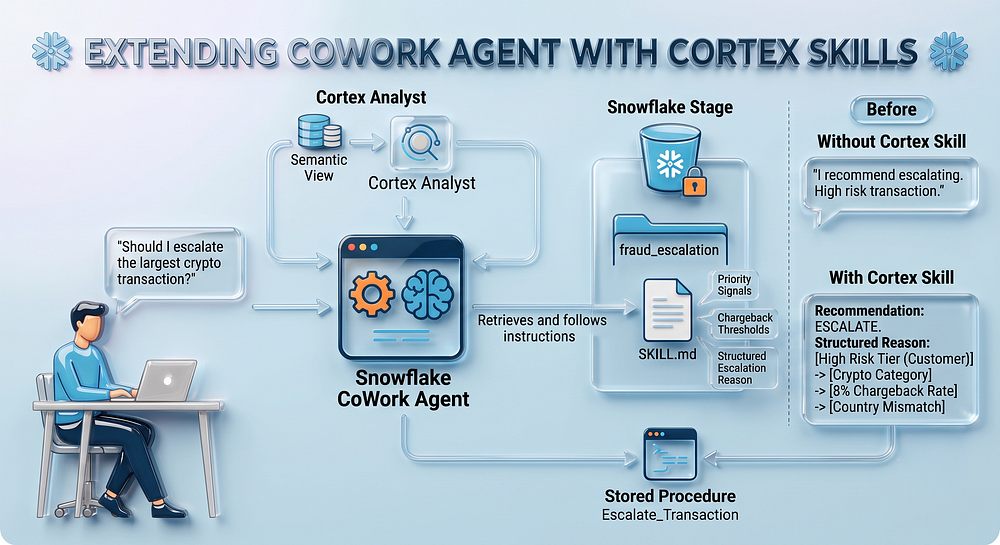
Extending our CoWork Agent with a Cortex Agent Skill
Last Updated on July 16, 2026 by Editorial Team
Author(s): Krishnan Srinivasan
Originally published on Towards AI.
Extending our CoWork Agent with a Cortex Agent Skill
A step by step guide to adding consistent, auditable domain reasoning to our CoWork agent.
The previous post in the series built a fraud ops agent in Snowflake CoWork from scratch. A Semantic View for structured querying, a stored procedure for writing escalations, and a Cortex Analyst tool. The agent could answer questions and act on the answers.
This post extends that same agent with a Cortex Agent Skill. Not the procedural SQL kind, but a packaged, reusable set of instructions that tells the agent how to reason through an escalation decision before it takes any action. Without the skill, the agent relies entirely on its orchestration instructions and whatever the user happens to ask. With the skill, it carries a consistent, auditable decision framework that activates every time escalation comes up, regardless of how the question is phrased.

What a Cortex Agent Skill actually is
A skill is a modular, portable package of instructions stored in a named Snowflake stage. At its core it is a single SKILL.md file placed at the root of a skill folder. That file contains a name, a description, and detailed instructions the agent follows when it decides the skill is relevant.
The discovery mechanism is what makes this useful. When the agent receives a query, it reads the name and description of every skill configured on it. If it judges a skill relevant, it retrieves the full SKILL.md content and follows the instructions inside. It does not persist a copy of the skill file. It reads from the stage on demand each time. This means updating the SKILL.md on the stage updates the agent’s behavior immediately.
For fraud ops, the skill encodes the escalation logic that would otherwise live perhaps only with a senior analyst, such as which signals matter, in what order, and how to draft a reason that holds up under review. We will now take a closer look at the skill file.
The SKILL.md file
The SKILL.md file has the following content:

The SKILL.md is a plain text file with three parts. A name (Fraud Escalation Guidance) that the agent matches against when deciding whether the skill is relevant, a description that acts as the trigger, telling the orchestrator exactly when to activate it, and a set of instructions that define how the agent should reason and respond when it does. For the fraud escalation skill, the instructions encode the signal priority order, the chargeback rate thresholds that matter, which merchant categories carry inherent risk, and the exact structure the escalation reason should follow. It reads less like code and more like a standard operating procedure that the agent follows to the letter, every time. Below is a pictorial representation of the skill file.

The description is what the agent reads to decide whether to activate the skill at all. Keep it precise: “use this skill whenever the user asks about escalating a transaction” gives the orchestrator a clear trigger. Vague descriptions like “helps with fraud” leave the agent guessing.
Let us dive into the code.
Note: The dataset (Customers, Merchants and Transactions) and the agent from the previous post are assumed to already be in place. Everything here builds on top of them.
Creating the stage and uploading the skill
Save the accompanying SKILL.md file to your local machine.
Run the below commands in a Snowsight SQL worksheet against the fraud ops database that we created in the previous post.

Now navigate to the stage we just created:
Catalog -> Database Explorer -> FRAUD_OPS_DB->CORE->Stages-> SKILLS_STAGE

Use the + Files option at the top right, and upload the SKILL.md file to this stage.
Specify the path as /fraud_escalation/
This will create a new folder called fraud_escalation in the stage and store the SKILL.md file within the folder.

Click Upload.

Verify that the file landed:

Adding the skill to the agent
We will now attach this skill to our Fraud Ops agent.
In Snowsight, go to AI & ML > Agents and open the FRAUDOPS agent that we built in the previous post. Select Configuration, then navigate to the Skills tab.
i. Select Add Skill -> Add from Stage
ii. For the stage, select FRAUD_OPS_DB.CORE.SKILLS_STAGE
iii. For the skill folder path, choose “fraud_escalation”
iv. Enter Skill name as “SKILL.md”
v. Click Add

You should now see the skill added to the agent.

Click Save.
Let us now navigate to CoWork and ask a question. Navigate to AI & ML-> Snowflake CoWork. CoWork opens in a new window.
What changes in CoWork
Without the skill, asking the agent to evaluate a transaction for escalation produces a reasonable but generic response.
With the skill active, the agent follows the priority order defined in the SKILL.md every time escalation comes up, regardless of phrasing. Ask it this:
Look at the largest flagged transaction from a crypto exchange merchant in the last 30 days. Should I escalate it?
Let us break down the output from CoWork.
- CoWork identifies and displays the transaction:

2. Performs the Risk Assessment:
The agent queries the Semantic View through Cortex Analyst to find the transaction, then activates the “Fraud Escalation Guidance” skill to evaluate it. It works through the signals in order: customer risk tier first, then merchant chargeback rate, then any country mismatch, and drafts a structured reason before asking for confirmation. The skill invocation is visible in the thinking steps panel in CoWork, so you can see exactly when it was selected and what input it received.

3. Provides the Recommendation and asks for confirmation to escalate:
The agent provides its final recommendation and asks for confirmation to escalate. Notice how it reasons and proactively suggests escalation.

4. Escalates the Transaction after receiving user confirmation
Upon user confirmation, the transaction is successfully escalated.

The agent calls the Escalate_Transaction procedure with the transaction ID and the drafted reason. The record is written to the Escalation table for further review. Check the Escalations table to confirm.
SELECT * FROM ESCALATIONS order by escalated_at desc;

The ESCALATION_REASON column will reflect the skill’s structured format: risk tier, merchant category, chargeback rate, country mismatch if any, and amount, not a freeform sentence the LLM improvised.
Expand the the column and view the content to confirm.
“High-risk customer (tier: high) transacting $2,430.64 with a UAE-based crypto exchange (8% chargeback rate) from India at 3:15 AM — cross-border mismatch and unusual timing suggest potential fraud/money laundering”.
Compare this to the earlier escalation record from our previous blog. The reason column was a short sentence then and whatever the agent improvised from the question asked. The reason now follows the exact structure defined in the SKILL.md, customer risk tier first, then merchant category and chargeback rate, country mismatch if present, and transaction amount to close. The output is noticeably more structured and auditable.

Why a skill and not just an instruction
The skill does two things the orchestration instructions alone cannot. First, it encodes domain knowledge in a form that is versioned and auditable. The SKILL.md lives on a stage, which means it can be governed by Snowflake roles, updated without touching the agent configuration, and reviewed the same way you would review a SQL change. Second, it makes the agent’s reasoning reproducible. Two different analysts asking the same question in different ways will get escalation drafts built on the same signal hierarchy.

Orchestration instructions are best kept for routing decisions, telling the agent to use Cortex Analyst for structured data questions and Cortex Search for policy or document questions. The moment domain reasoning gets detailed enough to need its own structure, its own version history, and its own owner, it belongs in a skill. That separation keeps the agent configuration clean and the domain logic maintainable as it grows.
(The code and the SKILL.md file for this walkthrough can be accessed here. The code for this blog is built on top of the previous blog where we created the objects and built the agent).
I share hands-on, implementation-focused perspectives on Generative & Agentic AI, LLMs, Snowflake and Cortex AI, translating advanced capabilities into practical, real-world analytics use cases. Do follow me on LinkedIn and Medium for more such insights.
Join thousands of data leaders on the AI newsletter. Join over 80,000 subscribers and keep up to date with the latest developments in AI. From research to projects and ideas. If you are building an AI startup, an AI-related product, or a service, we invite you to consider becoming a sponsor.
Published via Towards AI
Towards AI Academy
We Build Enterprise-Grade AI. We'll Teach You to Master It Too.
15 engineers. 100,000+ students. Towards AI Academy teaches what actually survives production.
Start free — no commitment:
→ 6-Day Agentic AI Engineering Email Guide — one practical lesson per day
→ Agents Architecture Cheatsheet — 3 years of architecture decisions in 6 pages
Our courses:
→ AI Engineering Certification — 90+ lessons from project selection to deployed product. The most comprehensive practical LLM course out there.
→ Agent Engineering Course — Hands on with production agent architectures, memory, routing, and eval frameworks — built from real enterprise engagements.
→ AI for Work — Understand, evaluate, and apply AI for complex work tasks.
Note: Article content contains the views of the contributing authors and not Towards AI.
Related posts
Recent Posts





