From Raw Audio to Actionable Data, Automating Call Center Triage with Cortex AI
Last Updated on August 19, 2026 by Editorial Team
Author(s): Krishnan Srinivasan
Originally published on Towards AI.
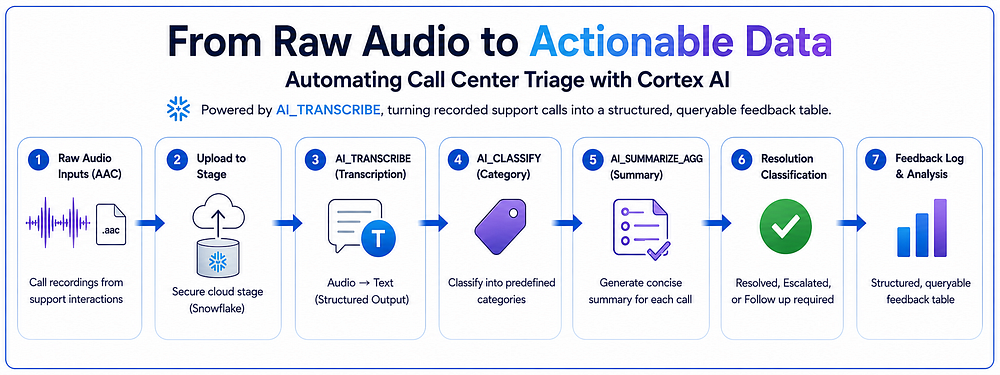
Powered by AI_TRANSCRIBE, turning recorded support calls into a structured, queryable feedback table.
A call center runs on a routine most of us know without ever having worked one. A customer calls in. An agent listens, resolves the issue, then spends a few minutes after the call typing notes, picking a category from a dropdown, and writing a summary for the next shift or the reporting dashboard. That last part, the typing, is where most of the delay and inconsistency creeps in.
This post walks through a small pipeline that removes that manual step entirely. Three short support calls go in as raw audio. AI_TRANSCRIBE is the function that makes the whole thing possible, since every downstream step, the categorization, the summary, the resolution log, all exists because the call is now text a query can read.
On a personal note, I was recently named a Finalist for AI Excellence in the Snowflake Community Awards 2026 (APJ region), and voting is now open. If this series, or any of the work I have shared, has been useful to you, I would genuinely appreciate your vote here. (You can navigate to Page 7, the last page of the form, and find me, “Krishnan Srinivasan” under APJ region.) Thank you!
Now, back to the pipeline.
Snowflake recently extended AI_TRANSCRIBE to accept AAC directly. Most existing transcription demos still stick with WAV or MP3, so this one uses AAC end to end instead.
The setup
Three recorded calls stand in for a real support queue, each one manually scripted and recorded for this demo rather than pulled from an actual queue.
Call one is a billing dispute. A customer was charged twice for a subscription, and the agent verifies the account before issuing a refund.
Call two is a technical issue. A customer’s app crashes on photo upload, and the agent logs a bug before offering a workaround.
Call three is an account access issue. A customer has been locked out since the previous day because a password reset email never arrived, and the agent traces it to a spam filter catching the reset attempts on the company’s end.

All three files are AAC audio, a compressed audio format that gets used in most streaming services and modern phone recordings for its smaller file size, at a similar quality to older formats like MP3.
Note: In a real deployment, these recordings would not need a manual upload step at all. A contact center platform typically writes call recordings straight to cloud storage as soon as a call ends, and an external stage or a Snowpipe trigger would pick them up automatically. For this post, uploading through Snowsight keeps the demo self contained and easy for anyone to reproduce without setting up a storage integration first.
Step 1: Create the database and schema
We will begin by creating the dedicated database and schema for this analysis.

Step 2: Create the stage for storing the call recordings

Step 3: Upload the recordings to stage.
Click on Add data
Choose the database, schema and the stage we just created.

Click Upload. The three audio files are successfully uploaded to the stage.
Step 4: Transcribe calls to searchable text
AI_TRANSCRIBE is where the actual work of this pipeline begins, converting spoken audio into a plain transcript a query can act on.

AI_TRANSCRIBE returns a structured object, not just a string. The transcript text sits under a text key, alongside metadata like audio duration.
The query below pulls and flattens the transcript and duration out into their own columns, making them easier to reference in the queries that follow.

We can examine the flattened results by querying the table:
SELECT * FROM CALL_TRANSCRIPTS_FLAT;

At this point the raw audio has already done its job. Everything from here forward works on text.
Step 5: Classify and Summarize
Every unresolved billing dispute or unlogged bug report costs real time and goodwill, and step three is where that cost starts getting recovered, the moment the call becomes searchable text instead of an audio file.
This step takes the flattened transcripts and produces two AI generated columns for each call, a category and a summary, in a single pass.
AI_CLASSIFY takes the category list as an argument rather than needing a separate model or lookup table, which keeps this approachable for a team that has not built a custom classifier before. With three calls spanning billing, a technical bug, and account access, all four category labels get a real workout instead of the same one or two showing up every time. It reads the transcript text and picks the best matching label from that list. The result comes back as a structured object containing the labels it assigned, so :labels[0]::STRING pulls out just the first one as a plain string, since that’s the label we want stored as the call’s category.
AI_SUMMARIZE_AGG(transcript_text) generates a short natural language summary of the transcript, the same kind of note an agent would normally type up by hand after a call. In effect it summarizes the transcript text for each individual call.

The output is call_analysis, a table where each row now has the original transcript plus a category and a summary sitting right next to it, ready for the next step to layer a resolution status on top.
SELECT file_name, category, call_summary FROM CALL_ANALYSIS;

The results confirm that the pipeline is working end to end, all three calls landed in the right category and got a concise, readable summary out of nothing but raw audio.
support_call_1.aac, Billing. The transcript centers on a duplicate subscription charge and Maya issuing a fix, which AI_CLASSIFY correctly reads as a billing issue rather than, say, a general inquiry.
support_call_2.aac, Technical Support. The app crashing on photo upload is a product bug report, and the model picked technical support over account access or billing, which is the right call since nothing in that transcript touches billing or login credentials.
support_call_3.aac, Account Access. Being locked out because a reset email never arrived is squarely an access issue rather than a technical bug, and the classification reflects that distinction correctly.
Each summary also reads like something an agent could paste straight into a ticket, naming the actual problem and the specific action taken, rather than a generic restatement of “customer called with an issue.” That’s the practical test for whether AI_SUMMARIZE_AGG is pulling its weight here, a summary someone could act on without listening to the call.
Step 6: Logging for feedback and analysis
A ticketing system tracks more than just topic and summary, it tracks whether the issue actually got resolved.

This step runs a second classification pass over the same transcripts, this time picking a resolution outcome, Resolved, Escalated, or Follow up required. The result lands in CALL_FEEDBACK_LOG, which carries forward the file name, category, and summary from the previous step and adds the resolution status plus a timestamp, giving you one table that tracks both what each call was about and whether it actually got sorted out. This resolution signal is especially useful for ops reporting.
Step 7: Close the loop
A rollup query gives a supervisor exactly the kind of view they would ask an analyst for.
SELECT FILE_NAME, CATEGORY,RESOLUTION_STATUS FROM CALL_FEEDBACK_LOG;

Notice that two calls came back as resolved, and the technical support call was correctly classified as escalated, since the agent mentioned logging it as a bug and passing it on to the engineering team.
Consistency Is the Real Feature
A conventional call center stack would need a transcription vendor, a separate classification model, a summarization step likely run through yet another API, and custom code to stitch the outputs into one table. Cortex AI functions collapse that entire chain into a Snowsight upload and a handful of SQL statements. The billing dispute, the app crash, and the locked account each landed in the right category without any manual tagging, and the resolution pass correctly told the two resolved calls apart from the one that was actually escalated to engineering. It read what the agent and customer actually said and reasoned to the right outcome each time.

Scale this from three calls to three thousand, and the real value comes into focus. Every call already carries signal about what is going wrong for customers, but that signal usually stays locked inside a recording nobody has time to listen to twice. Once it becomes a structured table, patterns that were invisible before become a simple GROUP BY away. A spike in account access issues on a particular day, a category with a disproportionate share of escalations, a category where average call duration keeps creeping up, all of that turns into questions a supervisor can ask directly instead of impressions gathered secondhand from a team lead.
The bigger shift is what this does to the feedback loop itself. A support team that can see its own patterns clearly, quickly, and consistently is a team that can act on them before they show up as churn or a bad review. That is the real payoff of pushing this kind of pipeline into a customer support operation, not less work for agents, but a much shorter distance between a customer’s problem and the fix that keeps it from happening again.

Wire this into a scheduled task or a Snowpipe trigger on the storage stage, and the whole pipeline runs on its own every time a new call lands, with no one needing to remember to kick it off. That consistency is worth as much as the automation itself. A human reviewing calls gets tired, skips some, categorizes similar issues differently depending on the day, and summarizes with varying detail. A pipeline like this applies the same categories and the same summarization approach to every single call, which means the resulting data can actually be trusted for trend analysis over weeks and months, not just a spot check on the ones someone happened to listen to.
The code for this blog can be accessed here.
I share hands-on, implementation-focused perspectives on Generative & Agentic AI, LLMs, Snowflake and Cortex AI, translating advanced capabilities into practical, real-world analytics use cases. Do follow me on LinkedIn and Medium for more such insights.
Join thousands of data leaders on the AI newsletter. Join over 80,000 subscribers and keep up to date with the latest developments in AI. From research to projects and ideas. If you are building an AI startup, an AI-related product, or a service, we invite you to consider becoming a sponsor.
Published via Towards AI
Towards AI Academy
We Build Enterprise-Grade AI. We'll Teach You to Master It Too.
15 engineers. 100,000+ students. Towards AI Academy teaches what actually survives production.
Start free — no commitment:
→ 6-Day Agentic AI Engineering Email Guide — one practical lesson per day
→ Agents Architecture Cheatsheet — 3 years of architecture decisions in 6 pages
Our courses:
→ AI Engineering Certification — 90+ lessons from project selection to deployed product. The most comprehensive practical LLM course out there.
→ Agent Engineering Course — Hands on with production agent architectures, memory, routing, and eval frameworks — built from real enterprise engagements.
→ AI for Work — Understand, evaluate, and apply AI for complex work tasks.
Note: Article content contains the views of the contributing authors and not Towards AI.
Recent Posts