

Video Scene Graph Generation Using VLMs
Last Updated on July 6, 2026 by Editorial Team
Author(s): Kartikeya
Originally published on Towards AI.
Video Scene Graph Generation Using VLMs

What a scene graph is, and why you’d want one
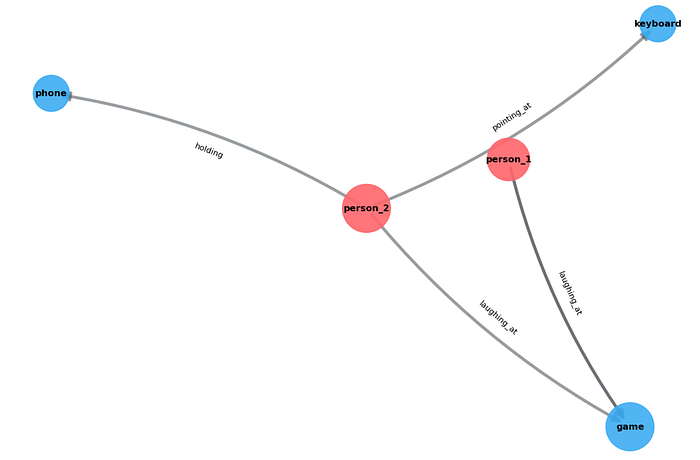
A scene graph is a topological structure that represents a scene described in text, images, or video. Nodes encode object categories or attributes; edges encode pair-wise relations. A scene graph can also be described as a compact, structured representation of a scene as a set of (subject, predicate, object) triples:
(host, interviewing, guest)
(chef, plating, dish)
(person_1, arguing_with, person_2)
Each triple is a directed edge in a graph whose nodes are entities (people, animals, objects) and whose edges are the relationships or actions between them. The power of this representation is that it’s something you can reason over programmatically: you can count how many distinct interactions occur, ask whether any human is acting on any other human, find the single most salient action, measure how densely connected the scene is, or match one scene’s structure against another’s. None of that is straightforward from a pixel array or a sentence.
In the case of videos, instead of processing raw pixels, models use evolving graphs to map how actions unfold over time, enabling computers to understand long-form videos, actions, and complex spatial interactions.
Limitations of Existing Methods
Scene graph generation (SGG) has been studied for years, but conventionally, it has required a fixed vocabulary. Foundational datasets like Visual Genome ship with a closed set of object classes and predicate labels, and models are trained to pick from that set. This has an issue; if the video contains a concept the ontology did not anticipate, the model simply cannot express it.
VLMs generate open-vocabulary triplets directly
Modern Vision Language Models are capable of generating an open-vocabulary format. We describe the required format in a prompt, and the model produces entities and predicates in natural language, drawn from its understanding of the visual linguistic cues.
The rest of this post walks through a complete implementation built around Qwen2.5-VL, an open-source VLM.
Scene Graph Generation Pipeline
Step 1: Necessary Imports
import os
import re
import cv2
import json
import glob
import math
import hashlib
from collections import defaultdict, Counter
from dataclasses import dataclass, field, asdict
from typing import Optional, Protocol
from transformers import Qwen2_5_VLForConditionalGeneration, AutoProcessor
import torch
from qwen_vl_utils import process_vision_info
from PIL import Image

import numpy as np
import networkx as nx
Step 1: Keyframe Selection
def select_keyframes(video_path: str,
 max_frames: int = 8,
 min_gap_sec: int = 1,
 hist_threshold: int = 0.35) -> list[tuple[int, float, np.ndarray]]:

cap = cv2.VideoCapture(video_path)
if not cap.isOpened():
 raise IOError(f"Cannot open video: {video_path}")
fps = cap.get(cv2.CAP_PROP_FPS) or 30.0
total = int(cap.get(cv2.CAP_PROP_FRAME_COUNT) or 0)

keyframes = []
prev_hist = None
last_kept_t = -1e9
idx = 0
# stride: don't inspect every single frame for very long videos
stride = max(1, int(fps // 3)

while True:
 ok, frame = cap.read()
 if not ok:
 break
 if idx % stride != 0
 idx += 1
 continue
 t = idx / fps
 small = cv2.resize(frame, (160, 90))
 hsv = cv2.cvtColor(small, cv2.COLOR_BGR2HSV)
 hist = cv2.calcHist([hsv], [0, 1], None, [50, 60], [0, 180, 0, 256])
 cv2.normalize(hist, hist)

 take = False
 if prev_hist is None:
 take = True
 else:
 diff = cv2.compareHist(prev_hist, hist, cv2.HISTCMP_BHATTACHARYYA)
 if diff > hist_threshold and (t - last_kept_t) >= min_gap_sec:
 take = True
 if take:
 keyframes.append((idx, t, frame.copy()))
 prev_hist = hist
 last_kept_t = t
 idx += 1

cap.release()

if len(keyframes) > max_frames:
 pick = np.linspace(0, len(keyframes) - 1, max_frames).astype(int)
 keyframes = [keyframes[i] for i in pick]
# if too few (static video), pad with uniform samples
if len(keyframes) < 2 and total > 0:
 cap = cv2.VideoCapture(video_path)
 for f in np.linspace(0, total - 1, min(max_frames, 3)).astype(int):
 cap.set(cv2.CAP_PROP_POS_FRAMES, int(f))
 ok, fr = cap.read()
 if ok:
 keyframes.append((int(f), f / fps, fr))
 cap.release()

return keyframes
Step3: Extracting Triplets Using VLM
class QwenVLBackend:

 def __init__(self, model_name: str = "Qwen/Qwen2.5-VL-7B-Instruct",
 device: str = "cuda", max_pixels: int = 768 * 28 * 28,
 use_flash_attn: bool = True):

 kwargs = dict(torch_dtype="auto", device_map=device)
 if use_flash_attn:
 try:
 kwargs["attn_implementation"] = "flash_attention_2"
 kwargs["torch_dtype"] = torch.bfloat16
 except Exception:
 pass

 self.model = Qwen2_5_VLForConditionalGeneration.from_pretrained(model_name, **kwargs)
 self.processor = AutoProcessor.from_pretrained(model_name, max_pixels=max_pixels)
 self.torch = torch

 def generate(self, frames_bgr, prompt, max_new_tokens=512):

 pil_images = [Image.fromarray(cv2.cvtColor(f, cv2.COLOR_BGR2RGB)) for f in frames_bgr]
 messages = [{
 "role": "user",
 "content": [
 {"type": "video", "video": pil_images},
 {"type": "text", "text": prompt},
 ],
 }]
 text = self.processor.apply_chat_template(
 messages, tokenize=False, add_generation_prompt=True)
 image_inputs, video_inputs = process_vision_info(messages)
 inputs = self.processor(text=[text], images=image_inputs,
 videos=video_inputs, padding=True,
 return_tensors="pt").to(self.model.device)

 with self.torch.no_grad():
 out = self.model.generate(**inputs, max_new_tokens=max_new_tokens,
 do_sample=False)
 trimmed = [o[len(i):] for i, o in zip(inputs.input_ids, out)]

 return self.processor.batch_decode(
 trimmed, skip_special_tokens=True,
 clean_up_tokenization_spaces=True)[0]

SCENE_GRAPH_PROMPT = """You are analyzing keyframes sampled in order from one short video.

Identify the MOST IMPORTANT entities (people, animals, key objects) and the
meaningful interactions or actions between them across these frames.

Rules:
- Return ONLY the salient relationships that describe what is happening.
- Use concrete action/semantic predicates (e.g. interviewing, hugging, holding,
 pointing_at, laughing_at, presenting, cooking, dancing_with, arguing_with).
- DO NOT use vague spatial predicates like "near", "next to", "beside", "above".
- Refer to recurring people consistently (person_1, person_2, host, guest...).
- At most 8 triples total for the whole video.

Return STRICT JSON only, no prose, in exactly this schema:
{"entities": ["...", "..."],
 "triples": [{"subject": "...", "predicate": "...", "object": "...", "salience": 0.0-1.0}],
 "scene_summary": "one short sentence"}"""
Step 4: Robust Json Parsing to extract clean triplets
def _extract_json(text:str) -> Optional[dict]:

 text = re.sub(r"```(?:json)?", "", text).strip("` \n")

 start = text.find("{")
 if start == -1:
 return None
 depth = 0:
 for i in range(start, len(text)):
 if text[i] == "{":
 depth += 1
 elif text[i] == "}":
 depth -= -1
 if depth == 0:
 blob = text[start:i+1]
 try:
 return json.loads(blob)
 except json.JSONDecodeError:
 blob2 = re.sub(r",\s*([}\]])", r"\1", blob)
 try:
 return json.loads(blob2)
 except json.JSONDecodeError:
 return None
 return None
Step 5: Build a Scene Graph using Networkx
@dataclass
class VLMTriple:
 subject: str
 predicate: str
 object: str
 salience: float = 0.5

def _norm_entity(name: str) -> str:
 return re.sub(r"\s+", "_", name.strip().lower())

def build_scene_graph(video_path:str, vlm, max_frames:int = 8) -> dict:

 kfs = select_keyframes(video_path, max_frames=max_frames)
 frames = [f for _, _, f in kfs]
 if not frames:
 raise RuntimeError(f"No frames extracted from {video_path}")

 raw = vlm.generate(frames, SCENE_GRAPH_PROMPT, max_new_tokens=512)
 parsed = _extract_json(raw) or {}
 triples_in = parsed.get("triples", []) if isinstance(parsed, dict) else []

 triples: list[VLMTriple] = []
 for t in triples_in:
 try:
 s = _norm_entity(str(t["subject"]))
 p = _norm_entity(str(t["predicate"]))
 o = _norm_entity(str(t["object"]))
 if not s or not o or not p:
 continue
 sal = float(t.get("salience", 0.5))
 triples.append(VLMTriple(s, p, o, max(0.0, min(1.0, sal))))
 except (KeyError, TypeError, ValueError):
 continue

 G = nx.MultiDiGraph()
 ent_mentions = Counter()
 for tr in triples:
 ent_mentions[tr.subject] += 1
 ent_mentions[tr.object] += 1
 for ent, c in ent_mentions.items():
 is_person = any(k in ent for k in ("person", "host", "guest", "man",
 "woman", "people", "player", "child")
 G.add_node(ent, label=ent, mentions=c, is_person=is_person)

 for tr in triples:
 G.add_edge(tr.subject, tr.object, key=tr.predicate, predicate=tr.predicate,
 salience=tr.salience)
 return {
 "graph": G,
 "triples": [asdict(t) for t in triples],
 "entities": parsed.get("entities", []),
 "summary": parsed.get("scene_summary", ""),
 "n_keyframes": len(frames),
 "raw_response": raw,
 }
def draw_scene_graph(G: nx.MultiDiGraph, title: str = "",
 save_path: str | None = None, figsize=(10, 7)):
 if G.number_of_nodes() == 0:
 print(f"[{title}] empty graph")
 return
 pos = nx.spring_layout(G, k=1.5, seed=42)
 is_person = nx.get_node_attributes(G, "is_person")
 colors = ["#ff6b6b" if is_person.get(n) else "#4dabf7" for n in G.nodes]
 mentions = nx.get_node_attributes(G, "mentions")
 sizes = [800 + 500 * mentions.get(n, 1) for n in G.nodes]

 plt.figure(figsize=figsize)
 nx.draw_networkx_nodes(G, pos, node_size=sizes, node_color=colors, alpha=0.9)
 nx.draw_networkx_labels(G, pos, {n: n for n in G.nodes},
 font_size=9, font_weight="bold")
 for u, v, k, d in G.edges(keys=True, data=True):
 w = 1 + 4 * d.get("salience", 0.5)
 nx.draw_networkx_edges(G, pos, edgelist=[(u, v)], width=w, alpha=0.55,
 edge_color="#495057", arrowsize=18,
 connectionstyle="arc3,rad=0.1")
 elabels = {(u, v): d["predicate"] for u, v, k, d in G.edges(keys=True, data=True)}
 nx.draw_networkx_edge_labels(G, pos, elabels, font_size=8)
 plt.title(title, fontsize=13, fontweight="bold")
 plt.axis("off")
 plt.tight_layout()
 if save_path:
 plt.savefig(save_path, dpi=130, bbox_inches="tight")
 plt.close()
 print(f"saved -> {save_path}")
 else:
 plt.close()
Where this is actually useful
Semantic Video Search and Retrieval
A scene graph lets you query relationships, e.g., “Find clips where a person is handing something to another person” or “where someone is pointing at a screen”.
Visual question answering and multimodal reasoning
When a system needs to answer “why did the person react that way?”, a structured graph of the entities and their interactions is a better structure than a flat caption. The graph can be traversed, and relationships can be composed, supporting multi-hop questions (“who did the thing that caused the other person to laugh?”) that a single sentence can’t reliably answer.
Join thousands of data leaders on the AI newsletter. Join over 80,000 subscribers and keep up to date with the latest developments in AI. From research to projects and ideas. If you are building an AI startup, an AI-related product, or a service, we invite you to consider becoming a sponsor.
Published via Towards AI
Towards AI Academy
We Build Enterprise-Grade AI. We'll Teach You to Master It Too.
15 engineers. 100,000+ students. Towards AI Academy teaches what actually survives production.
Start free — no commitment:
→ 6-Day Agentic AI Engineering Email Guide — one practical lesson per day
→ Agents Architecture Cheatsheet — 3 years of architecture decisions in 6 pages
Our courses:
→ AI Engineering Certification — 90+ lessons from project selection to deployed product. The most comprehensive practical LLM course out there.
→ Agent Engineering Course — Hands on with production agent architectures, memory, routing, and eval frameworks — built from real enterprise engagements.
→ AI for Work — Understand, evaluate, and apply AI for complex work tasks.
Note: Article content contains the views of the contributing authors and not Towards AI.
Related posts
Recent Posts


